Who can benefit from a graphics tablet?

Greeting card fans who love detail

You often illustrate small motifs or lettering, and your main decision is whether you want to draw directly on the visible card design. Pen displays such as the XPPen Artist Pro 16 and Huion Kamvas 13 show your input on a screen.

Designers short on desk space

You already use a computer and want to draw or edit artwork from time to time, without having another screen set up permanently. A pen tablet without a display lets you work on your existing monitor.

Designers who work in different places

You want to create card designs away from your usual computer setup, then pass them on for layout and printing. The XPPen Magic Drawing Pad is described as a standalone drawing tablet; check that its apps and file-sharing options suit the rest of your workflow.

What should you look for when choosing one?

Pen tablet without a display

A good fit if: You have a usable monitor and want to draw or edit card designs with a pen.

The trade-off: You use the pen on the tablet surface, but see your strokes on the computer screen.

Connected pen display

A good fit if: You often create detailed artwork and want to see your input directly on the display.

The trade-off: You’ll need space and a suitable video and power connection. Huion describes the USB-C-to-USB-C cable for the Kamvas 13 as optional.

Standalone drawing tablet

A good fit if: You want to create artwork without a connected computer, then bring it into your card design and print workflow.

The trade-off: Check that the apps and file formats you need work with your layout or print software, and that you can transfer files between them.

What you need What to check before buying Who is this important to?
Draw directly on the artwork Active area and display size; the specific model’s video connection and power supply. If I want to see the line directly on the card design, drawing on the screen matters more to me than keeping the device as small as possible. Around 33% of consumers prioritise drawing directly on the artwork.
Pen input for occasional use, with limited space Compare the overall dimensions and active area separately. Wacom lists an active area of 263 × 148 mm and overall dimensions of 291 × 206 mm for the Intuos Pro Medium. If I only draw on my existing monitor occasionally and have little free desk space, the device’s actual footprint matters to me. Around 27% of consumers prioritise space-saving pen input.
Edit recurring card designs Check whether the buttons and scroll wheel on the specific model can be assigned functions in your software. Layers are a feature of the design software, not the tablet. When I’m working on recurring card variations, I want to access edits and tools quickly and be able to continue working on my file. Around 20% of consumers prioritise editing recurring designs.
Draw without a fixed computer setup Check the apps, file formats and file-sharing options you need; follow the requirements for the specific card product when preparing files for print. If I want to create artwork away from my usual computer setup and pass it on later, the subsequent file and print workflow is crucial. Around 20% of consumers prioritise drawing without a fixed computer setup.

Avoid common buying mistakes

  • Confusing a pen display with a standalone tablet

    A connected pen display such as the Huion Kamvas 13 is connected to a computer. The XPPen Magic Drawing Pad, on the other hand, is described as a standalone device.

    First decide whether you want to draw using your existing computer or independently of it. Then check the connections and what’s included with the exact model.

  • Assuming the display or pen pressure levels guarantee print-ready cards

    Your print file is created using design software and must meet the requirements of your chosen card product. The pen pressure specification alone doesn’t confirm that a file meets those requirements.

    Before exporting, check the print guidelines for format, colour profile and bleed. For example, Onlineprinters specifies 300 dpi and 2 mm bleed all round for its Maxi portrait greeting card product. These requirements don’t automatically apply to other print jobs.

  • Confusing the active drawing area with the total space required

    For the Wacom Intuos Pro Medium, the manufacturer’s stated dimensions for the active area differ from those of the device itself.

    Measure the free space on your desk and compare it with the overall dimensions, not just the active area.

Key brands at a glance

Wacom

The Intuos Pro is a pen tablet without a display, designed for working with your existing monitor.

  • Wacom lists an active area of 263 × 148 mm and a Pro Pen 3 for the Intuos Pro Medium.
  • The drawing surface doesn’t display your artwork; the dimensions and features here apply to the Medium version.

XPPen

The Artist Pro 16 (Gen 2) is a connected pen display, while the Magic Drawing Pad is described as a standalone drawing tablet.

  • The range includes models designed for different ways of working.
  • For the Artist Pro 16, check how it connects to your computer. For the Magic Drawing Pad, check that its apps and file-sharing options suit your workflow.

Huion

The Inspiroy 2 M works with your existing screen, while the Kamvas 13 shows your input on a connected display.

  • Huion lists buttons and a scroll wheel for the Inspiroy 2 M.
  • The manufacturer says the USB-C-to-USB-C cable for the Kamvas 13 is optional, so check the connection method and what’s included with the specific version.

Xencelabs

The Pen Tablet Medium Bundle v2 is an option for a display-free workflow.

  • According to the manufacturer, this bundle includes two v2 pens and a Quick Keys remote.
  • The listed contents apply to this bundle and may not be the same for other offers.

Joybuy product selection

A Joybuy product option for sketching on an LCD drawing tablet.
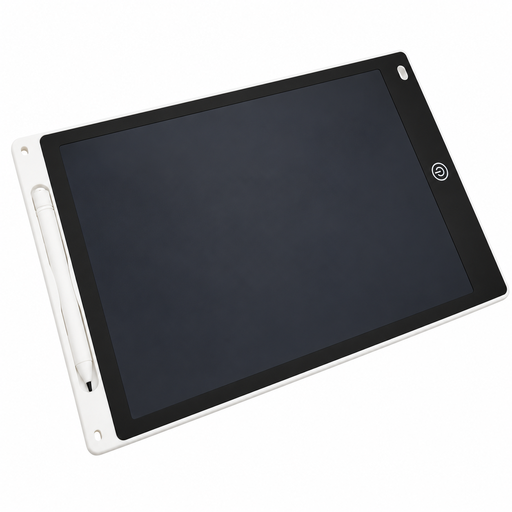
12-inch LCD drawing tablet with pen and erase function

12-inch LCD drawing tablet with pen and erase function

An option for sketching with a pen on an LCD drawing surface.

The stated size is 12 inches; a pen and erase function are also listed.

Joybuy

Frequently asked questions

Do I need a display on my graphics tablet to make greeting cards?

No. If you can draw on your existing monitor, a pen tablet without a display is one option. If you want to draw directly on the visible card design, compare connected pen displays and check their connection and space requirements.

What should I check before setting up a pen display?

Check that the connection method for the exact model works with your computer’s video output and power supply, and find out which cables are included. Huion describes the USB-C-to-USB-C cable for the Kamvas 13 as optional; a USB-C connector alone doesn’t guarantee a complete, compatible connection.

Can the drawing tablet create print-ready greeting cards on its own?

No. The format, resolution, colour mode and bleed depend on the requirements of the print product you choose. For example, Onlineprinters specifies 300 dpi and 2 mm bleed all round for its Maxi portrait greeting cards. Don’t apply these settings to other print jobs without checking.

What warranty applies when buying a graphics tablet?

According to information from the European Union, when you buy as a consumer in the EU from a business seller, you’re generally entitled to a legal guarantee of at least two years from the date you receive the goods. This is separate from any voluntary manufacturer’s warranty.

What should I know about product safety and disposal in Germany?

According to information from the European Union, CE marking is required only for product groups covered by relevant EU rules; it isn’t an official quality mark. In Germany, discarded electrical and electronic equipment must be disposed of separately from household waste, as explained by the German Environment Agency.