
Lieferung heute & morgen

Qualitätsgarantie

Willkommens-Angebote freischalten: KOSTENLOSE Lieferung | Bis zu 80 % RABATT | Kostenlose 30-Tage-JoyPlus-Testphase
App herunterladen
The search for a new mechanical gaming keyboard can quickly become overwhelming. The market is flooded with models that boast aggressive aesthetics and long feature lists. But all too often, these promises lead to disappointment: keys that lose their precision after a short time, a loud typing noise that disturbs housemates, or a layout that is impractical for your region.
This guide will help you distinguish marketing hype from genuine performance features. We'll focus on the crucial criteria so you can make an informed decision and avoid buyer's remorse.
Before we dive into the technical details, let's look at three common issues that often lead to dissatisfaction:
To avoid these pitfalls, you should focus on three objective core parameters. These determine the performance, feel, and longevity of your future keyboard.
The switch type is the most important decision. It determines how every keystroke feels and sounds. The three basic types are:
Brands like Cherry MX switches have long been the benchmark for quality and reliability, but other manufacturers now offer high-quality alternatives as well.
The size of the keyboard directly impacts ergonomics and the space available for your mouse. Common form factors include:
When making your selection, be sure to look for the German QWERTZ layout to avoid compatibility issues with umlauts and special characters.
Modern keyboards offer features that go far beyond simple typing and allow for deep personalisation:
Based on the criteria above, we have identified a few models that are well-suited for different user profiles and needs.
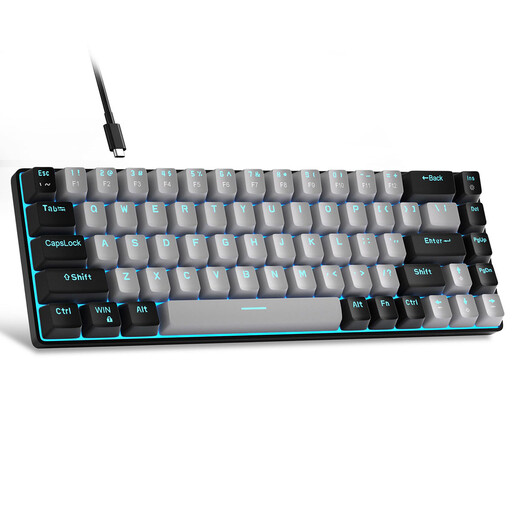
Why This Fits Their Persona: Offers an authentic mechanical typing feel at an accessible price point. Ideal for entering the world of mechanical keyboards without breaking the bank, and perfect for setups with limited space.
Focuses on the core function—the mechanical switches—instead of distracting with over-the-top RGB lighting from a simple but functional build.
The compact 60% keyboard layout saves a lot of desk space. The blue switches provide clear, tactile feedback for precise inputs.

Why This Fits Their Persona: Designed for competitive gaming where response time and reliability are crucial. The TKL keyboard format provides more room for wide mouse sweeps, which is an advantage in fast-paced games.
Relies on proven, German-engineered CHERRY MX2A RED switches and a robust build with a metal plate instead of fragile plastic and pure marketing gimmicks.
High-quality linear switches for fast, repeated keystrokes. The durable construction and German QWERTZ layout ensure reliable performance for heavy use.
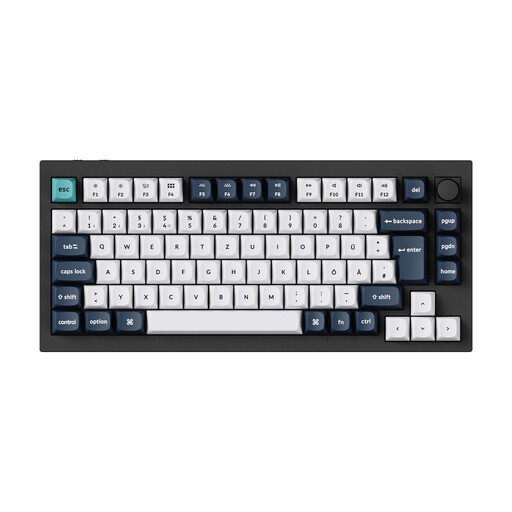
Why This Fits Their Persona: Offers maximum customisability for users who want to perfect their typing feel and sound profile. Ideal for the German custom keyboard community, which values high-quality materials and open standards.
Instead of a closed ecosystem, this hot-swap keyboard offers the freedom to change switches without soldering and to customise the firmware via QMK/VIA. You're investing in a platform, not a disposable product.
Full aluminium case, wireless tri-mode connectivity, and hot-swap capability for ultimate personalisation. The double-gasket design provides a dampened, pleasant typing feel.
We've compiled a complete, real-time updated list of products that fully meet these strict selection criteria and German safety regulations.
The main difference is in the feel and sound. Red switches are linear and quiet, ideal for fast-paced gaming. Brown switches are tactile, meaning they offer a noticeable actuation bump but remain relatively quiet. Blue switches are both tactile and clicky, providing the most distinct feedback, but they are also the loudest.
A hot-swap keyboard can be a great choice even for beginners. It offers the flexibility to try out different switch types without having to buy a whole new keyboard. It also simplifies repairs if a single switch fails, potentially extending the keyboard's lifespan.
Regular cleaning is crucial. Use compressed air to remove dust and crumbs from between the keys. The keycaps can be removed and cleaned separately with a mild soap solution (make sure they are completely dry before reattaching them). Avoid spilling liquids, as this can damage the electronics and the mechanical switches.