
Lieferung heute & morgen

Qualitätsgarantie

Willkommens-Angebote freischalten: KOSTENLOSE Lieferung | Bis zu 80 % RABATT | Kostenlose 30-Tage-JoyPlus-Testphase
App herunterladen
The search for a new mechanical gaming keyboard can quickly become overwhelming. The market is filled with tempting offers, but not every model advertised with "Gaming" or flashy lighting delivers the expected performance and durability. Many buyers invest in products that turn out to be impractical or low-quality after a short time.
As your Joybuy Product Recommendation Officer, I'll help you identify the common pitfalls and make an informed decision. We will focus on the objective features that truly matter.
Common Pitfalls When Buying a Gaming Keyboard:
To avoid a bad purchase, you should focus on three core parameters that directly impact your keyboard's performance and user comfort.
The switch type under each key determines the typing feel and response speed. The three basic types are:
The size of the keyboard has a direct impact on the ergonomics of your setup.
For users in Germany, choosing a mechanical keyboard with a QWERTZ layout is crucial to ensure intuitive operation without a learning curve.
Modern mechanical keyboards increasingly offer options for personalisation.
Here are some recommendations tailored to specific user profiles that meet the quality criteria mentioned above.
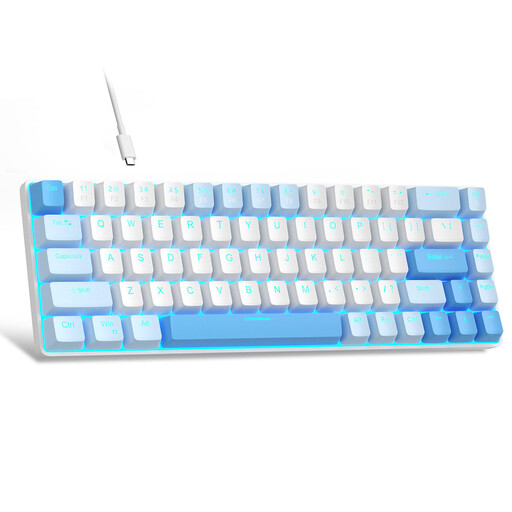
Why This Fits Their Persona: This model is a great choice for beginners looking for a true mechanical typing experience without a large investment. The compact 60% format saves space, and the linear red switches are well-suited for gaming.
It bypasses the "gaming label trap" by using genuine mechanical switches. However, note that it has a QWERTY layout, which is a trade-off for the price.
Compact, space-saving design. Linear red switches for fast gaming. Wired connection for a stable link.

Why This Fits Their Persona: For gamers who value proven quality and precision. This keyboard combines durable CHERRY MX2A Red switches with a functional design and the correct German layout for uncompromising performance.
Solves the layout problem with a full German QWERTZ layout. Relies on the proven quality of CHERRY switches instead of flashy aesthetics.
High-quality linear CHERRY MX2A Red switches. Full N-Key Rollover and Anti-Ghosting for precise inputs. Durable construction.

Why This Fits Their Persona: Perfect for users who love to personalise their gear. The hot-swap capability allows for easy switch replacement, while the 75% layout with a volume knob offers a blend of compactness and functionality.
Offers both a German QWERTZ layout and true customisation through hot-swap sockets. The focus is on function and flexibility, not just aesthetics.
Full-key hot-swap for 3-pin switches. Convenient volume knob. Gasket-mount structure for a cushioned typing feel.
We've compiled a complete, up-to-date list of products that fully meet these strict selection criteria and safety standards.
Red switches are linear and quiet, ideal for fast gaming. Blue switches are "clicky" and loud, which many typists appreciate for the tactile and audible feedback. Brown switches are tactile but quieter than blues, representing a good middle ground for mixed use (gaming and typing).
A hot-swap keyboard is worthwhile if you value flexibility. It allows you to change your keyboard's typing feel by swapping out the switches without having to buy a whole new keyboard. It also makes repairs easier if a single switch fails. For users who find a setup they like and stick with it, it's not a necessary feature.
For pure gaming, the layout is less critical, as key bindings can be freely configured in most games. However, as soon as you use the in-game chat or use the keyboard for everyday tasks like emails or web browsing, a missing QWERTZ layout quickly becomes impractical. The familiar positions of Z, Y, umlauts, and special characters are missing, which disrupts the typing flow.