What should you consider when choosing?
Base your choice on the room and your speaking position, then check the connection, monitoring options and any accessories your recording space needs.
Dynamic USB or USB/XLR microphone
A good fit if: You can speak from close range at a consistent level, and room noise is distracting in a test recording.
Consider: Maintaining a fixed position close to the microphone can feel restrictive during long recordings. To use XLR with a computer, you’ll need suitable additional recording equipment.
Cardioid USB condenser microphone
A good fit if: You can keep your recording space quiet and position the microphone to suit your voice.
Consider: The recording may still pick up the distance between you and the microphone, as well as room reflections. A model without an XLR output can’t be turned into an XLR microphone just by changing the cable.
XLR-only setup
A good fit if: You already have a suitable audio interface or mixer, or are planning to get one.
Consider: To record to a computer, you’ll need suitable signal conversion as well as the XLR connection. The connection alone doesn’t tell you anything about recording quality.
| What matters |
What to look for |
Who is this important to? |
| Room noise and other background sounds |
Check the polar pattern and whether you can maintain a comfortable speaking position in your actual recording space. |
If I can hear room noise in a test recording, I want to be able to control my voice and distance from the microphone. Around 31 % of consumers consider room noise and other background sounds their top priority. |
| Quiet speech |
Test the microphone’s speaking direction and a comfortable distance you can maintain, using a quiet test recording. |
If I speak softly, I want to be able to assess quieter words in my usual sitting position. Around 25 % of consumers prioritise how the microphone captures softer speech. |
| Easy setup and monitoring |
Check USB compatibility, the cable included and whether there’s a direct headphone connection. |
If I’m recording on my own, I want to monitor my voice directly and keep the setup simple. For around 19 % of consumers, easy recording with monitoring is the top priority. |
| Room to expand later |
Check the connections on the specific model, including USB and XLR, and whether both outputs can be used at the same time, if needed. |
If I want to use an interface later, the microphone needs to suit that signal path. Around 13 % of consumers prioritise this option to expand their setup. |
| A complete recording space |
Compare what’s included with the cables, stand or arm and other recording equipment you already have. |
If I want to set up a usable recording space straight away, I need to know what else I’ll need. For around 12 % of consumers, the effort involved in completing the setup is the top priority. |
Joybuy products
The products below include dynamic USB/XLR models, as well as other wired and wireless microphones. For meditation at home, pay particular attention to a comfortable speaking position, the right connection and the monitoring options you need.
 No image available
FIFINE AM8 USB/XLR dynamic microphone
If you can maintain a close speaking position, this dynamic USB/XLR design could suit a direct USB setup now or an XLR setup later.
The product title lists a mute function, headphone connection and desktop stand. For an XLR setup, allow for the recording equipment and cables you’ll need.
View at Joybuy
 No image available
FIFINE K688CT USB/XLR dynamic microphone kit with boom arm
This dynamic USB/XLR model could be a good fit if you speak from close range at a consistent level and want to use the microphone arm to suit your sitting position.
The product title lists a boom arm, mute function, headphone connection and gain control. To record to a computer via XLR, you’ll need suitable additional recording equipment.
View at Joybuy
 No image available
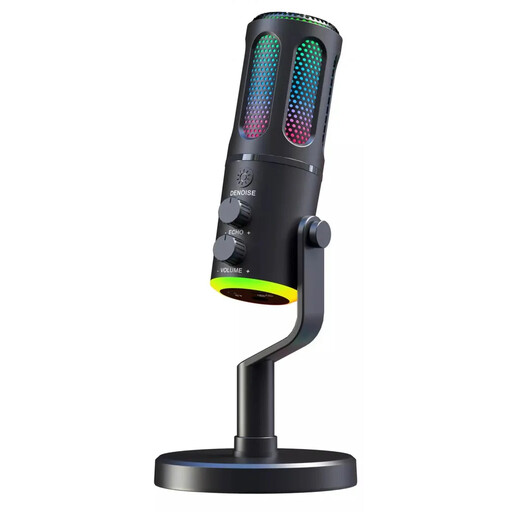
The G-Lab K-MIC-NEON gaming microphone
If a fixed, wired microphone suits your recording space, check whether you can position this model comfortably for speaking.
The product title lists a wired design and cardioid polar pattern. Before choosing, check that the connection is compatible with your recording device.
View at Joybuy
 No image available
SYNCO P1XT USB-C wireless lavalier microphone
If you want to move around while recording, a wireless lavalier microphone could be an alternative to a fixed desktop microphone.
The product title lists a wireless lavalier design and USB-C receiver. Check that this style and connection suit your recording device.
View at Joybuy
 No image available
JBL Quantum Stream Studio USB-C condenser microphone
A wired USB condenser microphone could suit a quiet, permanent recording space. Test its position with a quiet passage.
The product title lists a USB-C connection and condenser capsule. Whether it’s suitable will also depend on whether you can position it appropriately in your recording space.
View at Joybuy
Frequently asked questions
How do I find the right microphone position for a calm meditation?
Point the microphone’s speaking side towards your mouth and record a quiet passage in your usual sitting position. As model-specific starting points for voiceovers, RØDE recommends around 10–15 cm for the NT-USB Mini and around 5–10 cm for the PodMic USB. These distances don’t automatically apply to other microphones.
Do I need an audio interface for a USB microphone?
You don’t need a separate interface to record directly over USB with the USB models described here. If you want to record an analogue XLR signal to your computer instead, you’ll need suitable additional recording equipment, such as an audio interface or a suitably equipped mixer.
What should I monitor while recording?
Listen to a test recording through the direct headphone connection, if your model has one. Check quiet words, breaths and plosive sounds, as well as the recording level from your usual speaking position. For the NT-USB Mini, RØDE also explains how to select the microphone as an input and output device on your computer.
What extra equipment should I allow for in my setup?
Compare what’s included with the exact version against the equipment you already have. Depending on the microphone and connection, you may need cables, a stand or arm, and an interface or suitable mixer to use XLR with a computer. Also check that the cable supplied is compatible with your recording device.


