For large project folders and mostly scheduled backups, an external HDD is a natural choice. If you regularly transfer files between work locations, an SSD may suit your workflow better. Before buying, check the total size of your folders, the connection and how your backup software is set up. A drive on its own won’t guarantee that you can restore previous versions: test your restore process and keep one backup separate from your computer.
Which drive is right for you?
Writers with multiple drafts
If you want to retrieve an earlier version of your manuscript after accidentally deleting or overwriting a file, a suitable backup routine matters just as much as the drive itself. Germany’s Federal Office for Information Security recommends testing your ability to restore files.
Writers with a large archive of material
If you have extensive research, image and project folders, take your total storage needs into account, including space for additional backup versions. Toshiba lists capacities of up to 4 TB for its Canvio Basics range; the right capacity depends on the model.
Writers working in multiple locations
If you regularly transfer large folders between work locations, consider the connection and transfer speed alongside the available storage space. Samsung notes that the T7 Shield’s stated maximum speeds depend on certain conditions, including having a suitable USB port and cable.
What should you consider when choosing?
For manuscripts and large project folders, first decide what you want to back up and how you want to restore it. Then check the drive’s capacity, connection and protection.
| What matters to you |
What to check before buying |
Who should pay particular attention? |
| Restorable versions |
Which folders does the software cover? How can you retrieve earlier versions, and can you successfully test a restore? |
If I need to go back to an earlier version after overwriting a file, I need versioned backups of the entire project folder. Around 29% of consumers put restorable versions first. |
| Capacity for large folders |
Work out the total size of all the folders you want to back up and allow space for additional versions. |
With extensive research and image folders, I want enough room for multiple backup versions. Around 23% of consumers consider capacity the most important factor. |
| Transferring large files |
Check your computer’s port and cable against the conditions specified by the manufacturer. |
If I regularly transfer large folders between work locations, waiting time matters most to me. Around 18% of consumers prioritise transfer speed. |
| Compatibility and setup |
Check the operating system, file system and requirements of the backup feature you use. Before reformatting, make sure you have another copy of any existing data. |
If I need to set up the drive with my computer and backup software, I want to be sure that all my project folders are included. Around 18% of consumers focus on compatibility and setup. |
| Privacy and storage |
Check whether your backup method supports encryption, how the encryption key will be stored and where you’ll keep the drive after backing up. |
For confidential files, I want to restrict access to a drive I take with me and store it separately after backing up. Around 12% of consumers prioritise privacy and storage. |
Common mistakes when buying a backup drive
-
Assuming a large drive is a complete backup plan
A drive full of saved files is of little use if important project folders are missing or you can’t retrieve earlier versions. Germany’s Federal Office for Information Security recommends checking that you can restore your files.
Decide which folders and versions you want to back up, then test restoring a manuscript file along with its accompanying folder.
-
Confusing the USB interface speed with actual backup speed
The connection alone doesn’t determine write speed. Samsung lists sequential maximum speeds for the T7 Shield of up to 1.050 MB/s for reading and 1.000 MB/s for writing. To achieve these, among other conditions, the host device and cable must support USB 3.2 Gen 2, and UASP must be enabled.
Check your computer’s port and cable. Don’t assume the manufacturer’s maximum speeds are a guarantee of how long your own backup will take.
-
Leaving formatting and folder coverage until after you’ve filled the drive
A volume formatted for Windows can’t be used straight away as a Time Machine backup volume. With Windows File History, project folders outside the libraries it covers need to be added appropriately.
Set up your backup method and choose which folders to include before your first large file transfer. Make another copy of any existing files before reformatting a drive.
Reformatting may take extra time, as you’ll need to move existing files elsewhere and copy them back afterwards.
Key brands to consider
Toshiba
The Canvio Advance and Canvio Basics are portable HDD ranges for larger, mostly scheduled backups.
- Toshiba lists capacities of up to 4 TB for Canvio Basics. The manufacturer also offers downloadable backup and security software for Canvio Advance.
- Canvio Basics is formatted with NTFS for Windows and, according to Toshiba, needs to be reformatted for use with a Mac. The software listed for Advance isn’t automatically included with Basics. The stated interface speed of around 5,0 Gbit/s is not a measured backup write speed.
Samsung
The portable T7 Shield SSD is worth considering if you regularly transfer large folders or need a drive for use on the move.
- For the German 2-TB version, MU-PE2T0S/EU, Samsung lists sequential maximum speeds of 1.050 MB/s for reading and 1.000 MB/s for writing, provided the specified port and cable requirements are met.
- The IP65 rating is based on controlled tests. Samsung notes that damage caused by liquids or dust isn’t covered by the warranty.
Western Digital
The My Passport range is a line of portable HDDs for capacity-focused backups.
- Western Digital’s datasheet lists capacities of up to 6 TB, password protection and hardware encryption for the range described.
- These specifications don’t prove that an individual backup plan is effective, or that every older or differently named My Passport version comes with the same software.
Seagate
Expansion Portable is a range of portable HDDs for larger file collections, with a USB connection.
- A 2021 Seagate datasheet describes the STKM4000400 model as having 4 TB capacity, USB power and a USB 3.0 cable.
- Expansion Portable isn’t the same as the separately tested Game Drive for Xbox. The datasheet states that Rescue Data Recovery Services are subject to country restrictions; this doesn’t confirm current service eligibility in Germany.
Joybuy products for large project folders
The Joybuy products below are external HDDs for large project folders and scheduled backups, including portable and desktop models.
 No image available
WD Elements Portable 5TB USB-C
For large project folders if you’re looking for a portable HDD for scheduled backups.
Capacity: 5 TB. USB-C and USB 3.2 Gen 1. 2.5-inch format; 240 g.
View at Joybuy
No image available
WD Elements Portable 6TB USB-C
For extensive project archives if you need a portable HDD with 6 TB capacity.
Capacity: 6 TB. USB-C and USB 3.2 Gen 1. 2.5-inch format; 240 g.
View at Joybuy
No image available
WD Elements Portable 4TB USB-C
For large project folders if a portable HDD with 4 TB capacity suits your backup needs.
Capacity: 4 TB. USB-C and USB 3.2 Gen 1. 2.5-inch format; 240 g.
View at Joybuy
 No image available
WD Elements Portable 2TB USB-C
For smaller project archives or extra backup copies, if 2 TB is enough for your needs.
Capacity: 2 TB. USB-C and USB 3.2 Gen 1. 2.5-inch format; 131 g. Formatted with exFAT and powered without an external power supply.
View at Joybuy
 No image available
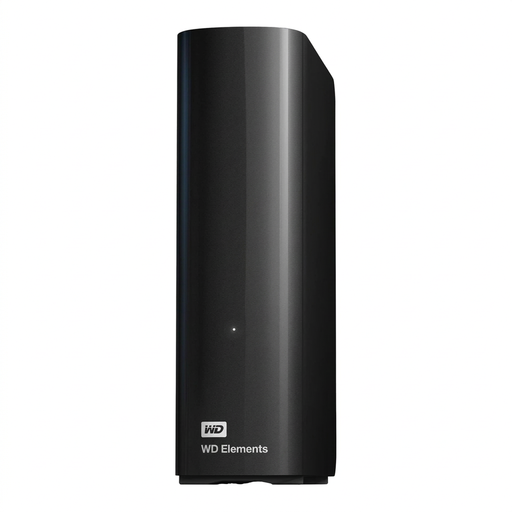
WD Elements Desktop 14TB
For very large project archives and scheduled backups at a fixed workstation.
Capacity: 14 TB. USB 3.0; 3.5-inch format. Formatted with NTFS and powered by an external power supply. According to the product description, it needs to be reformatted for use with macOS.
View at Joybuy
Frequently asked questions
How can I back up earlier manuscript drafts, rather than just the latest file?
Use a method that lets you restore earlier file versions, and test restoring an entire project folder. Windows File History offers earlier versions; folders outside the libraries it covers need to be added appropriately.
Can I use an external HDD set up for Windows straight away with Time Machine?
A volume formatted for Windows can’t be used straight away as a Time Machine backup volume. Apple recommends APFS or APFS (Encrypted) as the preferred format for new Time Machine volumes. Reformatting will delete any existing data on the affected volume.
Is it enough to leave my backup drive connected all the time?
That isn’t enough if you want to keep a backup separate from your computer. Germany’s Federal Office for Information Security describes offline backups, disconnected from the rest of the system, as a protective measure against ransomware and recommends testing restores. Make sure you also back up regularly.
What rights do I have after buying online?
Germany’s consumer advice centre notes that consumers generally have a 14-day right to cancel online purchases. When the cancellation period starts and whether any exceptions apply depends on the circumstances. This right is separate from claims relating to faulty or misdescribed goods.


