First, choose a backup method that lets you restore earlier project versions, then match the drive capacity to your files, version history and expected growth. An external HDD is an option if plenty of storage matters more than fast transfer times; an SSD may be a better fit if you frequently transfer large projects or take the drive with you. Also check your operating system and connections, and keep an additional backup separate from your computer.
Which option is right for you?
Families with frequently updated projects
If you want to undo accidental changes or deletions, you’ll need version history set up and enough space to keep older versions. Microsoft Support explains how to restore previous file versions using File History, while Apple Support outlines how to restore files with Time Machine.
Families with growing file archives
If you’re backing up lots of photos, videos and documents as well as projects, allow room for additional backups and future data. The German Federal Office for Information Security recommends keeping a backup in a different location from your PC.
Families on the move with their projects
If you often take a drive with you or regularly transfer large project files, check the connections and cables, and make sure they’re compatible with your computer. The transfer speeds you can actually achieve also depend on the connections and cables supported.
What should you look for when buying?
External HDD
A better fit if: you want to store lots of files and several backup versions, and fast transfer times aren’t your top priority.
The trade-off: an HDD won’t automatically save previous file versions; you’ll need to set up a backup feature for that.
External SSD
A better fit if: you frequently transfer large project files or often take the drive with you.
The trade-off: manufacturers’ maximum speeds aren’t guaranteed on your computer. Plenty of storage and another backup kept separately are still important, too.
First, compare the version history and storage space you need, then check the operating system, connection and planned storage arrangements. The percentages below show the top priority of consumers with these backup needs.
| Priority |
What to look for when buying |
Who should pay particular attention |
| Earlier project versions |
Check that the backup feature covers your project folders and keeps older versions. |
If I want to restore an earlier version after making changes or accidentally deleting something, version history needs to be set up correctly. Around 33% of consumers prioritise restoring earlier project versions. |
| Space for archives and versions |
Allow for current files, the version history you want to keep and future growth; compare the specific options available. |
If you want to back up lots of family photos, videos and projects alongside older versions, don’t base your storage needs on today’s files alone. Around 27% of consumers prioritise available storage space. |
| Connection and transfer |
Check that your computer port, cable and operating system are compatible. For large transfers, also check which USB version is supported. |
If I frequently transfer large files, I want to connect the drive to my computer without an incompatible port getting in the way. Around 20% of consumers prioritise the connection and practical transfer speeds. |
| Separate, tested backup |
Plan a backup schedule, a separate storage location and occasional restore tests. |
If you want to keep an additional copy separately and be able to use it if needed, remember to plan for regular backups and checks, too. Around 20% of consumers prioritise keeping a separate, tested backup. |
Common backup mistakes
-
Confusing extra storage with version history
Copying files to an external drive won’t automatically create a history that lets you restore older project versions.
Choose a suitable backup method before you buy, set it up and test restoring an older file.
Setting up and running regular backups, as well as testing restores, takes time.
-
Allowing space for today’s files only
Projects, photos, videos and additional backup versions all use the available storage space.
Estimate your current data, the version history you want and expected growth separately, then check the capacity of the specific option you’re considering.
Choosing too little storage could mean keeping a shorter version history or needing an additional drive.
-
Taking the connection or advertised speed at face value
An SSD’s advertised maximum speed depends on the host device and cable having the right specifications. Drives in the same product range may also have different connections.
Check your computer port and cable against the specific option, and don’t assume the manufacturer’s figures reflect your actual backup time.
Depending on the connection, you may need a suitable cable or adapter.
-
Keeping your only backup next to the computer
A single drive connected to your computer won’t protect you from every risk affecting the computer’s location. The German Federal Office for Information Security recommends keeping backups in a separate location and occasionally checking that they can still be read.
Keep another copy separately and test that you can restore the backed-up files.
Keeping an additional copy separately may require another backup device or storage location.
Key brands at a glance
Toshiba
Canvio Basics is a range of USB-powered HDDs for local storage. The EMEA product information also lists a 4-TB option.
- Toshiba says Canvio Basics comes pre-formatted for Windows.
- You may need to reformat it for macOS. Simply copying files won’t create version history.
Western Digital
WD Elements Portable includes HDD options with different capacities and connection types.
- The data sheet for the USB-A version lists options including 4 and 6 TB.
- According to its data sheet, the separate USB-C range is pre-formatted as exFAT. Make sure the connection and format suit the specific version.
Seagate
Expansion Portable is another range of portable HDDs. Seagate lists the model number STKM4000400 for the 4-TB version.
- Seagate describes its USB connection and how you can copy files without installing additional software.
- Simply copying files manually won’t automatically keep older project versions.
Samsung
The Portable SSD T7 Shield is an SSD option for frequent transfers or taking with you. The German product page lists the black 2-TB version as MU-PE2T0S/EU.
- Samsung quotes speeds of up to 1.050 MB/s for reading and 1.000 MB/s for writing, provided the stated host, cable and mode requirements are met.
- The advertised IP65 rating isn’t a substitute for an additional backup. Samsung excludes liquid and dust damage from its warranty.
Drives for the family computer
These Joybuy product options include external HDDs and SSDs for extra files and backup copies. To keep earlier project versions, you’ll need to set up version history separately.
 No image available
WD Elements Portable 4 TB USB-C
An HDD option if you need extra space for family files and backup copies.
4 TB; USB-C; USB 3.2 Gen 1; pre-formatted as exFAT according to the product description.
You’ll also need to set up a backup feature to keep earlier project versions.
View at Joybuy
 No image available
WD Elements Portable 2 TB USB-C
This HDD can be used as an external storage destination for project files and other family documents.
2 TB; USB-C; USB 3.2 Gen 1; pre-formatted as exFAT according to the product description.
You’ll also need to set up a backup feature to keep earlier project versions.
View at Joybuy
 No image available
Kexin M.2 SATA external SSD, 256 GB
A portable SSD option for external backups, if 256 GB is enough for the data you need to store.
256 GB; USB 3.1; up to 500 MB/s according to the product description.
The description lists USB-C and USB-A cables. You’ll need a backup feature to keep earlier project versions.
View at Joybuy
 No image available
Kexin external SSD, 512 GB
This SSD can be used for external storage of project files, provided it has enough capacity for the version history you want to keep.
512 GB; USB 3.1; up to 500 MB/s according to the product description.
The description lists a USB-C-to-USB-C cable and a USB-A adapter. You’ll need to set up version history separately.
View at Joybuy
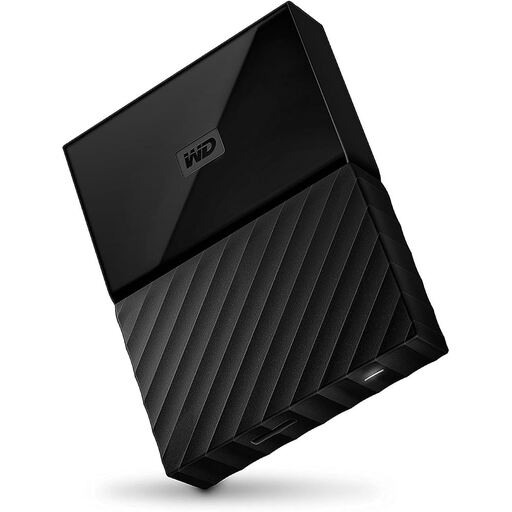 No image available
Western Digital My Passport 4 TB, Black
An HDD option for larger file archives and backup copies if you need 4 TB.
4 TB; USB 3.0/2.0; 256-bit AES hardware encryption according to the product description.
You may need to reformat it for operating systems other than the Windows versions listed there. You’ll need to set up a backup feature to keep earlier project versions.
View at Joybuy
Frequently asked questions
Does an external drive automatically save older versions of projects?
No. The drive itself won’t keep a version history. On Windows, File History can provide previous versions of backed-up files; on a Mac, Time Machine lets you restore changed or deleted files. Check that your project folders are included.
How do I set up and check my backup?
Select the drive in your operating system’s backup feature and set a backup schedule. Every so often, try restoring an older project file and check that you can open it. The German Federal Office for Information Security recommends checking that backups can be read.
What should I know if the family computer is a Mac?
Apple recommends using a Time Machine backup volume with at least twice the storage capacity of your Mac. During setup, Time Machine may ask to erase the selected drive, so back up any files already on it elsewhere first. An HDD pre-formatted for Windows may also need reformatting.
Is a manufacturer’s warranty the same as your statutory rights if a product is faulty?
No. A manufacturer’s warranty and statutory rights relating to defects are separate matters. Under § 438 BGB, claims for defects specified there generally become time-barred two years after delivery in the case of an ordinary sale of goods; the requirements for the specific claim still apply.
How should I dispose of an old external hard drive in Germany?
An old hard drive is electrical waste and must not go in your household rubbish. The German Environment Agency advises disposing of electrical appliances separately.


