Couch party with a group of guests
First, you’ll want to know whether everyone can play on the same screen and how many controllers you’ll need. Your headphone set-up needs to work for the size of your group.


The right console depends first on the specific party game, how many people can play locally and how you want to connect your audio. Switch models are worth considering for Nintendo games and playing in different locations, while the PS5 or Xbox Series S may suit you if your chosen game supports local multiplayer on those consoles. Nintendo notes that when using Bluetooth audio on Switch and Switch 2, no more than two wireless controllers can be connected. If you’re playing with a larger group, check the actual headphone connection and controller set-up before you buy.
First, you’ll want to know whether everyone can play on the same screen and how many controllers you’ll need. Your headphone set-up needs to work for the size of your group.
You want to listen to game audio through headphones, perhaps so you don’t disturb anyone else. The connection, audio output and any restrictions on using controllers at the same time are all important.
You want to chat while playing with friends who aren’t nearby. Check online features, your headset or microphone, and any access requirements separately from local multiplayer.
Start by checking the specific game and how many people can play locally, then check the audio connection. Online chat and game format are separate buying considerations.
| Consideration | What to check before buying | Who is it important to? |
|---|---|---|
| Local player numbers and party games | Check the specific game’s platform version, local game mode, player numbers and the controllers it requires. | If several guests will be playing on the same screen, the player limit for the specific game matters more to me than the console alone. Around 31% of consumers put playing together first. |
| Headphone audio during the party | Decide who needs headphones and check the connection type and whether you need a microphone. For Bluetooth audio on Switch and Switch 2, Nintendo specifies a limit of two wireless controllers connected at once. | If I need to listen to game audio through headphones, I want to know whether the connection and controllers will work together. Around 31% of consumers prioritise headphone audio. |
| Voice chat with friends | Distinguish a game’s online mode from the console’s voice chat. For GameChat on Switch 2, Nintendo lists an internet connection and a Nintendo Switch Online membership among the requirements. | If friends are joining from a distance, I check chat features and access requirements separately from local play. Around 23% of consumers put online chat first. |
| Game format and overall cost | Check your existing games against the console version: the PS5 Digital Edition has no built-in disc drive, and the Xbox Series S is all-digital. | If I want to keep using games I already own, I check the format and any extras I’ll need first. Around 15% of consumers prioritise game format and overall cost. |
According to Nintendo, no more than two wireless controllers can be connected when using Bluetooth audio on Switch and Switch 2. A pair of Joy-Con controllers already counts as two controllers.
Before choosing any extra accessories, check how many controllers you plan to use and which headphone connection is actually available.
For a larger group, you may need a different audio connection or compatible accessories that you’ve checked in advance.
Local player numbers and online features vary from game to game. A multiplayer mode may therefore require something different from a group playing together in front of the TV.
Look at the details for the specific game and check that they explicitly mention local multiplayer and the number of players on one device.
If a mode is online-only, you may need extra devices, game copies or memberships.
The PS5 Digital Edition has no built-in disc drive, and the Xbox Series S is an all-digital console.
Before buying, compare the exact console version with the format of the games you already own.
If you want to play PS5 games on disc, check the disc-drive option on the version you’ve chosen. Disc games aren’t an option on an all-digital console.
A good choice for Nintendo party games, whether you’re playing on the TV, in tabletop mode or on the move. The right Switch version also depends on whether your chosen game uses features exclusive to Switch 2.
Worth considering if your chosen local party game is available on PS5 and you’d like to manage headphone audio output through the console settings.
The Series S could be a good fit if your favourite party games are available on Xbox, you buy games digitally and want to use a compatible headset with an Xbox Wireless Controller.
These options range from a retro console for gaming on your TV to Nintendo Switch models for party games. Check the local mode and compatible headphone connection for each game.
 No image available
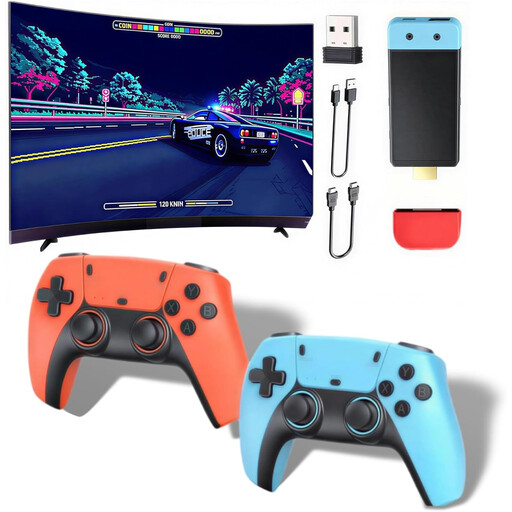
For gaming on your TV: the product description says up to four people can play together.
The product title lists 20,000+ games, wireless controllers and HDMI output, as well as 1080P/720P. Other listed features include support for 28+ emulators, a Dual-core Cortex-A7 and DDR3 256MB.
 No image available
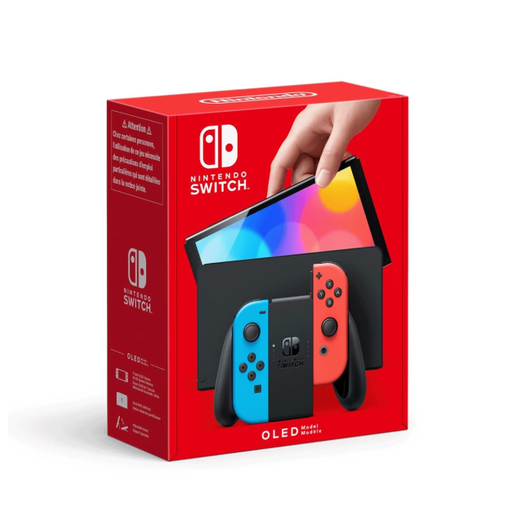
For Nintendo party games in TV or tabletop mode, if you don’t need Switch 2-exclusive features. Nintendo lists up to four local players for Super Mario Party Jamboree.
The product description lists a 3.5 mm audio jack, plus TV, tabletop and handheld modes. According to Nintendo, no more than two wireless controllers can be connected when using Bluetooth audio.
 No image available
For compatible Nintendo party games and switching between TV, tabletop and handheld play. Nintendo notes that some Switch games may not be compatible with Switch 2, or may not be fully compatible.
The product description lists a 3.5 mm headphone jack and TV, tabletop and handheld use. According to Nintendo, no more than two wireless controllers can be connected when using Bluetooth audio.
Not as a standard solution without checking first: according to Nintendo, no more than two wireless controllers can be connected when using Bluetooth audio on Switch and Switch 2; a pair of Joy-Con controllers counts as two. Bluetooth audio on Switch is disabled in local play between Switch consoles. Check whether another audio connection would work for your group.
On PS5, you can adjust headphone output in Settings under “Sound” and “Audio Output”. Connect a compatible audio device, then select it as your output device and choose the audio content you want under “Output to Headphones”.
You don’t automatically need an online subscription just to play locally. For GameChat on Switch 2, Nintendo lists a Nintendo Switch Online membership and a stable internet connection as requirements. PlayStation requires a paid PlayStation Plus subscription for online multiplayer on the PS5 Digital Edition. Check the requirements for your chosen game too.
Under Section 12 of the German Youth Protection Act, game discs may only be made available to children and young people in public if they have been approved and labelled for their age group; the rating for the specific game applies. The USK notes that an age rating alone does not assess whether a game is suitable for pre-school children or its educational value.