Choose a headset with microphone and headphone connections that match your recording equipment. For long bilingual read-alouds, you’ll also want a comfortable fit, a consistent microphone position and a test recording featuring both languages, with quiet and loud passages. USB can make connecting to a PC simpler. With TRRS and broadcast setups, you’ll need to check the inputs, microphone power requirements and whether you need any additional accessories.
Which headset is right for you?
Bilingual storytellers
If you switch between languages, volume levels and character voices, test the microphone position and recording level using your own script. This lets you check how clearly your voice comes through in quieter and more emphatic passages.
Storytellers recording long takes
When you’re recording longer stories in one go, it’s important that the headset stays comfortable for the planned duration and that the microphone remains in position as you read.
Recorders with an existing setup
If you want to record directly on your computer or use existing 3.5 mm, TRRS or studio connections, the headset’s signal path needs to work with your recording equipment.
What should you look for when buying?
First, check that the complete connection setup is compatible with your recording equipment. Then test the fit and microphone position with a short recording before relying on it for a long take.
| What matters to you |
What to look for |
Who will value this most? |
| Clear speech |
Record quiet and emphatic sentences in both languages. Check the microphone position and recording level before starting your long take. |
If you switch between languages and character voices, you’ll want to be able to assess articulation and volume in the finished recording. Around 31 % of consumers prioritise clear speech. |
| Comfort during long takes |
Test the fit and how warm the headset feels over a reading session of a representative length for you, including while wearing glasses. Look for an adjustable headband and replaceable ear pads if these matter to you. |
If you read longer stories in one go, the headset should stay comfortable for the planned duration. Around 25 % of consumers prioritise long-term comfort. |
| The right connection |
Check the exact model variant against the microphone input, headphone output and power requirements of your computer, recorder or interface. |
If you want to keep using your existing recording equipment, the complete signal path for both the microphone and headphones needs to be compatible. Around 25 % of consumers focus on connection compatibility. |
| Monitoring and room noise |
Listen back to a saved test recording in your usual recording space. Live monitoring alone won’t tell you which noises are actually captured in the recording. |
If you want to spot distractions while reading, you’ll need to check the saved track, not just the headphone signal. Around 19 % of consumers pay particular attention to monitoring and room noise. |
Common misconceptions
-
“Closed-back ear cups remove room noise from my recording.”
A closed-back design affects what you hear from outside while monitoring. You’ll need to check separately whether a fan or other noises can be heard on the recorded microphone track.
Record a test at the place where you’ll actually be reading, then listen back to the saved track.
-
“Every version of a headset has the same connector.”
USB and XLR versions can use different signal paths. Sennheiser states that no cable is included with the current HMD 26, product number 700318.
Check the full model name, microphone power requirements, both audio connections and the items included against your equipment.
Depending on the headset and recording equipment, you may need a suitable interface, a power converter or a cable sold separately.
-
“A good microphone specification guarantees a flawless long take.”
A recording level that’s too high can cause distortion, even with a suitable headset. Audacity also notes that noise reduction is better suited to steady background noise than to individual sounds.
Before recording the whole story, test both loud and quiet passages, then check the saved recording.
If clipping or background noise makes a take unusable, recording it again can take extra time.
-
“The same usage rights apply to private recordings and public audiobooks.”
Copyright law distinguishes private copies from public performance and making a work available to the public. A translation may also be relevant under copyright law.
Before publishing, check the rights to the text, translation and use of the specific work.
Key brands at a glance
RØDE
The NTH-100M is an analogue over-ear headset with a detachable microphone boom. It may suit you if your setup is compatible with its TRRS signal path.
- RØDE says the NTH-100M has a locking headband and removable ear pads.
- RØDE describes the microphone position as helping to reduce plosive sounds. This is a manufacturer claim, not an independent sound assessment for bilingual storytelling.
- According to RØDE, you must use the supplied TRRS cable with the microphone. Some XLR setups require a suitable power converter.
Audio-Technica
The ATH-M50xSTS-USB is a USB version for computers, while the BPHS1 is designed for separate broadcast connections. They use different connection setups.
- Audio-Technica describes the USB StreamSet as offering adjustable sidetone monitoring and two sets of ear pads.
- According to Audio-Technica, the microphone boom on the BPHS1 can be positioned on either side.
- The BPHS1 requires compatible XLR and 6.3 mm connections. Manufacturer claims about speech clarity are no substitute for a test recording with your own voice.
beyerdynamic
The wired MMX 300 PRO is a closed-back, analogue option for a setup with compatible 3.5 mm connections.
- beyerdynamic lists a condenser microphone with a cardioid polar pattern for this model, as well as replacement ear pads and cables.
- Check the connector pinout and recording result with your own voice. The manufacturer’s descriptions of comfort and sound don’t tell you how the headset will feel or sound during long storytelling sessions.
Sennheiser
The current HMD 26, product number 700318, is a modular, wired broadcast headset for suitably equipped recording setups.
- Sennheiser lists a dynamic supercardioid microphone, closed on-ear headphones and interchangeable cable options.
- According to Sennheiser, no cable is included with model 700318. Check which cable version you need and how it connects to your recording equipment.
- Details for older HMD 26 II variants do not automatically apply to model 700318.
Shure
The SM35 is a separate headset microphone for anyone who wants to keep using their existing headphones and choose their microphone and monitoring setup separately.
- Shure recommends positioning the microphone close to the corner of your mouth.
- The SM35 does not include headphones. According to Shure’s guide, the TA4F and XLR versions have different power requirements.
- A documented live use case does not automatically mean it’s suitable for your specific storytelling recording.
Joybuy products
The selection below includes headsets and headphones with microphones. For voice recordings, check that the connection, microphone signal path and monitoring setup are compatible with your equipment.
 No image available
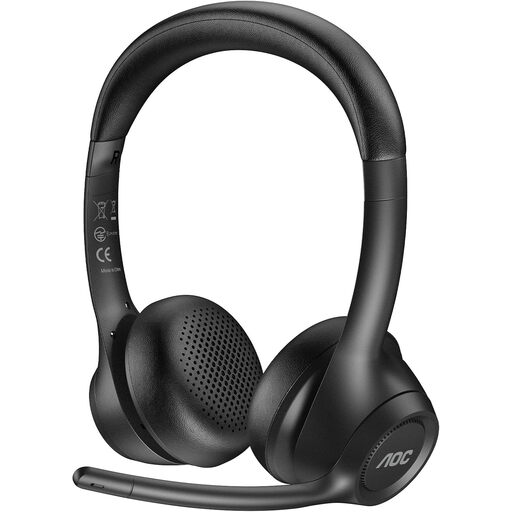
AOC Wireless Headset with Mic
This headset with microphone may be worth considering for a test recording. Check that its wireless signal path works with your recording equipment.
View on Joybuy
 No image available
JBL LIVE 770NC Wireless Over-Ear Headphones with Mic, White
These over-ear headphones with microphone could be tried for listening back and making a test recording. First, check that the microphone works with the recording setup you want to use.
View on Joybuy
 No image available
JBL Quantum 360P Wireless Gaming Headset, White
This headset with boom microphone may be suitable for a voice test. Check that its wireless or wired connection works with your recording equipment.
View on Joybuy
 No image available
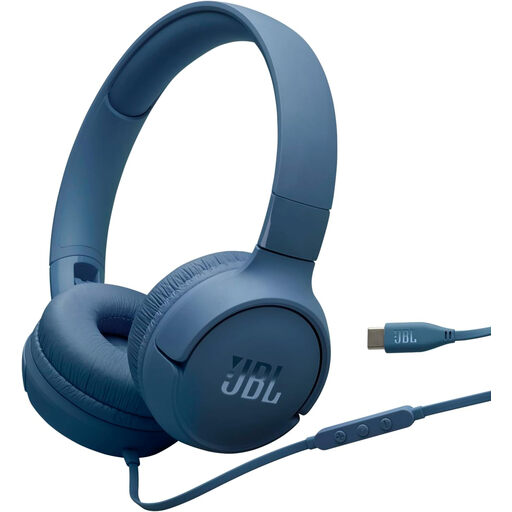
JBL Tune 520C Wired On-Ear Headphones with Microphone, USB-C, Blue
These wired on-ear headphones with USB-C and an integrated microphone may be a good fit if your device supports this audio connection. Check the signal path before recording.
View on Joybuy
 No image available
Logitech H540 Headset with Microphone, USB
This USB headset with microphone could be worth trying for computer recording. Make sure your recording equipment recognises both the microphone and headphones over this connection.
View on Joybuy
Frequently asked questions
How do I check the recording level before a long take?
Record a short test in both languages, including the loudest character voice you plan to use. Audacity recommends lowering the recording level if the meter reaches the yellow or red zone between −9 dB and 0 dB during the test.
Can I simply connect an analogue headset microphone to an XLR input?
Not necessarily: the connection also needs to meet the microphone’s power requirements. For certain mixer setups with the NTH-100M, RØDE describes using a splitter and an adapter to convert phantom power to plug-in power. Check the requirements of your specific headset and interface.
What can I do about constant background noise in a recording?
First, listen back to the saved track and check the recording space and microphone position. Audacity describes noise reduction as suitable for steady sounds such as fan noise, rather than individual sounds such as a door slamming. It therefore can’t reliably remove those one-off noises.
What return and warranty rules apply to online purchases in Germany?
For online purchases from traders, the EU consumer portal says you generally have a 14-day right to cancel from the date of delivery. Under the conditions it sets out, you may have to pay the return postage. The German Federal Government explains that traders are liable for defects under a two-year statutory warranty. Check the terms of the specific offer and who the seller is.
Can I translate someone else’s bedtime story, record it and publish it online?
Not simply because you’re reading or translating it yourself. The German Patent and Trade Mark Office lists translations as possible adaptations of protected works, while copyright law gives the author the right to make a work available to the public. The exception for private copies does not allow public distribution. Before publishing, check the rights to the specific work and its translation.


