
Lieferung heute & morgen

Qualitätsgarantie

Willkommens-Angebote freischalten: KOSTENLOSE Lieferung | Bis zu 80 % RABATT | Kostenlose 30-Tage-JoyPlus-Testphase
App herunterladen
The search for the right headset can quickly become overwhelming. Whether for the home office, intense gaming sessions, or simply for clear online calls, the market is saturated with technical jargon and marketing promises. Many users invest in a model that looks great on paper but disappoints in practice. This guide will help you identify the crucial features and navigate common pitfalls.
Before we dive into the technical details, it's important to understand the most common issues that lead to a bad purchase. By knowing what to look out for, you can more effectively search for a durable and functional product.
To make an informed decision, you should carefully examine three technical aspects. These factors are key in determining the performance, compatibility, and intended use of your future headset.
The connection type is fundamental to compatibility and sound quality.
The driver is the speaker inside the headphone. Its size, often specified in millimetres (mm), influences the sound profile.
For clear communication, a good microphone is essential. The term Noise Cancelling Headset often refers to the microphone, not necessarily the headphones. A noise-cancelling microphone uses algorithms or additional mics to filter out distracting ambient sounds (like keyboard clatter or background voices). This ensures your voice is transmitted clearly to the other person—a must-have for any professional Office Headset.
Instead of making a blanket recommendation, we have selected models tailored to specific use cases.
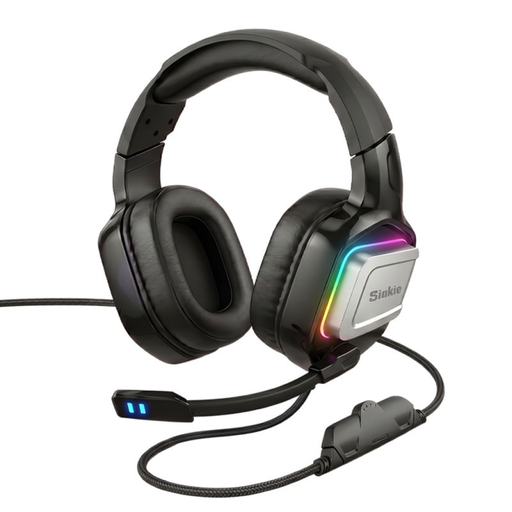
Why This Fits Their Persona: This model is aimed at entry-level users looking for a functional gaming experience without a large budget. It combines essential gaming features with broad compatibility for PC, PS5, and other consoles.
It sidesteps the pitfall of overpriced "virtual surround sound" by focusing on solid 50 mm drivers for a good stereo soundstage. The wired connection prevents latency and connectivity issues.
High flexibility thanks to dual USB and 3.5 mm connections. The over-ear design provides good passive noise isolation.
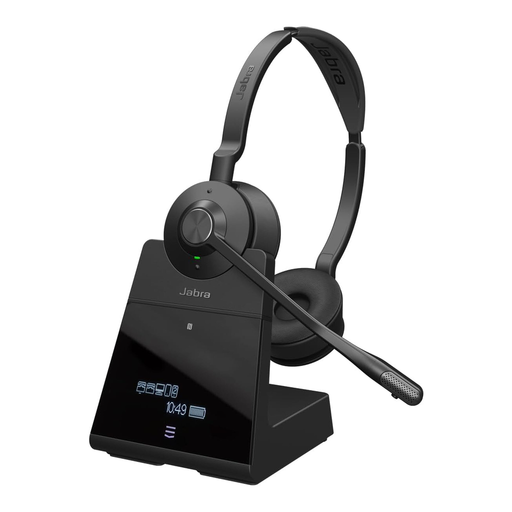
Why This Fits Their Persona: For professionals who depend on maximum reliability, freedom of movement, and call quality. Ideal for long days filled with conference calls in a potentially noisy environment.
It solves the problem of poor microphone quality with an advanced noise-cancelling microphone. Its DECT technology offers a far more stable connection and greater range (up to 150 m, according to the manufacturer) than conventional Bluetooth.
Professional DECT wireless technology for extended range and security. The lightweight design is engineered for all-day comfort.
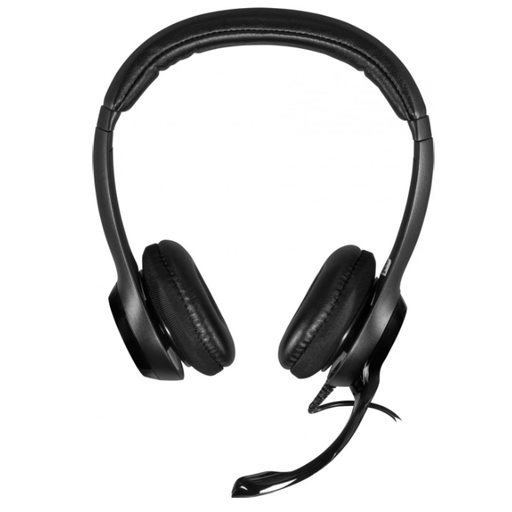
Why This Fits Their Persona: This headset is a pragmatic choice for users who need a straightforward, reliable tool for daily video conferences and calls in the office or home office.
It focuses on core functions: clear digital audio via USB and a noise-cancelling microphone. This actively avoids the pitfall of poor call quality without making you pay for unnecessary features.
Simple plug-and-play installation via USB-A. The in-line remote control allows for quick adjustments to volume and mute.
We have compiled a complete, real-time list of products that fully satisfy these strict selection criteria and UK safety regulations.
The lifespan of a headset depends heavily on its build quality, frequency of use, and how it's cared for. A solid model can last 3 to 5 years or even longer if handled well. For wired models, cable failure is a common weak point, while the battery life of wireless devices degrades over time. Look for a robust construction, flexible cables, and ideally, replaceable parts like earpads.
Neither connection type is universally "better"; it all depends on the use case. A USB Headset has its own integrated sound card, delivering consistent audio quality on any PC. This makes it a very reliable choice for a PC Headset in an office environment. A 3.5 mm jack is more universal and compatible with a wider range of devices, including consoles like the PS5. However, its sound quality can be influenced by the quality of the device's audio output.
It's important to distinguish between two types. A Noise Cancelling Headset with a microphone that filters out ambient sound is a worthwhile investment for anyone who regularly makes calls or participates in online meetings in a less-than-silent environment. It ensures professional communication. Active Noise Cancellation (ANC) for the earcups, which blocks out ambient noise for the wearer, is especially useful in loud open-plan offices or while travelling to improve focus, but it also increases the device's price.