If everyone taking part is in the room in person, you generally won’t need your own headset. If anyone is joining remotely, the right choice depends on whose voice needs to be transmitted and which audio device the meeting uses. If you’ll be doing most of the talking, a USB headset with an adjustable microphone that you’ve tested beforehand could be a good fit. If you also need to hear people in the room, consider a mono model. A headset microphone isn’t a substitute for a solution that can pick up several voices around the table.
Who can benefit from a headset?
Candidates speaking to someone remotely
If you’ll mainly be speaking to someone remotely using a computer, check your microphone and audio input before the interview. Microsoft Support explains how to check your audio settings in Teams, while Logitech lists volume and mute controls for the H390.
Candidates in a hybrid meeting room
If you need to hear both someone joining remotely and people in the room, keeping one ear free may matter more than having greater noise isolation. HP Deutschland and EPOS describe mono headsets as one option for situations like these.
Candidates using different devices
If you’re not sure which computer or ports you’ll be using, check that the headset’s connection matches the device and test your audio settings. Microsoft Support explains how to select a microphone and speaker in Teams.
What should you look for when buying?
First, check whether anyone will be joining remotely. Then consider how much you need to hear what’s happening in the room, which connection you need and how the microphone controls work.
| What matters |
What to check before buying |
Who should consider this? |
| Making your voice easy to understand |
Microphone boom and mute control; test your voice briefly using the conference software you’ll be using. |
If I’m speaking to someone remotely, I want my voice to come across clearly. Around 33% of consumers put clear voice transmission first. |
| The right connection |
Check that the computer’s port matches the specific headset variant; select the audio input beforehand. |
If I want to avoid surprises when using the intended device, I check the connection and audio settings in advance. Around 27% of consumers prioritise a suitable connection. |
| Awareness of the room |
If there are people in the room, consider a mono model; check how their voices will be transmitted to the person joining remotely. |
If I need to pay attention to both people around the table and someone joining remotely, I want to stay aware of what’s happening in the room. Around 20% of consumers prioritise being able to hear the room. |
| Fit and ease of use |
Try the fit of the headband and ear cushions, and check that the mute control is easy to reach. |
If I want to wear the headset comfortably during the conversation and mute the microphone quickly, ease of use matters to me. Around 20% of consumers prioritise fit and usability. |
Common buying mistakes
-
Assuming all noise cancellation does the same thing
Noise isolation around your ears affects what you hear, while microphone processing affects how your voice sounds to the person on the other end. One feature doesn’t automatically tell you how well the other works.
Check separately whether you need to hear the room and how your voice sounds through the microphone.
-
Ordering a similarly named connection variant without checking
Models and variants may differ in whether they use USB-A, USB-C or another connection. An adapter isn’t necessarily included with every version.
Check the full model variant and stated contents against the ports on the computer you plan to use.
-
Relying on the headset microphone alone when several people are in the room
Information about a personal headset microphone doesn’t prove that it will pick up everyone else around the table clearly.
Beforehand, check which microphone will pick up the other people’s voices and how they’ll be heard by the person joining remotely.
Brands to help you choose
Logitech
The H390 is a wired stereo USB headset for calls on a computer.
- Logitech lists an adjustable microphone boom and volume and mute controls.
- Check the specific connection variant: USB-A and USB-C aren’t directly interchangeable.
Jabra
The wired Evolve2 40 SE range includes stereo variants for calls where you’ll mainly be speaking to people remotely.
- Jabra lists three microphones and isolating ear cushions for the Evolve2 40 SE. UC and Teams versions are separate variants.
- Greater noise isolation can make it harder to hear people in the room.
HP Poly
The Blackwire 3300 range includes wired mono and stereo models, while the Voyager Focus 2 is a separate wireless stereo range.
- HP describes the Blackwire 3300 as having a flexible microphone boom and different wearing styles.
- According to HP, the 3.5 mm connection is available only on models 3315 and 3325. For the Voyager Focus 2, check the connection, battery and specific variant.
EPOS
The IMPACT 100 MS Mono USB-C+A is a wired mono model for situations where you want to keep one ear free.
- EPOS lists an included USB-C to USB-A adapter, in-line controls and a flexible microphone boom.
- Check that the specific variant is suitable for your device and preferred wearing style.
Headsets at Joybuy
The models below include wired stereo and mono headsets, as well as a wireless mono model for calls with people joining remotely.
 No image available
Logitech H540 stereo USB headset
For calls with people joining remotely, when you want to hear their audio through both ears.
The description lists a 2.4 m cable, an adjustable microphone boom, and volume and mute controls. It’s wired, which limits your freedom to move around.
View at Joybuy
 No image available
Logitech 960 stereo headset
A wired stereo option if you want to hear the remote conversation through both ear cups.
The description lists USB, a 2.4 m cable, an adjustable microphone boom and in-line controls with a mute function. The cable limits your freedom to move around.
View at Joybuy
 No image available
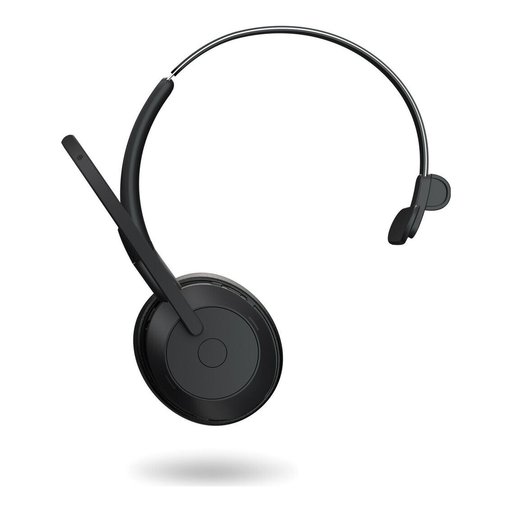
Jabra Evolve2 55 mono wireless headset
The mono design is worth considering if you want to hear someone joining remotely while staying aware of what’s happening in the room.
The description lists Bluetooth 5.2, USB-C wired use and an included USB-C adapter. Wireless use requires a charged battery and a configured connection.
View at Joybuy
 No image available
Logitech H570e mono headset
A wired mono model worth considering if you want to keep one ear free to hear what’s happening in the room.
The description lists USB-A, a boom microphone, and volume and mute controls with an LED indicator. The cable limits your freedom to move around.
View at Joybuy
 No image available
Jabra Evolve 20 SE mono headset USB-C/A
The mono design is worth considering if you want to stay aware of people in the room during a call with someone joining remotely.
The description lists USB-C and USB-A, an adjustable headband, and call and mute controls on the cable. As a wired model, it limits your freedom to move around.
View at Joybuy
Frequently asked questions
How do I test my headset before the interview?
Connect the specific variant to the computer you’ll be using, select the microphone and speaker in your conference software, and check the mute function. Microsoft Support explains how to make a test call in the Teams desktop app; according to Microsoft, this feature isn’t available in Teams for the web. For other services, use their built-in audio test.
Will my personal headset be enough if several people are speaking in the room?
Don’t assume it will work without checking: information about a personal headset microphone doesn’t prove that it will transmit other voices around the table clearly. Check beforehand which microphone will pick up those voices and how they’ll reach the person joining remotely.
What should I know about returns and faulty goods when shopping online as a private individual?
For a qualifying distance contract with a business seller, you generally have 14 days from delivery to cancel. Exceptions and possible return costs may apply. This is separate from your statutory rights if goods are faulty: EU consumer information states that you have at least two years from receipt to make a claim against the seller.
Can I record the job interview using my headset?
Owning a headset doesn’t give you the right to record the conversation. Section 201 of the German Criminal Code makes it a criminal offence to record another person’s non-public speech without authorisation. Don’t record the conversation unless you’ve confirmed that you’re entitled to do so. If you’re unsure, seek advice about your specific circumstances.


