What should you look for when buying?
First, check that the microphone and headphones can connect to your recording device. Then make a test recording with the fan running and consider how comfortable the headset feels during longer reading sessions.
| What matters |
What to check before buying |
Who is it important to? |
| Clear speech despite fan noise |
Check the microphone boom and its directionality; record a quiet sentence with the fan on and listen back. |
If I can’t turn off the fan, I want to check how clearly my voice comes through when I speak softly. Around 36% of consumers prioritise speech clarity despite fan noise. |
| The right connection |
Check the microphone input, headphone output and connector type on your recording device against the specific headset version; for the HS2, also check for plug-in power. |
If you want to record directly on a computer you already own, you’ll need a microphone connection and monitoring option that will actually work. Around 29% of consumers put device compatibility first. |
| Listening back to quiet passages and language changes |
Check whether the microphone and headphones can both be used with your planned device; record test passages in both languages. |
If I want to check quiet words and transitions between two languages before sharing the recording, I need a reliable way to listen back. Around 21% of consumers prioritise this kind of monitoring. |
| Comfort while reading aloud |
Consider the design, adjustability and ear cushions; check the fit during a longer session. |
When reading longer stories, I want to be able to focus without the fit becoming a distraction. Around 14% of consumers place particular importance on comfort. |
Wired USB headset
A good choice if: you’re recording on a computer with a compatible USB port and want to listen back through the same headset.
Trade-off: The models reviewed are mainly described as headsets for calls. Test how your quiet storytelling voice sounds with the fan in the background.
Broadcast headset with separate connections
A good choice if: you already use a compatible interface or mixer and can connect the microphone and headphones separately.
Trade-off: The Audio-Technica BPHS1 has separate microphone and headphone connections. Its cardioid microphone doesn’t guarantee that the fan will disappear from your recording.
Separate headset microphone
A good choice if: you’re looking for a microphone without built-in headphones and have a compatible input device, plus separate headphones if needed.
Trade-off: The RØDE HS2 picks up sound from all directions and needs plug-in power when connected to a 3.5 mm microphone input; it doesn’t offer the directional pickup pattern of a cardioid microphone.
Joybuy products for voice recording
Joybuy headsets for voice recording and listening back; check the connection and design of each model.
 No image available
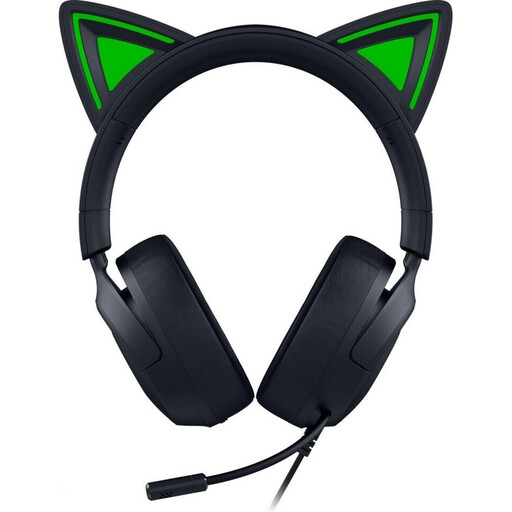
Razer Kraken Kitty V3 X, wired over-ear headset, black
Could be worth considering for directional voice recording if the fixed microphone position suits the way you sit.
The description lists a cardioid microphone, a 3.5 mm connection and headphones for monitoring.
The microphone is fixed in place, so its position depends on how the headset fits.
The listed weight is 270 g.
Joybuy
 No image available
JBL Quantum 400, wired over-ear headset
The product description lists a directional microphone with noise reduction. Test it with your fan before relying on it to pick up quiet speech clearly.
Listed features include USB-C and 3.5 mm connections, plus a flip-up boom microphone.
The description lists a lightweight headband and memory foam ear cushions.
Joybuy
 No image available
ONIKUMA GT889, wireless headset
The description lists a flexible, detachable microphone and over-ear headphones for monitoring.
Both wired and wireless connections are listed; check which one works with your recording device.
The product description lists a noise-reducing microphone, but this doesn’t guarantee a recording free from fan noise.
Joybuy
 No image available
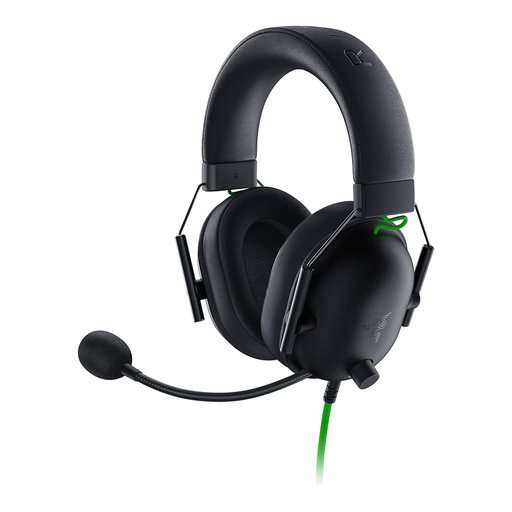
Razer BlackShark V2 X, wired headset
The description lists a flexible cardioid microphone and headphones; make a test recording to check whether your voice remains clear with the fan running.
The headset has a 3.5 mm connection and, according to the description, weighs 240 g.
For computers with separate audio and microphone sockets, the description says to use the Y-splitter for the microphone function.
Joybuy
 No image available
Logitech H151 stereo headset
Could suit storytellers looking for an adjustable microphone and headphones for monitoring.
The description lists a 3.5 mm connection, along with in-line volume and mute controls.
The microphone is described as adjustable and noise-reducing; the listed weight is 80 g.
You’ll need a compatible audio connection on the device you’re using.
Joybuy
Frequently asked questions
How can I tell whether the headset will record audio on my device?
Check the connector on the specific version against a suitable microphone input, not just the headphone socket. The Audio-Technica BPHS1 uses separate XLR and 6.3 mm connections; the RØDE HS2 needs plug-in power at its 3.5 mm microphone input. The Logitech H390 described here connects to a computer via USB-A.
How can I edit out constant fan noise after recording?
If the noise is steady, you can record a short section in Audacity with just the fan audible, then use it to create a noise profile. Audacity warns that noise reduction can produce disappointing results if the noise is loud, variable or very similar to speech.
What should I know about fit and returns after buying?
Check the fit and make a short recording on the device you plan to use. According to Germany’s Verbraucherzentrale, goods ordered online in Germany generally come with a 14-day right of withdrawal from the date the contract is concluded or the goods are received; you need to inform the retailer if you want to withdraw. Check the terms of your specific purchase.
Can I publish a story read aloud in two languages?
Not simply because you recorded the voice yourself. According to the German Patent and Trade Mark Office, both texts and translations can be protected works, and making a work available to the public is one of the rights of use. If the text or translation belongs to someone else and is protected, check what permissions you need before making the recording publicly available. Whether a specific work is protected or a particular use is permitted depends on the circumstances.


