What to consider when choosing
If you’re recording only your own voice, focus on microphone position and testing with the fan running. For a group discussion, the entire recording setup needs to work for everyone taking part.
| What you need |
What to check before buying |
Who it matters most to |
| Your voice, despite the fan |
Check the microphone boom and polar pattern; listen back to a test recording made with the fan running. |
If the fan has to stay on while I’m recording, I want my voice to sound clear and close, and to check the results in my own room. Around 36% of consumers put capturing their own voice clearly despite fan noise first. |
| Everyone’s voice in the discussion |
Decide how many people will be speaking, how many microphone inputs you need, and whether you want monitoring and separate tracks. |
If several people are discussing a book, I don’t want only my own voice to be recorded clearly. Around 29% of consumers prioritise clear recordings of several voices. |
| Connection and recording setup |
Compare the connection on the specific model with the input available; select and test the input device in your software. |
If you want to record on a computer without any fuss, it’s especially important that your headset, computer and software work together. Around 21% of consumers prioritise a simple, compatible computer connection. |
| Comfort and setup requirements |
Consider the headset design, any headphones you already have and any extra recording equipment you may need. |
For a longer discussion, I want the headset to be comfortable to wear and to know what else I’ll need to complete the recording setup. Around 14% of consumers prioritise comfort and a straightforward setup. |
Joybuy products at a glance
These products offer headset options for recording one voice on a computer. Check the connection and microphone performance with your own recording equipment and the fan running.
 No image available
JBL Quantum 360P over-ear wireless gaming headset, white
May suit recording one voice on a computer, provided the recording software recognises the connection as a microphone input.
It’s described as compatible with PCs and has a boom microphone. Bluetooth and a detachable 3.5 mm cable are listed; check which connection is right for your recording before you buy.
View at Joybuy
 No image available
Logitech H540
A USB option for recording one voice on a computer, as long as the headset works as an input device with your recording software.
A USB-A connection and an adjustable microphone are listed. The product description says it can be positioned close to your mouth; you’ll need to check how it handles the fan in your own room.
View at Joybuy
 No image available
Logitech 960 stereo headset
It may work for recording on a computer if the USB connection is compatible with your device and chosen recording software.
A USB connection, 2.4 m cable and adjustable microphone boom are listed. The product description also mentions volume and mute controls.
View at Joybuy
 No image available
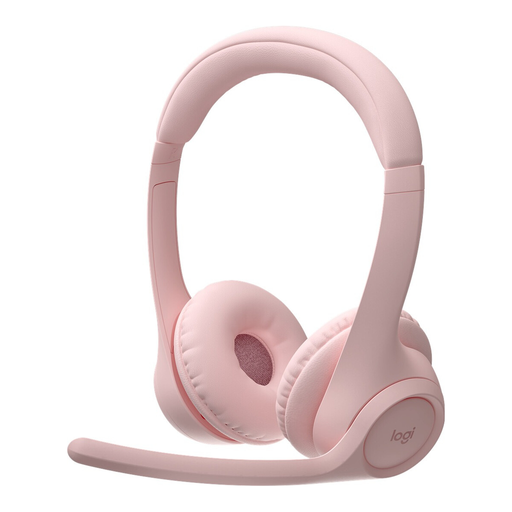
Logitech Zone 300 wireless Bluetooth headset, pink
May suit recording one voice if your recording device can use the Bluetooth connection as a microphone input; test this before your discussion.
Bluetooth multipoint for two devices and up to 16 hours of talk time are listed. The product description mentions two beamforming microphones; this does not prove they will reduce the specific fan noise in your setup.
View at Joybuy
 No image available
Logitech H151 stereo headset
An option for devices with a compatible 3.5 mm audio connection, provided their microphone input works with the headset connection.
The cable is described as having volume and mute controls. According to the product description, the adjustable microphone boom rotates through 180°; the stated noise cancellation does not prove that it will deliver a fan-free recording.
View at Joybuy
Frequently asked questions
Is one headset enough for the whole book discussion?
It may be enough to record the person wearing the headset at close range, but it won’t automatically pick up everyone else just as clearly. If you want to edit each voice separately, plan suitable microphones and inputs for everyone who’ll be speaking.
Can I simply connect an XLR headset or the RØDE HS2 to USB?
No, not without the right equipment. The Shure WH20XLR needs a suitable XLR microphone input; the Audio-Technica BPHS1 has separate connections for the microphone and headphones. The RØDE HS2 needs a compatible 3.5 mm microphone input with plug-in power.
Can I remove all the fan noise afterwards?
You shouldn’t rely on that. Audacity describes noise reduction for steady background sounds such as fans, but it’s still important to get the cleanest possible recording at the outset. Record a short sample with the fan running and some speech, then check the result before recording the whole discussion.
What return and warranty rights apply to online purchases?
For a distance contract covered by the rules, you generally have a 14-day right of withdrawal in the EU from the date of delivery; exceptions and details apply. Your Europe also explains the two-year minimum legal guarantee for goods, which is separate from a voluntary manufacturer’s warranty.
Am I allowed to record the other people in the discussion in Germany?
Not without permission: § 201 StGB makes unauthorised recording of another person’s non-public speech a criminal offence. Make sure everyone involved has agreed to the recording before you start; this provision does not automatically answer every question about later publication or the processing of personal data.


