What should you look for when buying?
Wired gaming headset
A good fit if: You want to use headphones and a microphone together and get started without a separate XLR recording setup.
Things to consider: Connections and microphone performance vary by model; gaming or chat features don’t prove that a headset will capture a natural-sounding voice.
Broadcast headset
A good fit if: You want to combine a positionable speech microphone with headphones, and have a compatible XLR input or audio interface.
Things to consider: The standard BPHS1 has separate XLR and 6.3 mm jack connections; it isn’t a direct USB replacement.
Standalone headset microphone
A good fit if: You want to keep your existing headphones and use a microphone that moves with you.
Things to consider: The RØDE HS2 needs a 3.5 mm microphone input with plug-in power; headphones aren’t included.
Wireless gaming headset
A good fit if: You want the freedom to move while listening and speaking.
Things to consider: Check that it connects to your recording platform and listen to the recorded microphone track. COMPUTER BILD describes the Sony INZONE H9 II’s microphone sound on PS5 as thin and tinny.
The percentages refer to consumers choosing a headset microphone for a softly spoken character voice. Each person is assigned to the concern that matters most to them when choosing.
| Priority |
What to check when buying |
Who is most concerned? |
| Recording a quiet voice clearly |
Record and listen back to both quiet and louder passages, and check the levels. |
When I record a softly spoken character voice, I want to be able to assess it clearly in louder passages too. Around 36% of consumers put clarity in quiet passages first. |
| Reducing room and background noise |
Record a speech sample and a pause in the room you’ll actually use; compare microphone placement and sources of noise. |
If I’m recording with fan or keyboard noise, I want to hear how noticeable it is during pauses and quiet passages. For around 29% of consumers, reducing room and background noise is the main priority. |
| Connecting the microphone and headphones |
Check the microphone and headphone connections, as well as any power requirements, against the inputs on your PC or audio interface. |
If I want to keep using my existing PC or audio interface setup, the microphone and headphone connections need to be compatible. That’s why around 21% of consumers prioritise device connectivity. |
| Comfort during longer recording sessions |
Check the fit and microphone position for the length of session you have planned; if you’re buying a standalone microphone, plan for headphones separately. |
For longer takes, I want to sit comfortably and monitor my voice; a standalone microphone doesn’t come with headphones. Around 14% of consumers put wearing and monitoring comfort first. |
Joybuy products
The Joybuy models below include wired and wireless gaming headsets with boom microphones. Before buying, compare the connection type, microphone features and compatibility with your recording device.
 No image available
JBL Quantum 360P wireless gaming headset, White
For anyone looking for a gaming headset with a boom microphone and several connection options.
The product details list a directional flip-up microphone with echo cancellation, Bluetooth 5 and a detachable 3.5 mm cable. Battery life is listed as 22 hours.
View at Joybuy
 No image available
ONIKUMA GT889 wireless gaming headset
For anyone considering a flexible, detachable microphone and a choice of connection types.
The product details list 2.4 GHz wireless, Bluetooth and a wired connection. They also specify 50 mm drivers and a noise-cancelling microphone.
View at Joybuy
 No image available
Razer Barracuda wireless multiplatform headset
For anyone considering a headset for gaming and mobile devices who wants to check the microphone processing before recording.
The product details list integrated beamforming microphones with adjustable noise cancellation, SmartSwitch Dual Wireless, USB-C and 50 mm drivers.
View at Joybuy
 No image available
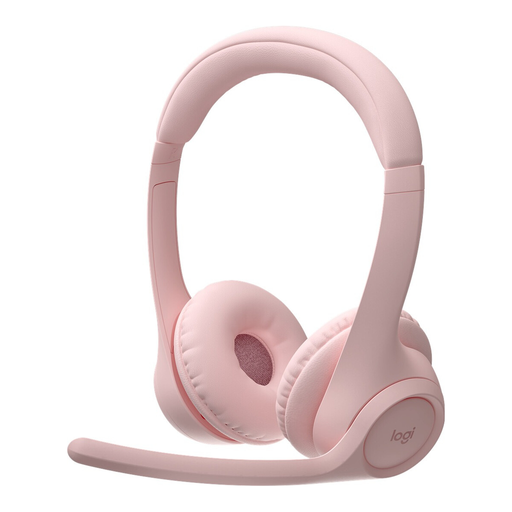
Logitech Zone 300 Wireless Bluetooth Headset, Pink
For anyone comparing lightweight wireless headsets with a microphone on an extendable boom.
The product details specify a weight of 122 g, two beamforming microphones, Bluetooth multipoint and a flip-up microphone boom.
View at Joybuy
 No image available
Siukie CH25 wired gaming headset
For anyone looking for a wired gaming headset with listed USB and 3.5 mm connections.
The product details describe the microphone as unidirectional and noise-cancelling. Check which connection is compatible with your recording device.
View at Joybuy
Frequently asked questions
How should I set up my headset for a softly spoken test recording?
Select the microphone you want to use in your recording software, then record your usual quiet voice as well as some louder character lines. Audacity recommends checking the level before recording and lowering it if the signal is clipping. Then listen back to the saved track.
Can I record an XLR broadcast headset directly through a USB port?
You’ll need a compatible audio interface to connect an XLR microphone to USB. The standard BPHS1 also has a separate 6.3 mm headphone plug, so check both connections and make sure they’re compatible with your existing equipment.
Will noise reduction help if my quiet voice gets lost in the room?
Noise reduction can help with certain consistent sounds, but it can’t replace recording in an environment with as little unwanted noise as possible. Audacity recommends reducing noise sources beforehand; a test in the room you’ll actually use will show you how your voice and background noise sound in the recording.
What are my rights when buying a headset online from a business seller?
For qualifying distance purchases, the European Union’s consumer portal states that you generally have 14 days from delivery to withdraw from the contract, and explains the exceptions and any return costs that may apply. You’re also entitled to a legal guarantee of at least two years for faulty goods; this is separate from any voluntary manufacturer’s warranty.
Can I record a private conversation between other people while recording my character voice?
Not without authorisation: Section 201(1) of the German Criminal Code makes it a criminal offence to record another person’s privately spoken words without authorisation. This provision doesn’t give a blanket answer to questions about publishing a character voice you’ve recorded yourself or the rights to a particular game character.


