What should you look for when choosing?
For a lively course introduction, shoppers are likely to choose a headset based on what matters most to them. The approximate percentages refer to this specific recording situation.
| Priority |
What to check before buying |
Who is this particularly important for? |
| Vocal nuance |
Microphone boom and side position; make a test recording of an emphatic passage. |
If I want to record emphasis and changes in volume clearly, I pay attention to position and level. Around 33% of consumers are likely to prioritise vocal nuance. |
| Easy connection |
Check that the plug and connection type are compatible with your computer and existing recording and headphone setup. |
If I want to record on a computer without a separate XLR audio interface, I check the USB connection and monitoring setup. Around 27% of consumers are likely to prioritise an easy computer connection. |
| Freedom of movement |
Check the fit, cable routing and microphone distance as you move your head; consider wireless only if you have a compatible system. |
If I want to gesture and move my head while presenting, a hands-free microphone that stays at a consistent distance is important to me. Around 20% of consumers are likely to prioritise freedom of movement. |
| Background noise |
Listen to a recording made in the actual room; don’t confuse microphone noise reduction with headphone isolation. |
If I’m recording in a noisy environment, I want to check how clear the speech is without assuming the voice will sound unchanged. Around 20% of consumers are likely to see background noise as a key concern. |
DPA Microphones notes that a microphone close to your mouth can pick up plosives and breathing sounds. A cardioid polar pattern can reduce sound from outside the direction you’re speaking into, but it is sensitive to position and distance. For the level test described, Audacity recommends a peak of around −6 dB; if the recording clips, lower the recording level.
Joybuy products for hands-free speaking
The following Joybuy picks are headsets or earphones with a microphone for hands-free speaking. Check that the connection and recording sound suit your computer and speaking style.
 No image available
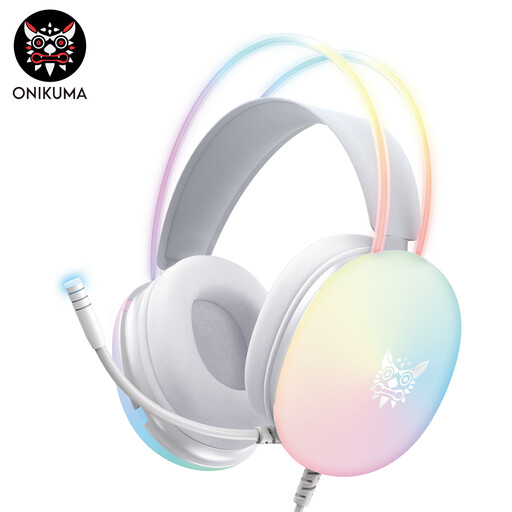
ONIKUMA GT889 gaming headset
The product title lists a microphone for hands-free speaking; make a test recording to check whether your voice sounds natural when you add emphasis.
The title lists both wireless 2.4 GHz and wired modes, as well as 50 mm drivers.
View at Joybuy
 No image available
Siukie CH25 gaming headset, pink
If you’re looking for a headset for hands-free speaking, check that the microphone connection is compatible with your recording device before you buy.
The title lists a wired over-ear headset with a microphone, 50 mm drivers, USB and a 3.5 mm jack. According to the product description, USB is for RGB lighting; the audio connection is the 3.5 mm jack.
View at Joybuy
 No image available
Siukie H100 gaming headset
For computer recording, this wired headset is an option if its listed connection suits your device; make a test recording to hear how it handles expressive speech.
The product title lists USB and a 3.5 mm jack. Check which connection carries the microphone signal to your recording device.
View at Joybuy
 No image available
Siukie L200 gaming headset
If you want to keep your hands free while speaking, check the microphone connection and listen to a test recording made in your usual recording environment.
The title lists a wired over-ear headset with 50 mm drivers, USB and a 3.5 mm jack.
View at Joybuy
 No image available
ONIKUMA X25 gaming earphones with microphone
These earphones are an option if you want to keep your hands free while speaking and don’t want over-ear headphones. Check the fit and microphone recording sound before you start recording.
The title lists a wired 3.5 mm audio connection. According to the product description, USB is for lighting only.
View at Joybuy
Frequently asked questions
How should I position the microphone for a lively introduction?
Position the capsule to the side, outside the direct path of your breath, and test emphatic words and plosive sounds. DPA Microphones describes a consistent distance as an advantage of a properly fitted headset, while also noting that speaking and breathing can cause wind noise.
How can I prevent distortion if I suddenly speak more loudly?
Make a test recording of the loudest passage you plan to deliver and check the level. The Audacity guide recommends a peak of around −6 dB for the test it describes and advises lowering the level if the recording clips; this is general recording advice, not a product feature.
Will I need extra equipment for an XLR headset?
For connecting an XLR microphone to a computer, Audacity describes using an XLR-to-USB audio interface. The Audio-Technica BPHS1 also has a separate 6.3 mm headphone connection. So check both signal paths and the connections on your recording device.
Can I use a wireless headband microphone in Germany without checking the frequency?
You can’t determine whether a system is permitted simply from the label ‘wireless microphone’. In its general frequency allocation Vfg. 37/2026, the Bundesnetzagentur lists frequency bands with technical and operational conditions. Check the frequency band used by the specific system against the applicable conditions; this doesn’t apply to every wired or USB headset.
What are my rights when buying online in Germany if I want to return an item or it’s faulty?
According to Verbraucherzentrale, consumers who buy online generally have a 14-day right to cancel; exceptions and the specific contract should be taken into account. Your statutory rights against the seller for faulty goods are separate from any voluntary guarantee.


