What should you look for?
Wired USB headset
Suitable if: you’re recording on a PC or Mac and want to connect a microphone and headphones without a separate XLR interface.
Things to consider: the USB connector, microphone position and mute controls need to suit your setup. Features designed for calls do not automatically guarantee good sound in a saved recording.
Separate XLR headworn microphone
Suitable if: you have a compatible XLR audio interface and want to wear a microphone on your head without needing headphones built into it.
Things to consider: you’ll need a suitable interface to record on a computer. Shure says the dynamic WH20 capsule does not require phantom power, but that does not mean it connects directly to USB.
First, make sure the connection works with your recording equipment. Then consider microphone position, ease of use and how a test recording sounds when you listen back.
For someone recording while seated, the choice comes down to four practical questions: does your voice sound clear in the room, is the connection straightforward, is there distracting background noise, and will the headset remain comfortable during longer use?
| Priority |
What to check before buying |
Who should consider this? |
| Clear speech |
Position the microphone boom, select the input in your software and listen to a test recording; adjust the recording level if the sound is distorted. |
If I want the story to be easy to understand later, I want to hear my own voice first. Around 36% of consumers put speech clarity first. |
| Easy connection |
Check that the USB-A, USB-C or other connector works with your computer and headset; test the mute function before you start. |
If you want to record on a computer without an additional interface, a compatible connection and simple controls are the main things to look for. Around 29% of consumers prioritise a straightforward recording setup. |
| Room noise |
If there are familiar sources of noise, record a short passage and listen to it through headphones rather than relying on product descriptions alone. |
If there’s background noise in the room, I want to know how it actually sounds in the saved recording. Around 21% of consumers focus on room noise. |
| Comfort |
Check how the headband and ear pads fit you, and consider whether you’ll need to wear headphones while recording. |
For a longer recording, I want the microphone to be comfortable to wear and to decide whether built-in headphones would be useful to me. Around 14% of consumers prioritise comfort. |
Joybuy products for computer recording
This selection includes wired USB and 3.5 mm headsets, as well as a wireless Bluetooth headset for computer recording. The right connection depends on the inputs available and how much freedom of movement you want.
 No image available
Logitech H540 USB headset with microphone, stereo
This could suit computer recording if you have a USB-A port.
The microphone is described as adjustable and noise-cancelling. You can control the volume and mute the microphone on the headset.
Joybuy
 No image available
Logitech 960 stereo headset with microphone, USB
This could suit seated computer recording if you want a wired USB headset with built-in controls.
The description lists a 2.4 m cable, plus volume and mute controls.
Joybuy
 No image available
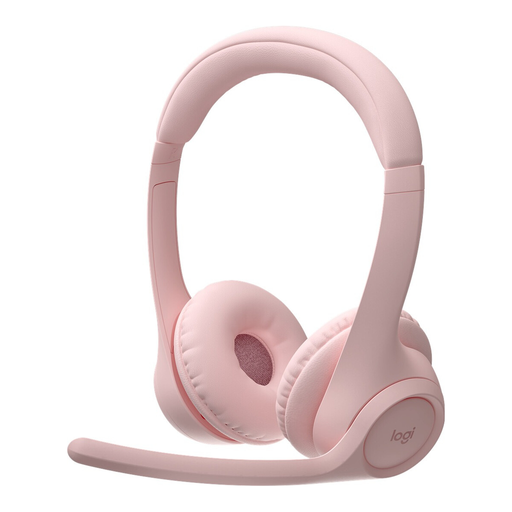
Logitech Zone 300 wireless Bluetooth headset, pink
This is a wireless option for computer recording if Bluetooth connectivity and freedom of movement suit your setup.
The description lists two beamforming microphones and a flip-up microphone boom with a mute function. The headset needs to be charged and connected via Bluetooth.
Joybuy
 No image available
Logitech H151 stereo headset, 3.5 mm connector
This could be suitable if your computer has a compatible 3.5 mm audio port and you want a wired headset.
The microphone is adjustable, and the description also lists inline volume control and a mute switch. Check that the connector is compatible with your device.
Joybuy
 No image available
Siukie CH25 gaming headset, USB and 3.5 mm, blue LED
This could work for PC recording if the listed wired connectors are compatible with your computer.
The product name lists a 50 mm driver and an over-ear headset with USB and 3.5 mm connectors. The description specifies a unidirectional microphone.
Joybuy
Frequently asked questions
How do I set up the headset for my audio message?
Connect the headset using a connection that’s compatible with your computer, then select the headset microphone as the input in your recording software. Make a short test recording and listen to it. If the sound is distorted, lower the level or adjust the microphone position.
How should I save the finished voice message?
After recording, export a finished audio file and check that it will play on the recipient’s device. The Audacity guide recommends exporting a mono recording as mono; keeping a separate archive copy may also be useful.
Do I need to buy anything besides the headset?
You don’t need a separate XLR-to-USB interface to connect a USB headset to your computer, provided the USB connector is compatible. An XLR headworn microphone, on the other hand, needs a suitable audio interface for computer recording.
What should I know about faults or online returns in Germany?
Your statutory rights against the seller are separate from any voluntary guarantee. Online purchases of goods generally come with a 14-day right to cancel; the Verbraucherzentrale explains the conditions and possible exceptions.
Can I secretly record other people for the family message?
Section 201 of the German Criminal Code (StGB) covers the unauthorised recording of another person’s private speech. This applies to other people who are recorded, not simply to recording your own words. Get the other person’s agreement before recording them.


