Families with a softly spoken storyteller
If the storyteller speaks quietly or changes their head position, a comfortable fit and an easily adjustable microphone boom are key.


For softly spoken stories, being able to position the microphone boom correctly is an important factor to consider. A quick test at the actual recording location will show whether the voice comes through clearly. A headset worn by the storyteller won’t automatically pick up other family members just as clearly, so you’ll need to plan separately for additional voices. Choose a connection that suits your recording device, and make sure you have permission before recording private conversations.
If the storyteller speaks quietly or changes their head position, a comfortable fit and an easily adjustable microphone boom are key.
If you’d also like to capture questions and contributions from other people, make sure you plan specifically for recording additional voices.
If you already have a computer, recorder or audio interface, check that USB, TRRS, and separate microphone and headphone connections match the available inputs.
First decide whether you want to record just the storyteller or several voices. Then check that the microphone position and connection suit your recording device.
| What you need | What to check before buying | Who will find this especially important? |
|---|---|---|
| Softly spoken main voice | Check the fit and adjustability of the microphone boom; record and listen back to a quiet passage at the recording location. | If I speak quietly, I want to be able to position the microphone boom so that it stays at roughly the same distance from my mouth as I speak. For around 36% of consumers, capturing a clear recording of a softly spoken main voice comes first. |
| Several voices | Decide whose voices you want to record, then run a test with everyone who will be speaking. | If I want to capture questions and contributions from my family too, I need a plan for voices beyond the person wearing the headset. Around 29% of consumers prioritise recording several people in a conversation. |
| The right connection | Check the exact model variant and compare its microphone and headphone connections with the inputs on your recording device. | If I want to keep using my existing equipment, the microphone and headphones both need to work with their respective inputs. For around 21% of consumers, compatibility with their equipment is the priority. |
| Comfort and monitoring | Try the fit for a realistic length of time; check whether the device supports microphone input and headphone output at the same time. | If I’m recording longer stories, I want to wear the headset comfortably and monitor the recording as I speak. Around 14% of consumers pay particular attention to extended wear and monitoring. |
Manufacturers’ claims about conversations or calls don’t automatically prove that a softly spoken family story will be captured clearly.
Position the microphone boom and listen to a short test using the actual voice at the intended recording location.
A microphone worn close to the head follows the person wearing it. That doesn’t mean it will be at the right distance from other people speaking in the room.
Decide in advance which voices matter and test the full conversation setup.
You may need an additional recording setup for other voices.
USB, TRRS, and separate XLR and headphone connections require different compatible inputs. BPHS1 variants can also have different connections.
Check the full model name and make sure both signal paths are compatible with your recording device.
Depending on the connection you choose, you may need additional compatible audio equipment.
The H390 is a computer headset offering a straightforward USB recording setup for one person.
The BPHS1 combines a broadcast headset with a microphone boom and separate connections.
The NTH-100M combines over-ear headphones with a detachable microphone boom.
The Evolve2 40 SE is designed for computer communications and listening. It may suit families who also want to use the headset for calls.
The SM35 is an option if you want a headworn microphone and prefer to choose your headphones and recording setup separately.
These Joybuy listings include wired USB and wireless headsets with a microphone for one person wearing the headset. Check the connection for each model and run a test before making a longer recording.
 No image available
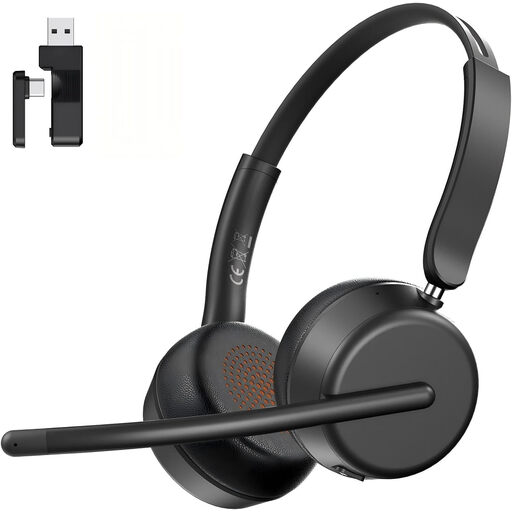
An option for one storyteller who wants a headset microphone and a choice of connection methods.
The listing specifies a 2.4 GHz USB dongle and a 3.5 mm cable connection. Check which connection works with your device before recording.
A rotating microphone boom is listed. Noise cancellation doesn’t prove that it will capture quiet archival recordings clearly.
 No image available
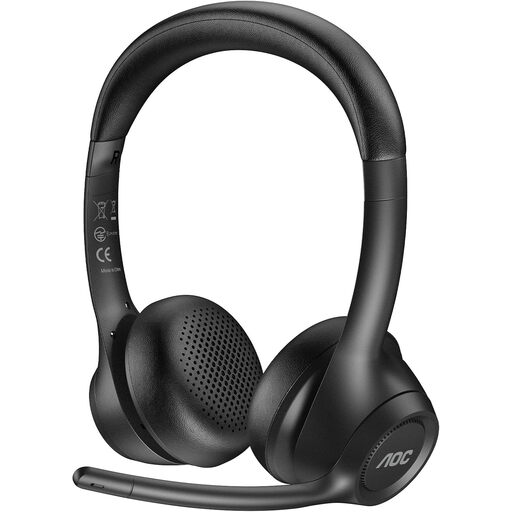
This headset may suit anyone who wants to record using a microphone boom connected to a computer or mobile device.
The listing specifies a USB-A/C dongle, Bluetooth 5.4 and a microphone boom that rotates by 270°.
The noise-cancellation claim is no substitute for testing it with a softly spoken voice at the recording location.
 No image available
For one person recording at a computer, the wired USB connection is a straightforward option.
The listing specifies an adjustable microphone boom, a 2.4 m cable and compatibility with PC, Mac and laptops.
Test whether it captures a softly spoken voice clearly before you start recording the story itself.
 No image available
This headset may suit someone who wants to record stories as well as handle professional computer calls.
The listing specifies DECT, a base station and a USB-C to USB-A cable. The microphone is described as being for calls, so test how well it captures a softly spoken voice separately.
 No image available
This wireless headset is an option for one person wearing it. Check that the available connections work with your recording device.
The listing specifies Bluetooth, Razer HyperSpeed Wireless and integrated beamforming microphones. The noise-cancellation claim alone doesn’t tell you whether it will make a good archival recording of a quiet story.
Position the microphone boom towards the storyteller and listen to a short test using their usual quiet speaking voice. A headworn microphone is more likely to keep a consistent distance from the mouth, but you’ll need to test whether the recording is clear.
Don’t assume it can without testing first. The microphone initially follows the person wearing the headset. If other voices are just as important, plan separately for extra microphones or a different setup.
Not without checking the connections on your recording device. The Audio-Technica BPHS1 has separate XLR microphone and 6.3 mm headphone connections. According to RØDE, the supplied TRRS cable is required for the microphone on the RØDE NTH-100M to work.
No. You can’t tell from a noise-cancellation claim alone. Run a test at the recording location using the actual voice, and listen to the recording before you capture the full story.
Not without authorisation: under Section 201(1)(1) of the German Criminal Code (StGB), recording another person’s privately spoken words without authorisation is a criminal offence. The Federal Ministry of Justice and the Federal Office of Justice include this provision in the text of the law. Make sure you have permission before recording.