Choose a headset whose microphone can be positioned close to your mouth and kept there consistently. Check for room echo by making a test recording in the spot where you’ll actually be speaking. Shure points out that a microphone cannot simply separate direct sound from reflected speech, so a directional microphone won’t automatically eliminate echo. Next, check whether USB, an analogue connection or separate microphone and headphone connections will work with your recording device.
Who is this selection relevant to?
Speakers recording in an echoey room
If you’re recording a film recap in a room with noticeable echo, first check whether moving the microphone closer or changing your speaking position makes a difference to the sound of the recording. Shure recommends positioning the microphone appropriately, but this won’t change the room’s acoustics.
Speakers using a computer
If you want to monitor your voice and the film audio through a headset, make sure the specific USB, TRRS or XLR connection matches your computer. Audio-Technica, RØDE and beyerdynamic offer different connections and variants.
Speakers using a recording interface
If you use separate microphone and headphone connections, check that the plugs on your chosen headset are compatible. A test recording also helps you adjust the microphone position and recording level to suit the way you speak.
What should you look for when buying?
All-in-one USB headset
A good fit if: you want to record on a compatible computer and monitor through the same headset, without setting up an XLR microphone input.
Bear in mind: Check the connection and the exact model variant. USB alone tells you nothing about room echo.
All-in-one analogue headset
A good fit if: your recording device has a suitable analogue microphone input and a monitoring output.
Bear in mind: The plug type and headphone socket don’t automatically mean the microphone will work too. The RØDE NTH-100M requires the supplied TRRS cable for this.
Broadcast headset with separate signal paths
A good fit if: you already have suitable recording equipment and want to connect the microphone and headphones separately.
Bear in mind: This isn’t a direct USB solution, and a directional capsule doesn’t guarantee an echo-free recording.
Headworn microphone with separate monitoring
A good fit if: you already own headphones and only need a microphone worn on your head.
Bear in mind: A standalone headworn microphone doesn’t include headphones, so you’ll need to arrange a suitable separate monitoring setup.
| Concern |
What to check when buying |
Who is this important to? |
| Less noticeable room echo |
Record a typical sentence in your intended speaking position, listen back and try changing the microphone or speaking position. Shure explains that a microphone can’t simply separate reflected speech from direct sound. |
If the echo is clearly audible in my film recap, I want to start by making a test recording to see whether moving the microphone closer or changing position helps. Around 42% of consumers are likely to put this concern first. |
| A connection that works with your device |
Check the full model name, microphone input, headphone output and any required cables against your device. Audio-Technica’s BPHS2a uses separate XLR and 6.3 mm plugs; the ATH-M50xSTS-USB is a distinct USB variant. |
If I want to record and monitor on my computer, I need every signal path to work so I don’t buy the wrong model variant. For around 25% of consumers, the connection is likely to be the main concern. |
| Monitoring the recording and levels |
Record a passage with some louder emphasis and listen back. If the audio is clipping, Audacity recommends lowering the recording level and repeating the test. |
If I switch between quieter and more emphatic passages in my recap, I want to monitor the recording and spot distortion in good time. This check is likely to be a priority for around 17% of consumers. |
| Set-up and replacement part requirements |
Check whether your recording set-up needs extra hardware and whether wear parts can be replaced on the specific model. Audio-Technica lists a detachable cable and replaceable earpads and headband for the BPHS2a. |
If I want to understand the effort involved beyond my first recording, I need to know whether accessories or suitable replacement parts are relevant to my model. Around 16% of consumers are likely to consider the overall requirements first. |
Common buying misconceptions
-
‘Directional’ doesn’t mean ‘echo-free’
A directional microphone won’t change the room’s acoustics. Shure explains that reflected speech can’t simply be separated from the direct sound you want to capture.
Listen to a test recording made in your intended speaking position. If needed, change the microphone or speaking position before deciding that a particular microphone feature is the solution.
If your device doesn’t have the necessary inputs, you may need suitable extra recording equipment.
-
A headworn microphone isn’t automatically a complete monitoring headset
The Shure WH20 is a headworn microphone without integrated headphones.
Before buying, decide whether you want to monitor through the same device while recording, and check your separate monitoring set-up.
If you don’t already have suitable headphones, you’ll need to arrange monitoring separately.
Brands worth considering
The following models illustrate different connection options and designs. The information relates to the product lines listed and shouldn’t be taken as a blanket recommendation of any brand.
Audio-Technica
The ATH-M50xSTS-USB and BPHS2a offer different set-ups: USB for a computer, or separate connections for a broadcast set-up.
- Audio-Technica says the BPHS2a has a dynamic hypercardioid microphone, an adjustable boom arm and a cable with XLR and 6.3 mm plugs.
- USB connectivity is available on the ATH-M50xSTS-USB variant. Neither USB nor a microphone’s polar pattern guarantees an echo-free recording.
RØDE
The NTH-100M combines headphones with a detachable boom microphone. RØDE says it’s also designed for voice and media production.
- RØDE’s instructions specify that the supplied TRRS cable is required for the microphone to work.
- Manufacturer claims about voice quality don’t measure the room echo in your home.
beyerdynamic
The MMX 300 PRO is a closed-back, wired headset with an analogue recording connection.
- beyerdynamic lists a back-electret condenser microphone with a cardioid polar pattern, as well as replaceable earpads, headband and cable.
- Its gaming focus and the manufacturer’s claims don’t prove that it’s particularly suitable for, or better at, recording film recaps.
Sennheiser
The HMD 300, item number 700315, is a broadcast alternative for speakers with compatible recording equipment.
- Sennheiser describes this variant as having a dynamic supercardioid boom microphone and closed earcups.
- Check the connections and what’s included with the specific variant on offer. Its polar pattern doesn’t guarantee echo reduction.
Shure
The WH20 is worth considering if you already have headphones and are looking for a separate headworn microphone.
- Shure’s instructions describe a dynamic cardioid headworn microphone with several connection variants, including the WH20XLR.
- The WH20 doesn’t include headphones, so it won’t replace a complete headset for monitoring.
Joybuy products for voice recording
This selection includes all-in-one USB and analogue headsets for test recordings on a computer. Check the connection for each product and listen to a recording made in your intended speaking position: none of the microphones listed will eliminate room echo by itself.
 No image available
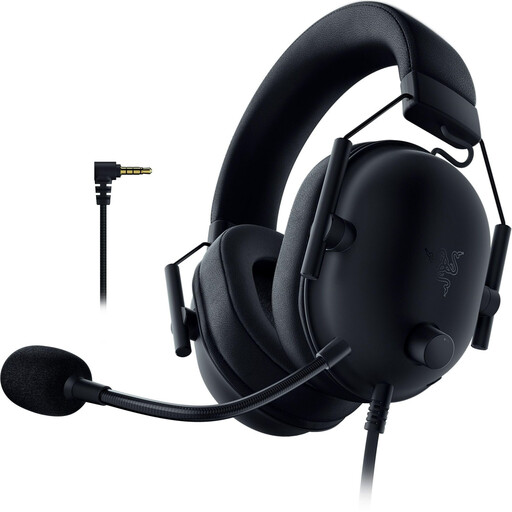
Razer BlackShark V2 X (PlayStation Licensed), wired, Black
The flexible microphone boom can be positioned close to your mouth for a test recording. Check that the analogue connection works with your recording device.
The headset has a cardioid microphone and a 3.5 mm connection. The product description says an additional adapter is required for Xbox.
View at Joybuy
 No image available
JBL Quantum 360P Over-Ear Wireless Gaming Headset
The headset has a microphone boom and headphone playback. Before recording your voice, check which of the listed connection options works with your device.
The product description lists Bluetooth and a detachable 3.5 mm cable, as well as compatibility with PC and Mac. It says that flipping up the microphone boom mutes the microphone.
View at Joybuy
 No image available
Logitech H540 USB headset
If your computer supports USB-A, this headset connects the microphone and headphones through the listed USB connection.
The product description lists an adjustable microphone boom and on-headset controls for volume and mute.
View at Joybuy
 No image available
Logitech H151 stereo headset
This analogue headset is suitable for a test recording if your device’s 3.5 mm connection works with both the microphone and monitoring path.
The product description lists an adjustable microphone boom, with volume and mute controls on the in-line remote.
View at Joybuy
 No image available
Logitech G PRO X gaming headset, Black, USB
The product description lists a detachable cardioid microphone and a USB sound card. Check that the connection works with your recording and monitoring set-up.
The product description says that a PC and Logitech G HUB software are required for the advanced Blue VO!CE features.
View at Joybuy
Frequently asked questions
Will a directional headset microphone alone reduce room echo?
No. Shure explains that a microphone can’t effectively separate direct sound from reflected speech or improve a room’s acoustics. Speak at a suitable distance, try changing the microphone or speaking position, and listen back to the test recording.
How do I check the recording level before making a film recap?
Record a short passage that includes your loudest emphasis and check it for clipping. Audacity recommends lowering the recording level and repeating the test if the audio is distorted.
Can I connect a broadcast headset directly to a laptop’s single headphone socket?
You can’t tell from the socket alone. The Audio-Technica BPHS2a has separate XLR and 6.3 mm plugs for the microphone and headphones. Check that both signal paths work with your computer or interface.
Can I record other people’s conversations?
Not without authorisation if the conversation involves other people’s non-public speech. Under § 201(1) of the German Criminal Code (StGB), recording such speech without authorisation is a criminal offence. The provision is published by the Federal Ministry of Justice and the Federal Office of Justice. Check that you have permission before recording these conversations.
Can I use film dialogue or clips in a published recap?
Not as a blanket rule. § 51 of the German Copyright Act (UrhG) permits quotations from published works only to the extent justified by the specific purpose of the quotation; § 23 of the UrhG covers the publication or exploitation of adaptations. Both provisions are published by the Federal Ministry of Justice and the Federal Office of Justice. Whether a particular use is permitted depends on the material used and how it is incorporated.


