Expressive storyteller
If you move your head and body as you speak, a headworn microphone or an adjustable microphone boom can help you position the mic to suit your posture.


For an engaging film presentation, an adjustable microphone boom or a well-fitting headworn microphone is a good starting point if you move around while speaking. If you’d like to monitor your voice as you record, consider a headset with built-in monitoring; otherwise, you can choose a separate headworn microphone. Before you buy, check that the connections and items included are compatible with your recording device, and test louder passages in a trial recording.
If you move your head and body as you speak, a headworn microphone or an adjustable microphone boom can help you position the mic to suit your posture.
If you want to monitor your recording through headphones as you speak, check that the headset and recording device support recording and monitoring at the same time through their available connections.
If background noise could be an issue, check the microphone’s pickup pattern and positioning separately from the headphones’ noise isolation. Neither feature is a substitute for making a test recording in your own room.
For a lively presentation, first check the fit and microphone position, then decide how you want to monitor your audio and finally check the connections on your recording device.
| What matters | What to check before buying | Who is this important to? |
|---|---|---|
| Microphone position when moving | Check the fit, adjustability and position when speaking normally and loudly. | If I gesture while telling a story, I need a microphone that can be positioned to suit me. Around 33% of consumers put freedom of movement first. |
| Monitoring while recording | Check that the headset and recording device support monitoring and recording at the same time through their available connections. | If I want to check my film summary as I record, being able to monitor the audio is essential. Around 27% of consumers would make monitoring a priority. |
| Handling room noise | Check the pickup pattern and position of the specific microphone; don’t confuse headphone isolation with microphone performance. | If there’s background noise in my room, I want to know how the microphone is positioned and what a test recording sounds like. Around 20% of consumers put handling room noise first. |
| Connections and items included | Check the model variant, microphone and headphone connections, and supplied cables against your computer or recorder. | If I want to record without needing extra connection solutions, the variant must be compatible with my device. Around 20% of consumers would prioritise ease of connection. |
Closed ear cups affect what you hear through the headphones. They don’t tell you how much room noise the microphone picks up.
Check the pickup pattern of the specific microphone and make a test recording in the environment where you’ll be recording.
Different variants of a headset can have different connection options. According to the manufacturer, the beyerdynamic DT 109 does not include a connection cable; the Shure SM35 also has different connection variants.
Check the full model name and what’s included against the inputs on your recording device. If needed, allow for a compatible cable or the required preamp.
A loud or dramatic passage can overload the input level and cause distortion. RØDE advises leaving headroom for volume peaks when setting levels.
Practise the loudest passage you plan to record and check the level through headphones.
The NTH-100M range combines a microphone with headphone monitoring; the NTH-Mic is described as a microphone for use with existing NTH-100 headphones.
The BPHS broadcast headsets combine a microphone with headphone monitoring; the BPHS2a is specified as having a dynamic hypercardioid capsule.
The WH20 and SM35 are headworn microphones for presenters who don’t need built-in headphone monitoring.
The HSD271 is described as a closed-back, over-ear headset for recording and video production.
The DT-109 series is designed as a closed-back, wired broadcast and intercom headset.
This selection includes wired and wireless headsets with microphones. Whether a model suits your film presentation depends, among other things, on the microphone position and its connection to your recording device.
 No image available
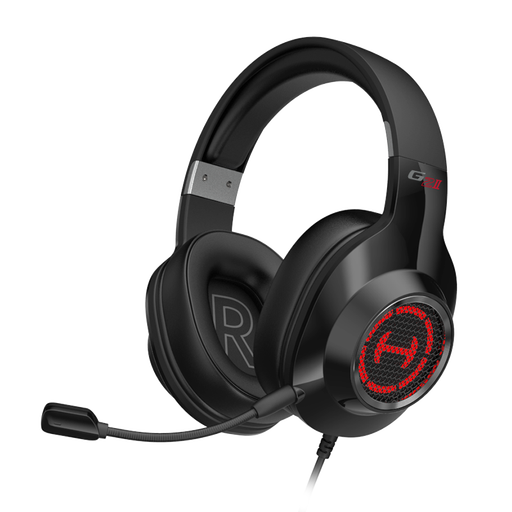
If you move your head as you present, the adjustable, detachable microphone may be useful; check that the connection is compatible with your recording device.
The product description lists 2.4 GHz wireless, Bluetooth 5.4 and wired operation.
 No image available
If you’re looking for a wired headset for voice communication, check that the USB connection is compatible with your recording device.
USB is listed as the connection; the description specifies a built-in microphone.
 No image available
If you’re looking for a particular microphone pickup pattern, the product description specifies a unidirectional microphone; test it in your own room.
The title lists USB and a 3.5 mm connection.
 No image available
If you want to adjust the microphone position, the description specifies an adjustable microphone boom; check that you can position it to suit the way you speak.
The title lists USB and a 3.5 mm connection; the description calls the microphone omnidirectional.
 No image available
If you want to reposition the microphone as you speak, the manufacturer describes a flexible boom microphone; check that the connection is compatible with your recording device.
The title lists USB and a 3.5 mm connection.
Practise the loudest passage you plan to record and set the input level so it doesn’t overload. In its general guide to XLR recording, RØDE recommends leaving headroom for volume peaks when setting levels and monitoring through headphones. This is the manufacturer’s advice, not a guaranteed setting for every headset.
It depends on the model and the connections on your recording device. The Audio-Technica BPHS2a has separate XLR and 6.3 mm plugs; the RØDE NTH-100M is listed with a TRRS cable and splitter. Check these connections against your computer or recorder before buying rather than assuming it has a USB connection.
According to the manufacturer, the beyerdynamic DT 109 does not include a connection cable. Audio-Technica describes the BPHS2a as having replaceable cables and ear pads; check which parts you need for the variant you choose and whether they’re available for your intended use.
There’s no blanket permission to do so. The German Patent and Trade Mark Office notes that films may be protected by copyright; § 51 UrhG permits quotations only where their extent is justified by the specific purpose of the quotation. Whether a particular use of images or audio is permitted depends on the material and how it is used.
As part of its market surveillance, the Federal Network Agency lists checks including the CE marking, manufacturer details and German-language instructions. The requirements for a specific wired or wireless model need to be checked against the product itself; a CE marking is not a sound-quality certification.