What should you look for when buying?
First, check that the microphone is compatible with your recording device. Then test its position and recording level with quiet and loud lines, as well as the sounds you’re likely to encounter where you record.
| What matters |
What to check |
Most important for |
| Voice at varying volumes |
Check that the boom is adjustable; record quiet and emphatic passages while moving your head. |
If I switch between quiet and emphatic lines, I want the microphone to stay in the right position without sitting directly in the airflow. Around 33% of consumers are likely to have this as their main concern. |
| The right connection |
Check the plugs, microphone input, headphone output and cables supplied with the exact version. |
If I want to record without needing extra equipment I hadn’t planned for, the signal path for the microphone and headphones must work with my device. Around 27% of consumers are likely to prioritise a straightforward connection. |
| Unwanted noise |
Make a test recording where you plan to record and listen for breath, plosives and background noise. |
If breath or room noise could affect my recording, I want to hear and assess it before recording the full commentary. Around 20% of consumers are likely to have this as their main concern. |
| Comfort and monitoring |
Check the fit, padding and adjustability, and whether headphones are included with the type you’ve chosen. |
If I’m recording longer takes, I want to be able to monitor comfortably or use my own headphones. Around 20% of consumers are likely to prioritise comfort and monitoring. |
Relevant brands and types
The information below relates to the specific product ranges and connections mentioned. A brand name alone doesn’t tell you whether a model is suitable for your recording device or your voice.
RØDE
The NTH-100M combines over-ear headphones with a detachable microphone boom. RØDE also positions the model for podcasting and media applications.
- RØDE describes an adjustable fit and a microphone position designed to help reduce plosives.
- According to RØDE, the supplied TRRS cable is required to use the microphone. The manufacturer’s information isn’t an independent listening test of your spoken-word recording.
Audio-Technica
The BPHS1 is a broadcast headset with closed-back headphones and a dynamic directional microphone, for setups with compatible separate audio connections.
- Audio-Technica specifies a microphone boom that can be positioned on either side, as well as replaceable cables and ear pads.
- The cable configuration described uses XLR for the microphone and 6.3 mm for the headphones, rather than a direct USB connection.
Logitech
The H390 connects its headphones and microphone to a computer via USB. Logitech describes it mainly as a headset for calls.
- Logitech specifies an in-line control and a positionable microphone.
- Information about using it for calls doesn’t tell you how quiet or emphatic lines of poetry will sound in a recording.
Shure
The WH20 is a standalone dynamic headworn microphone for use with compatible recording equipment and your choice of headphones.
- Shure describes an adjustable headband and a foam windscreen supplied in the box.
- The WH20XLR, WH20QTR and WH20TQG have different connections. Shure notes that the dynamic WH20 has a lower output level than condenser microphones.
beyerdynamic
The DT 297 PV MK II is a closed-back broadcast headset with a condenser microphone, designed for a suitably equipped recording setup.
- beyerdynamic specifies a flexible microphone boom and several versions.
- According to beyerdynamic, all DT 297 versions are supplied without a connection cable. Choose a cable that suits the specific version and your recording device.
Joybuy products for recording with a headset microphone
The options below are over-ear headphones or headsets with an integrated microphone. The product information doesn’t show how well these models record quiet and emphatic lines of poetry. Check that the microphone connects to your recording device and listen to a test recording.
 No image available
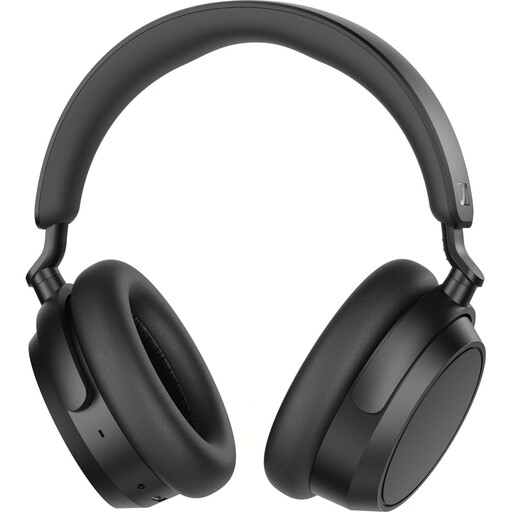
Sennheiser ACCENTUM Plus Wireless over-ear headphones
The integrated microphone and headphones combine both functions in one device. Check whether your recording device recognises the microphone as an input over your chosen connection.
Integrated microphone; detachable cable; Bluetooth 5.2 with aptX and Multipoint, according to the product title.
View at Joybuy
 No image available
JBL LIVE 770NC wireless noise-cancelling over-ear headphones, white
If you want to use the headphones and microphone in one device, check in advance that the connection you plan to use works with your recording device.
Over-ear headphones with a microphone; detachable audio cable connection, according to the product description.
View at Joybuy
 No image available
ONIKUMA GT889 wireless gaming headset
The product description specifies a flexible, detachable microphone and PC compatibility; still, test the recording function with your specific device.
Supports wireless and wired connections, according to the product description.
View at Joybuy
 No image available
Razer Barracuda wireless headset, black
This headset is described as a wireless option with an integrated microphone. Check the microphone connection and test a recording of your voice before using it to record a full commentary.
For gaming and mobile devices, according to the product title; USB-C is also mentioned in the product title.
View at Joybuy
 No image available
Siukie L200 wired over-ear headset
If you’re looking for a wired headset, check that the connections listed provide a compatible signal path to your recording device.
Flexible microphone, according to the product description; USB and 3.5 mm connections, according to the product title.
View at Joybuy
Frequently asked questions
How do I test a headset before recording a full poetry commentary?
Record the quietest and loudest planned passages as a test, then listen for breath, plosives and distortion. Audacity Support recommends aiming for peaks of around −6 dB on its own level meter. This is guidance for that software, not a general device specification.
Can I plug a broadcast headset straight into a USB port?
Not with the Audio-Technica BPHS1 version described here: the microphone cable ends in XLR, while the headphone cable ends in 6.3 mm. For XLR recording on a computer, you’ll need compatible audio equipment. Check the exact version and the complete signal path.
Do I need to plan for anything else with the beyerdynamic DT 297 PV MK II?
Yes. According to beyerdynamic, the DT 297 is supplied without a connection cable. Choose a cable that suits the specific 80- or 250-ohm version and the connections on your recording device.
Who should I contact about a fault after buying in Germany?
If there’s a fault, contact the seller: your statutory rights are separate from any voluntary manufacturer’s guarantee. The Verbraucherzentrale also explains that special rules may apply to purchase contracts entered into from 31 July 2026. The terms that apply to your specific contract are what matter.
Can I recite someone else’s poem in a review I publish?
There’s no one-size-fits-all answer. The German Patent and Trade Mark Office notes that poems may be protected by copyright and that their use can involve exploitation rights. Whether a specific use is permitted depends, among other things, on the text, any permission you may have and the applicable exceptions. Your choice of microphone doesn’t change this.


