What should you look for when buying?
Wired USB headset
Suitable if: you’re speaking at a computer and want headphones and a microphone in one device.
Keep in mind: You’ll need to check that the connector is right and that your voice is clear with the fan running on your own recording device.
XLR headworn microphone
Suitable if: you already have a suitable XLR microphone input and want to wear a separate microphone close to your mouth.
Keep in mind: The microphone and recording device form a separate signal chain; headphones aren’t automatically included.
Wireless headworn microphone
Suitable if: you need to move around while recording and can use a compatible wireless system.
Keep in mind: Check the complete connection and the conditions that apply to the frequency band used by the specific system.
| What you need |
What to look for when buying |
Who is this particularly important to? |
| A clear voice despite fan noise |
Position the microphone boom close to your mouth; record and listen back to quiet and loud sections with the fan running. |
If I’m recording a safety announcement, I want every word to be clear despite the fan. Around 36% of consumers put clarity first. |
| The right connector |
Check the connector on your recording device against the full model variant; for XLR, make sure you have a suitable microphone input. |
If I want to connect a microphone directly to my existing device, the right connection matters. Around 29% of consumers prioritise connectivity and a straightforward set-up. |
| Checking the recording |
Listen to a test recording and check for clipping; if you may use noise reduction, also record a section with only the fan noise. |
If I want to check the announcement beforehand, I need a process that lets me monitor the levels and clarity. Around 21% of consumers put being able to monitor the recording first. |
| Freedom of movement |
For wireless, check the microphone, transmitter and receiver as a complete system; check the frequency band and operating conditions for the specific variant. |
If I can’t stay by the recording device while speaking, a suitable wireless connection matters. Around 14% of consumers prioritise freedom of movement over a simple wired connection. |
Audacity explains how to reduce consistent noise, such as fan noise, but notes that noise reduction has its limits when unwanted sounds are loud or vary. That’s why a test recording with the fan running is still important; a filter is no substitute for checking how your voice sounds in the finished recording.
Headsets at Joybuy
The following Joybuy models are described as gaming headsets with microphones. If you’re considering one for a safety announcement, check that it connects to your recording device and make a test recording with the fan running to assess speech clarity.
 No image available
JBL Quantum 360P Over-Ear Wireless Gaming Headset
It may be suitable for recording on a computer if the connection works with your device; check speech clarity with fan noise by making a test recording.
The product title lists a microphone boom, Bluetooth 5, ANC and a 22h battery life. Compatible devices include PlayStation, PC, Mac and Switch.
Claims about the headphones’ noise cancellation don’t prove that the microphone will make a safety announcement clear.
Joybuy
 No image available
ONIKUMA GT889 Wireless Headband Headphones
You could consider this model for recording on a computer if the connection works with your device; test the microphone with the fan running where you plan to use it.
The product description lists a flexible, detachable microphone, 2.4 GHz wireless, Bluetooth 5.4 and a wired mode. Compatible devices include PC and Mac.
For wireless use, check that the required components are included and work together.
Joybuy
 No image available
Razer Barracuda Wireless Multiplatform Headset
If you’re considering this headset for a safety announcement, check that it connects to your recording device and make a test recording with fan noise to see how clear your voice sounds.
The description lists SmartSwitch Dual Wireless, Bluetooth and USB-C charging. It also specifies integrated beamforming microphones with adjustable noise cancellation and 50 mm drivers.
The product specifications are no substitute for checking speech clarity in your own recording set-up.
Joybuy
 No image available
Siukie CH25 Wired Over-Ear Gaming Headset
This wired model may be suitable if its connector works with your recording device; only a test recording will show whether your voice stays clear with the fan running.
The product title lists USB, a 3.5 mm connector and 50 mm drivers. The description mentions a flexible microphone and lists PC and several games consoles as compatible.
Describing the microphone as noise-cancelling doesn’t measure how clear your announcement will sound.
Joybuy
 No image available
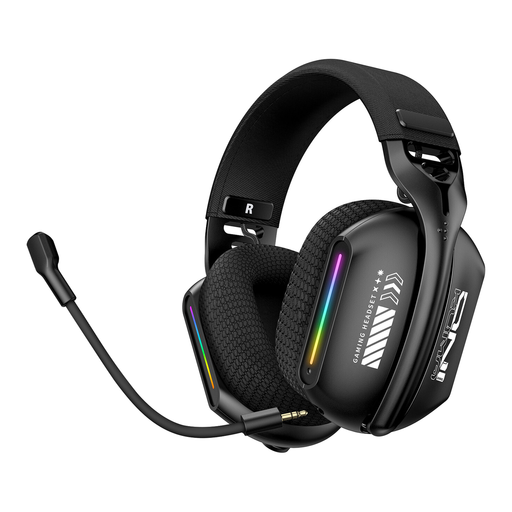
ONIKUMA GT808 RGB-Lit Triple-Mode Wireless Headset
You could consider this headset for recording on a computer if one of its connection types works with your recording device; test the microphone with the fan running.
The description lists 2.4 GHz wireless, Bluetooth 5.3 and wired operation. The microphone is described as rotatable through 360° and adjustable to different angles; PC and laptop are listed as compatible devices.
Before buying, check which connection you want to use and whether the necessary components are included.
Joybuy
Frequently asked questions
How can I check whether my announcement is clear despite the fan noise?
With the fan running, record a short section containing both quiet and loud sentences, then listen back to the file. Also check whether the recording is clipping. In its tutorial, Audacity gives around −6 dB as a target for this test process, not as a general setting for every device.
Can software remove the fan noise completely afterwards?
You shouldn’t rely on that. Audacity explains how to reduce steady noise, such as fan noise, and requires a section where only the unwanted sound can be heard. The result may still be unsatisfactory if the noise is very loud or varies.
Do I need extra equipment for an XLR headworn microphone?
To use the Shure WH20XLR, you need a suitable XLR microphone input in your recording set-up; this separate microphone doesn’t include headphones. Shure states that the dynamic WH20 capsule doesn’t require phantom power.
What should I check with a wireless headworn microphone?
The microphone, transmitter and receiver must work with the same system, and the frequency band must be suitable for the specific variant. In April 2026, the Bundesnetzagentur published an allocation setting out permitted frequency bands and operating conditions for wireless microphones; check the conditions for your chosen system.
Can I record other people’s conversations in the background in Germany?
Section 201 of the German Criminal Code (StGB) covers the unauthorised recording of another person’s non-public speech. Take care not to record other people’s conversations by mistake; permission to record your own announcement doesn’t automatically allow you to record other people.


