For a quiet solo recording, a lightweight headworn microphone with an omnidirectional polar pattern may be suitable. If there’s noise in the hall or sound coming from loudspeakers, a cardioid microphone may be a better choice, though it needs careful positioning. If you want to record directly on a computer and monitor the audio at the same time, you could choose a wired headset with a microphone and the right adapters. The key things to check are the actual input on your device, the power required and, for wireless systems, whether the frequency variant is suitable for your location.
Which headset microphone is right for you?
Speakers in a carnival hall
If you’re speaking to an audience while seated, consider noise in the hall, possible loudspeaker sound and the stage equipment available. DPA Microphones and Shure describe directional headsets as one option for these environments. The right connection and microphone position are still essential.
People recording on a computer
If you want to record your speech directly on a computer and monitor the audio at the same time, check its connections and the intended signal path. Audio-Technica describes the ATH-M20xSTS as a computer headset with a microphone and USB-A and USB-C adapters.
Speakers who want a discreet look
If a lightweight, discreet headband is important for a longer solo speech, compare the fit and the position of the microphone boom. Sennheiser lists a weight of 25 g and an adjustable neckband for the HSP Essential Omni; this doesn’t guarantee a comfortable fit for everyone.
What should you consider when choosing and connecting a headset?
First, decide whether you’ll be recording in a noisy hall or directly on a computer. Then check that the microphone’s polar pattern and connection are compatible with your existing equipment.
| What matters |
What should you look for? |
Who is this particularly relevant to? |
| Clarity in the hall |
If there’s an audience or sound from loudspeakers, check the cardioid pattern and microphone boom position; getting the direction right can take more care. A test recording in your actual seated position, with the sound system running, will help you assess the result. |
If I’m sitting in front of an audience, my voice needs to remain clear despite noise in the hall. Around 40% of consumers put clarity in the hall first. |
| Recording on a computer |
Check the microphone input and how you want to monitor the audio. For the Audio-Technica ATH-M20xSTS, check that the 3.5 mm TRRS connection and the supplied USB-A and USB-C adapters are compatible with your recording device. |
If I want to record directly on my computer and monitor the audio at the same time, the connection needs to work with my device. Around 30% of consumers prioritise recording directly on a computer. |
| Discreet fit |
Check the headband, cable routing and fit in your actual seated position. An omnidirectional microphone is less critical to position than a cardioid, but is more likely to pick up sound from other directions. |
If I’m looking for a discreet headband for a longer speech, fit and microphone position close to the mouth are important. Around 20% of consumers put discreet wear first. |
| Working with existing equipment |
Check the connector type, microphone input and power requirements against your specific equipment. For a wireless system, also check the frequency variant and the applicable German frequency allocation conditions. |
If I want to keep using my existing recording or wireless equipment, the microphone needs to work with that signal path. Around 10% of consumers prioritise compatibility with an existing system. |
Avoid common buying mistakes
-
“Headset” doesn’t automatically mean a USB connection
A stage headworn microphone with a TA4F connector and a computer headset with USB adapters are designed for different signal paths. A compatible bodypack transmitter or microphone input may be part of the recording chain.
Before you buy, check the input on your recording device and what’s included with the exact model. Shure lists a TA4F connector on the PGA31 for compatible bodypack transmitter systems; Audio-Technica describes the ATH-M20xSTS as having USB-A and USB-C adapters.
-
Don’t choose between omnidirectional and cardioid based on the label alone
An omnidirectional microphone is less critical to position, while a cardioid can reduce sound coming from outside its pickup direction. With a cardioid, take particular care with positioning and with breath and plosive sounds.
Choose the polar pattern to suit your recording environment and existing equipment. Make a test recording in your planned seated position, with the sound system running. Manufacturer information from DPA Microphones and Shure is no substitute for checking how it works in your setup.
-
Don’t buy a wireless headset without checking the frequency
A wireless headset needs a compatible signal path with a transmitter and receiver. The applicable conditions also depend on the frequency variant used; a general frequency allocation doesn’t guarantee interference-free use.
Check the exact band of the complete set against the applicable German regulations and the other wireless systems at the venue. Germany’s Federal Network Agency distinguishes between general frequency allocations and individually allocated frequency use.
Key brands at a glance
Shure
For this type of speech, the directional PGA31 for a compatible bodypack transmitter and the dynamic, wired WH20XLR are two different options to consider.
- Shure describes the PGA31’s cardioid pattern as suitable for reducing background noise.
- The PGA31 needs a compatible signal path with a TA4F connection. The XLR, jack and TA4F versions of the WH20 are not interchangeable.
- According to Shure, the dynamic capsule in the WH20XLR doesn’t need phantom power.
Sennheiser
The HSP Essential Omni is a headworn microphone with an omnidirectional polar pattern, suitable for a quiet solo speech if its connection and power requirements match your recording chain.
- Sennheiser lists an adjustable neckband and a weight of 25 g for this model.
- An omnidirectional microphone is less critical to position than a cardioid, but it doesn’t offer the same directionality for reducing sound from other directions. The stated weight doesn’t guarantee a comfortable fit for everyone.
DPA Microphones
The 4066 is a headworn microphone with an omnidirectional polar pattern and a modular adapter system.
- The adapter system offers different connection options to suit your recording chain.
- Before you buy, check which adapter and power supply you’ll need. The manufacturer’s information doesn’t establish an independent sound comparison or prove that it’s suitable for every hall.
Audio-Technica
The ATH-M20xSTS combines headphones with a cardioid microphone for recording on a computer.
- According to Audio-Technica, this model comes with a 3.5 mm TRRS cable and USB-A and USB-C adapters.
- The headphone design is different from a discreet stage headworn microphone. It doesn’t follow that the headset will work with an existing wireless system.
Joybuy products for recording speech at your computer
The selection below includes headsets with headphones for recording speech at your computer. Check the connection and microphone design for each model: a computer headset won’t automatically replace a stage headset with a compatible bodypack transmitter.
 No image available
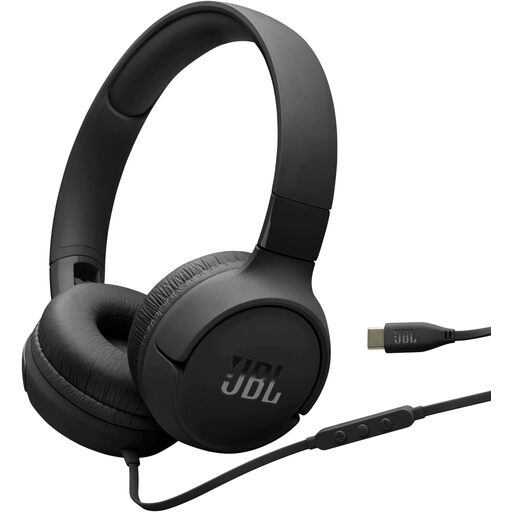
JBL Tune520C USB-C on-ear headphones
For recording while seated at a computer, if a wired headset with a microphone is compatible with your recording device.
USB-C connection and built-in microphone. The recording setup requires a compatible USB-C audio device.
View at Joybuy
 No image available
ONIKUMA GT889 wireless over-ear headset
For recording while seated at a computer, if you want an over-ear headset with a microphone and a compatible connection.
The product description lists a wired mode, a detachable microphone and PC compatibility. Its stated 2.4 GHz wireless connection uses a USB receiver, which needs to be compatible with your recording device.
View at Joybuy
 No image available
Razer Barracuda wireless multiplatform headset
For recording while seated at a computer, if an over-ear headset with built-in microphones is compatible with your intended recording setup.
The product description lists built-in beamforming microphones and compatibility with desktop PCs and laptops. The title mentions SmartSwitch Dual Wireless and USB-C; check that the connection you want works with your specific device.
View at Joybuy
 No image available
Siukie CH25 wired over-ear headset
For recording on a computer, if a wired over-ear headset with a microphone is compatible with your recording device’s input.
USB and 3.5 mm connections; the product description lists PC compatibility and describes the microphone as unidirectional.
View at Joybuy
 No image available
Siukie H100 wired headset
For recording while seated at a computer, if a wired headset with a microphone is compatible with your existing recording device.
USB and 3.5 mm connections. The product description lists PC compatibility and a boom microphone, which it describes as omnidirectional.
View at Joybuy
Frequently asked questions
Do I need a wireless system for a seated speech?
No, not just because you’re seated. If a cable to your recording device is practical, you won’t need to choose a wireless channel. Wireless may be worth considering if the venue’s cabling or the freedom of movement you need makes it necessary.
Where should the microphone capsule sit when I’m speaking?
Position it to the side of your mouth, not directly in the airflow. For the Sennheiser HSP 2, the instruction manual gives a model-specific distance of 2 to 3 cm from the corner of the mouth; this isn’t a general rule for other headsets. Then check the position in your actual seated speaking posture.
Can I connect a stage headset directly to my laptop via USB?
Not just because it’s called a “headset”. Shure’s PGA31 has a TA4F connector for compatible bodypack transmitter systems; Audio-Technica’s computer recording setup for the ATH-M20xSTS includes USB-A and USB-C adapters. The input, power supply and any additional equipment you need must be compatible with the specific model.
Do I need to register a wireless microphone in Germany?
For use under a relevant general frequency allocation and in line with its technical conditions, Germany’s Federal Network Agency says registration isn’t required. This doesn’t apply to every frequency or device variant; individual or short-term allocations may be required for other uses. Check the specific band and applicable regulations before use.
How can I check whether a headset is compatible with my recording device?
Before you buy, compare the headset’s connection and required signal path with your existing device. A TA4F headset such as Shure’s PGA31 is designed for a compatible bodypack transmitter; for a computer headset, check that its USB or jack connection and supplied adapters will work with your computer.


