For recording stories with a fan running, start with a microphone that stays close to your mouth and can be positioned as needed. Shure says that keeping it in a consistent position can help, but this does not guarantee a recording free from unwanted noise. Next, choose a recording setup that suits your device: a separate headset microphone, a complete analogue headset or a PC headset with voice filters. The Audacity Manual explains that steady fan noise can be reduced afterwards, but very loud or changing noise can be difficult to remove satisfactorily.
Which recording setup is right for you?
Storytellers recording with a fan running
If the fan needs to stay on while you record, keeping the microphone in a consistent position close to your mouth is important. Shure offers positioning guidance, but you should check how it sounds in your own room.
Storytellers focused on voice quality
If you want to control quiet passages and regional pronunciation, compare test recordings with and without voice filters. The sound and filter features described are claims made by the respective manufacturers, not the results of an independent fairy-tale recording test.
Storytellers who already have recording equipment
If you already use a computer, recorder or interface, check the microphone input, the cable you need and whether any extra equipment is required before you buy. Shure and RØDE specify different connection requirements for different models.
What should you look for when choosing?
Directional headset microphone with a separate recording setup
A good fit if: You want a consistent speaking position and already have, or are planning to get, the right recording setup. The Shure SM35 is available in different versions, including TA4F and XLR.
Bear in mind: The SM35 is a microphone without integrated headphones; the connection and any extra equipment you need depend on the version. Shure describes it as having a cardioid polar pattern, but this does not prove how well it will reduce fan noise in your recording room.
Complete analogue headset
A good fit if: You want a wired device with both a microphone and headphones, so you can monitor your voice while recording. beyerdynamic lists a cardioid microphone for the MMX 300 PRO; RØDE requires the supplied TRRS cable to use the NTH-100M microphone.
Bear in mind: Your recording device’s microphone input and connector wiring need to be compatible. Closed ear cups affect what you hear while monitoring; they do not prove that fan noise will disappear from the microphone recording.
PC headset with voice processing
A good fit if: You record on a PC and want to use voice filters. Logitech lists noise reduction, compression and a de-esser as part of BLUE VO!CE.
Bear in mind: According to Logitech, the advanced features require a PC and G HUB. Compare the filtered and unprocessed recordings, paying particular attention to quiet words and regional sounds.
| Priority |
What to check before buying |
Who is it important to? |
| Fan noise |
Check the microphone position, polar pattern and windscreen; make a test recording with the fan running. |
If the fan needs to be on while I read aloud, I want quiet words to remain clear and the microphone to sit close to my mouth. That’s why around 36% of consumers put voice clarity ahead of fan noise. |
| Voice quality |
Record the same passage unprocessed and with a filter; compare quiet syllables and pronunciation. |
When I tell stories with regional pronunciation and quiet passages, I want to be able to control how my voice sounds. Around 29% of consumers prioritise a natural-sounding voice for this reason. |
| Connection |
Check the microphone input, cable wiring and any extra equipment needed for the specific model. |
I want to connect my existing recording equipment without having to guess which signal path I need. That’s why around 21% of consumers put compatibility with a computer, recorder or interface first. |
| Comfort |
Check the headband, ear pads and adjustability; if needed, look for replacement parts for the exact model. |
When recording a longer story, I want my headset to feel comfortable and the microphone to stay in position. Around 14% of consumers prioritise a comfortable fit for longer recordings. |
Which buying mistakes should you avoid?
-
Confusing closed-back headphones with fan-noise reduction in the recording
The design of the ear cups does not directly tell you what the microphone will pick up. Noise reduction applied afterwards also has its limits.
Judge a short microphone recording made with the fan running, rather than relying only on how isolated you feel while monitoring.
If necessary, allow time for extra test recordings and post-production.
-
Assuming the Shure SM35 is a complete headset with headphones
The SM35 is a wearable microphone without integrated ear cups. The TA4F and XLR versions have different connection requirements.
Check the exact version and what’s included against your recording equipment; plan to use separate headphones if needed.
Depending on the version, you may also need a compatible transmitter, preamp or another recording setup.
-
Assuming ‘noise reduction’ guarantees natural-sounding storytelling
Manufacturers’ claims about filters do not tell you how quiet words or regional pronunciation will sound in your room. Audacity notes that very loud or changing noise can be difficult to remove.
Compare quiet and loud passages with and without processing, and keep the unprocessed recording for now.
Which brands are worth considering for this type of recording?
Shure
The SM35 is aimed at storytellers who want to use a wearable microphone with a recording setup chosen separately.
- Shure lists a cardioid polar pattern, flexible headband and windscreen.
- The SM35 does not include headphones. TA4F and XLR require different connection setups, and there is no evidence here of how well it reduces fan noise in a particular room.
beyerdynamic
The MMX 300 PRO is a wired all-in-one headset for recording and monitoring.
- The product specifications list a closed-back headset, a cardioid condenser microphone, and replaceable ear pads and cable.
- The model is analogue, so your recording device’s microphone input and connectors need to be compatible. Its suitability for use with a particular fan has not been measured.
RØDE
The NTH-100M combines headphones with a detachable microphone.
- RØDE describes voice reproduction and plosive reduction as product features.
- According to RØDE, the supplied TRRS cable is required to use the microphone; you’ll still need to check that the input is compatible. Sound descriptions are the manufacturer’s claims.
Logitech G
The wired PRO X is worth considering if you want to use voice filters when recording on a PC.
- Logitech lists adjustable voice filters for noise reduction, compression and de-essing through BLUE VO!CE.
- According to Logitech, the advanced features require a PC and G HUB. Judge how well the filters work for storytelling in your own room.
HyperX
The wired Cloud III is a headset option with several connection types listed by the manufacturer.
- HyperX lists 3.5 mm, USB-C and USB-A connections, as well as a noise-cancelling microphone.
- The manufacturer’s description focuses mainly on chats and calls; that does not demonstrate an advantage for recording stories with fan noise.
Joybuy product selection
The following Joybuy picks are headsets with microphones for a range of wired and wireless setups. When recording stories with a fan running, check clarity and voice quality with a test recording.
 No image available
Jabra Evolve2 75 Wireless PC Headset with Charging Station
Could be worth considering if you’re looking for a wireless PC headset with an integrated microphone; a test recording will show how clearly it picks up your voice with fan noise.
The product title lists 8-microphone technology, a USB-C Bluetooth adapter and a charging station.
View at Joybuy
 No image available
Jabra Engage 75 SE Wireless Stereo Headset
Could be a good fit if you’re looking for a wireless headset with a base station; check that DECT and the connection setup are compatible with your recording device. The noise-cancelling claim does not prove that it will reduce fan noise when recording stories.
The product title lists DECT, a USB-C to USB-A connection and a noise-cancelling microphone.
View at Joybuy
 No image available
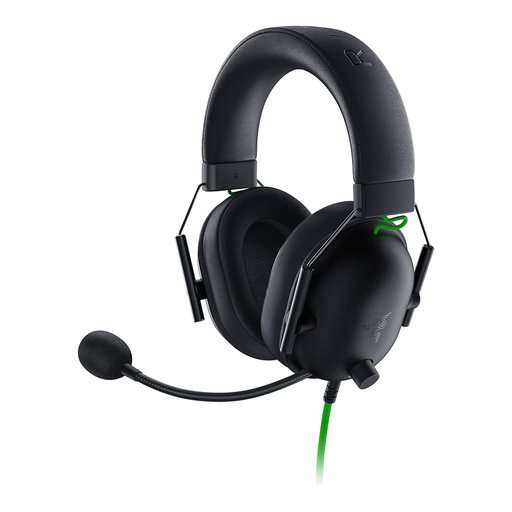
Razer BlackShark V2 X
Could be worth considering if you’re looking for a complete wired headset with a microphone; test it with the fan running before relying on the microphone’s stated features.
The product title lists a wired headset with 50 mm drivers. A Y-splitter is mentioned for PCs with separate audio and microphone sockets; check which connection you need and what’s included.
View at Joybuy
 No image available
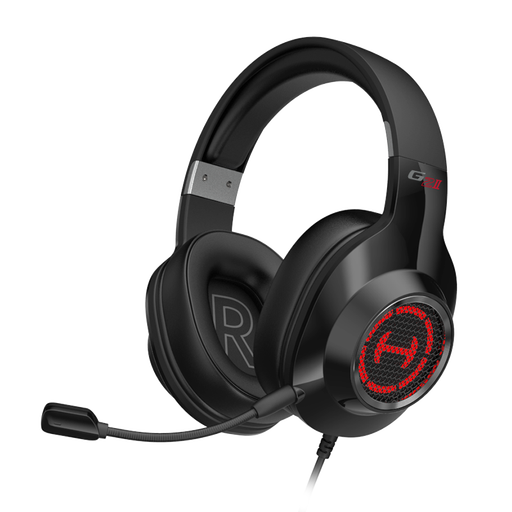
EDIFIER G2II USB Gaming Headset for PC
Could be a good fit if a wired USB headset is compatible with your computer; you’ll need a test recording to judge how the microphone handles fan noise.
The product title lists a USB connection, 50 mm drivers and a noise-cancelling microphone.
View at Joybuy
 No image available
Siukie CH25 Wired Over-Ear Headset
Could be worth considering if you’re looking for a wired over-ear headset with a microphone; check which connection suits your recording device, then test the voice quality with the fan running.
The product title lists USB and 3.5 mm connections, as well as a noise-cancelling microphone.
View at Joybuy
Frequently asked questions
How do I test a headset microphone with a fan running?
Start by recording a short passage with the fan running, and listen out for quiet words too. The Audacity Manual explains how to reduce steady background noise afterwards by sampling a section that contains only the noise; the results may be limited if the noise is very loud or changes over time. According to Audacity, a noise gate mainly reduces noise between spoken passages and will not automatically remove fan noise under your voice.
Can I connect a headset microphone with XLR or TRRS directly to my computer?
Not just because the connector fits. Check the microphone input and cable required for the specific model: RØDE requires the supplied TRRS cable to use the NTH-100M microphone, while Shure offers the SM35 in TA4F and XLR versions. Using a compatible adapter alone does not confirm that the signal path will work with your computer.
What should I check before buying the SM35 or replacement parts?
Check that your chosen SM35 version is compatible with your recording setup, and whether you’ll need a compatible transmitter, preamp or separate headphones. beyerdynamic lists ear pads, a headband pad and a cable as replacement parts for the MMX 300 PRO; whether you’ll need them later depends on how you use it.
Can I record another person’s non-public speech while recording a story?
Section 201 of the German Criminal Code makes recording another person’s non-public speech without authorisation a criminal offence. If someone else is going to speak or be recorded audibly, make sure you have the necessary permission before you start. This does not apply simply because you are recording yourself reading a text aloud.
Are traditional fairy tales automatically free to publish?
No. The age of a story does not automatically settle the rights for a particular version. The German Patent and Trade Mark Office notes that adaptations, such as translations, can also be protected works; in Germany, copyright protection generally ends 70 years after the author’s death. If you want to publish a modern version, check its rights separately.


