If you mainly want to record your own voice on a computer, a wired headset with an adjustable microphone boom and a compatible connection is a sensible starting point. For a dialogue with two important voices, a microphone close to one person’s mouth won’t automatically capture both speakers: you’ll need to plan and test how to record each voice separately. USB headsets connect directly, while devices with separate microphone and headphone connections require compatible inputs.
Who records learning dialogues?
Learners speaking on their own
If you want to record and listen back to your own dialogue role on a computer, a USB headset may be worth considering, as long as the connection is compatible with your device. Logitech says the H390 connects directly via USB-A.
People recording dialogues in pairs
If you want both voices to be audible in the finished recording, you’ll need to capture the second person too. The Audacity manual recommends recording interviews with two microphones on separate tracks, which you can edit individually later.
People with an audio interface
If you already have suitable microphone and headphone connections, you could also consider a broadcast headset or a head-worn microphone. Audio-Technica lists separate microphone and headphone plugs for the BPHS1, while Shure offers the WH20 with different connection options.
What should you look for when buying?
First, decide whether you want to record just your own voice or both speakers. Then check that the connections and headphone features you want are compatible with your recording setup.
| Priority |
What to check before buying |
Who is this particularly important to? |
| Your own voice |
Check that you can position the microphone boom towards the person speaking while seated; make a test recording at your normal speaking volume. |
If I’m recording my own dialogue role on a computer, I want to position the microphone correctly and listen back to my voice. Around 40% of consumers say clear recording of their own voice is their main priority. |
| Both voices in the dialogue |
Decide in advance how you’ll capture the second person and whether you want to edit the two voices separately; test your planned recording setup on your own system. |
When recording a dialogue, I don’t want to capture only the voice of the person wearing the headset. Around 30% of consumers prioritise capturing both voices in a dialogue. |
| Connection and recording setup |
Check that the connection on the exact model you’re considering is compatible with your computer or audio interface, as well as your chosen headphone setup. |
If I want to keep using my existing recording equipment, the plug needs to fit the relevant input. Around 20% of consumers say device compatibility is their main priority. |
| Comfort and controls |
Check the headband and ear cushions for the amount of time you plan to wear them; decide whether you need headphones and a mute button on the headset. |
For several recording sessions, I want a headset I can adjust to fit and whose controls suit the way I work. Around 10% of consumers prioritise comfort and ease of use. |
Common buying mistakes
-
Assuming a microphone for one person is enough to record a whole dialogue
A microphone close to one speaker won’t automatically pick up someone sitting further away. The Audacity manual recommends using a separate track for each microphone when recording interviews with two microphones.
Before buying, decide which voices you want to record and whether you need separate tracks. Then test your planned setup with both speakers.
You may need an additional recording setup to capture the second voice.
-
Checking only the model name, not the connection type
The Audio-Technica BPHS1 has separate microphone and headphone connections. The Shure WH20 is available in different versions, including options with different connections.
Before deciding, check that the plugs on the exact model you’re considering match the sockets you have.
Separate connections may require additional compatible recording equipment.
-
Assuming a head-worn microphone is the same as a complete headset
The Shure WH20 is a head-worn microphone, while the Audio-Technica BPHS1 combines a microphone and headphones.
Before buying, decide whether you want to listen back through the same device while recording.
If you use a WH20 and want to listen while recording, you may need separate headphones.
Key brands at a glance
Logitech
The H390 is an example of a wired USB-A headset with headphones, designed for recording on a compatible computer.
- Logitech lists an adjustable microphone boom, ear cushions and an in-line mute control.
- The manufacturer’s claims about noise reduction are not an independent recording test, nor do they prove that a second voice in a dialogue will be captured.
Audio-Technica
The BPHS1 is a broadcast headset with headphones and separate connections for the microphone and monitoring.
- Audio-Technica’s official specifications list a dynamic cardioid microphone, a replaceable cable, an XLR microphone plug and a 6.3 mm headphone plug.
- If your computer only has suitable USB connections, check how you can connect the microphone and headphones before buying.
Shure
The WH20 is a head-worn microphone for people who don’t need a headset with integrated headphones.
- Shure lists the WH20XLR, WH20QTR and WH20TQG with different connections. According to Shure, the dynamic microphone doesn’t require phantom power.
- The connection options aren’t interchangeable, and this type of microphone doesn’t replace headphones.
Joybuy products for recording on a computer
The following Joybuy products are headsets with a microphone and headphones, including models for wired use or with a wired operating mode. They may suit you if you’ll be speaking at a computer while seated and want to listen through the same device. You’ll need to plan separately for recording a second voice in a dialogue.
 No image available
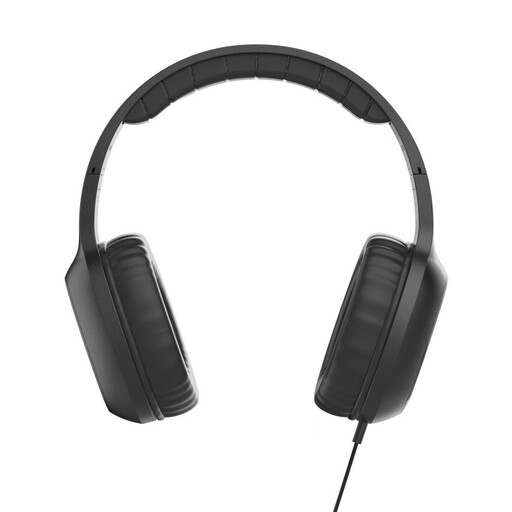
Fun C on-ear headset with microphone, USB-C, black
An option if you want to speak at your computer and listen through the same wired device.
On-ear headphones with microphone; USB-C connection; 1.2 m cable; in-line remote with microphone.
Check whether your recording device supports USB-C audio. A single headset microphone won’t automatically capture both voices in a dialogue.
Joybuy
 No image available
Logitech H540 stereo headset with microphone, USB
For recording on a computer if you’re looking for a headset with headphones and an adjustable microphone.
Stereo headset; USB connection; adjustable microphone.
Check that your recording device has a compatible connection. You’ll need to plan separately for recording a second voice in a dialogue.
Joybuy
 No image available
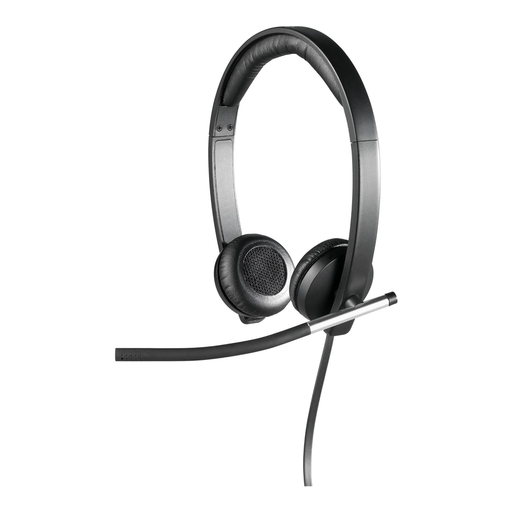
Logitech H650e stereo USB headset, over-ear, black
An option for recording on a computer, with one person speaking and listening through the headset.
Stereo USB headset; over-ear; black model.
Check that the connection is compatible with your recording device. A microphone worn by one speaker doesn’t replace a plan for capturing the second voice.
Joybuy
 No image available
Logitech 960 stereo headset with microphone, USB
For someone sitting at a computer who wants to speak and listen through a wired headset.
Stereo headset; USB connection; 2.4 m cable; black model.
Check that it connects to your recording device, and plan separately for recording a second voice in a dialogue.
Joybuy
 No image available
ONIKUMA GT889 headset with microphone
An option if you’re looking for a headset with a microphone and want to use the wired mode described.
Detachable microphone; according to the product name, supports 2.4 GHz wireless, Bluetooth and wired modes.
Check that the wired mode is compatible with your recording device. If you want to record both voices in a dialogue, you’ll need to plan separately for the second person.
Joybuy
Frequently asked questions
Can I use a headset microphone to record both people in a dialogue?
You can’t assume that just because the microphone works for the person wearing it, it will capture both speakers. If both voices matter, plan and test how you’ll record each person. With two microphones, separate tracks can make editing easier later.
How do I set up a voice recording after connecting my headset?
Select the right input device in your recording software, check the level with a spoken test and avoid clipping. The Audacity manual recommends aiming for a maximum peak level of around −6 dB on its level meter. This is a software guideline, not a microphone specification.
Which connections should I check before buying?
Check that the plugs on the exact model you’re considering are compatible with your recording and monitoring setup. The Audio-Technica BPHS1 has separate microphone and headphone connections; the Shure WH20 is a microphone and doesn’t replace headphones.
Can I record the other person in my dialogue without their permission in Germany?
No. Recording another person’s non-public speech without authorisation may be a criminal offence under section 201(1) of the German Criminal Code (StGB). Make sure you have permission before recording. Recording personal data may also involve data protection obligations. The German Data Protection Conference explains the requirements for valid consent; its separate resolution on telephone conversations cannot be applied universally to every learning-dialogue setting.


