Family interviewer with a laptop
If you want to record a seated person’s voice without a complicated setup, try a short test recording on your computer first to check that the USB headset works with your device.


For someone sitting at a computer, a wired USB headset is usually the easiest place to start. A separate headworn microphone is more suitable if you already have a compatible XLR or 3.5 mm recording setup, including any power it needs. Also consider whether you only need to hear the person telling their story, or want questions and other voices to come through clearly too. A test recording from the planned seat will show what your particular setup can pick up.
If you want to record a seated person’s voice without a complicated setup, try a short test recording on your computer first to check that the USB headset works with your device.
If the person speaking will be sitting for a while, adjust the headband, earcups and microphone boom before the interview, then check that everything feels comfortable.
If you want to capture questions or contributions from other people as well as someone’s life story, try different microphone positions and make a test recording with everyone you want to hear.
A good fit if: the person telling their story is sitting at a computer and a direct connection matters more than using separate audio equipment.
Consider: whether the person is happy to wear earcups and whether the USB connection matches the specific version of the headset.
A good fit if: you already have a suitable XLR input with enough gain and don’t want headphone earcups.
Consider: Shure says the WH20XLR does not need phantom power, but it does need a suitable input. Check the available gain range in advance.
A good fit if: your recording device or existing transmitter is explicitly compatible with the microphone.
Consider: the RØDE HS2 needs plug-in power when connected directly to a 3.5 mm microphone input; the Sennheiser ME 3 is designed for certain wireless systems.
| What matters | What to check before buying | Who will find this useful? |
|---|---|---|
| Clarity of the storyteller’s voice | Adjust the microphone boom and listen to a recording made from the planned sitting position. | If my main aim is to capture a seated person’s life story, I want to check how their voice sounds from the intended spot. Around 33% of consumers prioritise clarity of the storyteller’s voice. |
| Comfort | Try the headband, earcups and microphone boom on the person who will be speaking before the conversation. | For longer stories, I want the headset to feel comfortable and not distract the person. Around 27% of consumers prioritise a comfortable fit. |
| Connection and setup | Check the recording device, exact microphone version, input and power requirements. | If I want to record directly using the device I already have, it matters that the connection and microphone work together. Around 20% of consumers prioritise an easy connection to their device. |
| Other people speaking | Record a test question and answer from the planned sitting position, and consider a separate recording setup if needed. | If questions or contributions from other family members are to be part of the recording, I want to check in advance that they can still be heard clearly. Around 20% of consumers say capturing the whole conversation is their main concern. |
WH20 versions have different connections. If you connect the RØDE HS2 directly, the microphone input must also provide plug-in power.
Before ordering, compare the full model name with the input and requirements of your recording device.
Positioning the microphone on the storyteller alone won’t tell you how clearly questions or people sitting further away will come through in the recording.
Record a short question and answer from the planned seat, then listen back to check all the voices you want to capture.
Shure says that, under the conditions described, the WH20XLR needs more gain than the SM58.
Check the gain range available from the specific input and test the recording with the microphone in its intended position.
The H390 is a computer headset with headphones and a microphone boom. Choose the USB version that suits the connection on your recording device.
The WH20 is available with different connection options. For a wired XLR setup, the WH20XLR is the relevant version.
The HS2 is a headworn microphone without headphone earcups, designed for compatible microphone inputs or transmitters.
The PRO8HEx is the wired XLR version in a range of headworn microphones.
The ME 3 is described for use with certain wireless systems and isn’t a standalone USB headset.
The suggestions below include wired headsets for recording on a computer, with USB or 3.5 mm connections. Check that the connection is suitable for your recording device and that the storyteller is happy to wear earcups.
 No image available
For someone sitting at a computer who wants a wired headset with an adjustable microphone.
USB connection; stereo headset.
Check that the connection works with your recording device and test your preferred microphone position before the conversation.
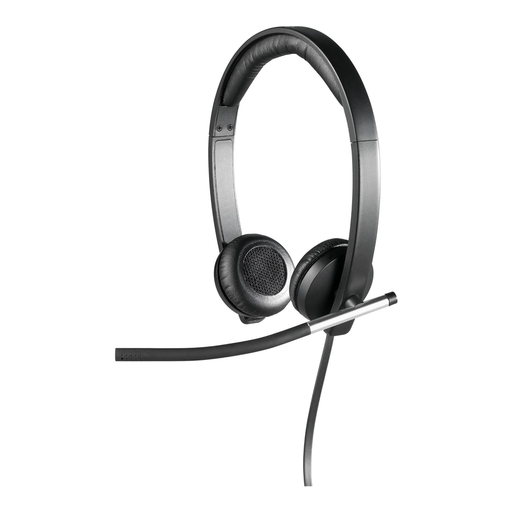 No image available
For recording on a computer if a USB headset with ear cushions and a microphone boom suits your preferred fit.
Stereo; USB; over-ear.
Check the USB connection on your recording device and try the fit before a longer conversation.
 No image available
For recording at a computer if a wired stereo headset is compatible with your recording device.
USB connection; 2.4 m cable.
Check the USB connection and make sure the cable is long enough to reach your planned seat.
 No image available
For someone sitting down if their recording device has a suitable 3.5 mm connection.
Stereo; 3.5 mm jack connection; adjustable microphone.
Check that the connection on your recording device works as a suitable audio input.
 No image available
For one person sitting at a computer if a wired mono headset is compatible with their recording device.
Mono; USB connection; ear cushions.
Check that the connection works with your recording device and that the mono version meets your needs.
Adjust the headband and position the microphone boom near the person who will be speaking. The Logitech guide recommends positioning the H390 at mouth level. Then make a short test recording to check their voice and any other speakers you want to include.
No. RØDE specifies a 3.5 mm microphone input with plug-in power, or a compatible transmitter. Before buying, check both the type of socket and the power supply available from your existing device.
According to Shure, the dynamic WH20 capsule doesn’t need phantom power. However, the WH20XLR does need a suitable XLR input. Also check that its gain range is sufficient for your setup.
Under Section 201(1) of the German Criminal Code (StGB), unlawfully recording another person’s non-public spoken words, or making such a recording available to a third party without authorisation, is a criminal offence. Before recording, check with the person speaking that you have their permission, and do the same before sharing the recording; permission to record does not automatically mean you can share it. The legal position may depend on the specific purpose for which the recording is used. Source: Gesetze im Internet, Federal Ministry of Justice and Federal Office of Justice.
No. Verbraucherzentrale distinguishes statutory rights in the event of defects from an additional voluntary guarantee, which has its own terms and conditions. Many online purchases also generally come with a right to cancel, usually within 14 days; exceptions and the specific contract terms should be checked. Source: Verbraucherzentrale, information on statutory rights and cancellation, as at 2026.