Who are the different setups suited to?

Recording one person’s memories

If you want to capture a longer story without constantly repositioning the microphone, plan your recorder, connection and power supply in advance. Shure, RØDE and Sennheiser describe headband microphones for different connections and setups.

Moving around as you tell your story

If the speaker needs to move between locations or guests, the microphone and a compatible wireless system, including its transmitter and receiver, must all work with the recording device. Sennheiser describes the ME 3 for use with specified wireless systems.

Capturing conversations with several voices

If you want to record a conversation with different people speaking, a microphone worn by one person won’t automatically capture everyone else. Zoom describes recorder setups for conversations and multiple microphone inputs.

What should you look for when choosing?

Wired headband microphone

A good fit if: the same person will be speaking in one place most of the time and your recorder has a compatible microphone input.

Things to consider: There’s no wireless system at the microphone, but you’ll need to get the cable routing, connection and, where required, microphone power right.

Headband microphone with wireless system

A good fit if: the speaker needs to move around and you have a compatible transmitter, receiver and recorder.

Things to consider: The transmitter and receiver add to your setup, and the frequency band and power supply need to be suitable too.

Headset with headphones and microphone

A good fit if: you want to monitor the recording through your own headphones as you record.

Things to consider: The microphone and headphones may need separate connections, and the microphone will remain focused on the person wearing it.

Setup for several voices

A good fit if: you want to focus on a conversation with different people speaking, rather than just one person’s voice.

Things to consider: Capturing other voices calls for suitable microphone positioning and, where necessary, additional microphones or inputs.

What matters to you What to check before buying Who is this important to?
Long, uninterrupted takes Test the fit and cable routing; make sure the power supply and storage for your complete recording setup will last for the planned duration. If you want to capture a story with as few interruptions as possible, consider both the microphone and the entire recording chain. Around 33% of consumers put long takes first.
Clarity in background noise Check the polar pattern and fit; listen to a test recording made in the actual noise conditions. If you mainly want to hear the speaker clearly at a busy gathering, test the microphone’s positioning on site. Around 27% of consumers prioritise clarity despite background noise.
Connection and setup Check the exact model variant, microphone input and required power supply; if you’ll be monitoring, check the headphone connection too. If you want to use recording equipment you already own, the connectors and power supply all need to be compatible. Around 20% of consumers put compatibility first.
Recording several voices Decide in advance how many voices you want to record and how many compatible microphone inputs you’ll need. If you want to capture memories as a conversation with different people speaking, you’ll need a setup that can accommodate those voices. Around 20% of consumers put recording several voices first.

Avoid common buying mistakes

  • Assuming a wireless headband microphone is a complete recorder

    The Sennheiser ME 3 is designed for specified wireless systems. You’ll need a compatible signal chain with a transmitter, receiver and recorder to make a recording.

    Before buying, check the box contents, compatible wireless system and recorder input separately.

  • Assuming connectors are interchangeable

    XLR, 3.5 mm and bodypack transmitter connections can require different inputs and microphone power. Shure states that the WH20XLR doesn’t require phantom power; the RØDE HS2 needs plug-in power when connected directly to a suitable 3.5 mm input.

    Check the exact model variant and the power requirements of the input you plan to use. Don’t confuse plug-in power with XLR phantom power.

  • Expecting a headset worn by one person to record a whole group conversation

    A microphone worn on the head is focused on the person wearing it. For different voices, the positioning or number of microphones and inputs must also suit the conversation.

    Decide in advance whether you want to record one voice or several speakers, then plan your setup accordingly.

  • Relying on an older wireless frequency ruling without checking

    In Ruling 37/2026, the Federal Network Agency repealed, among others, the previous Ruling 109/2025. An older ruling alone therefore doesn’t confirm the current conditions for a wireless system.

    Before using your system, check its specific frequency band and the technical and operational conditions currently in force.

Key brands to consider

Shure

The WH20 is a dynamic headband microphone. Its connector version needs to be compatible with your recording device or bodypack transmitter.

  • Shure specifies a cardioid polar pattern for the WH20; according to the manufacturer, the WH20XLR doesn’t require phantom power.
  • The XLR, 6.3 mm jack and TA4F versions are designed for different connections.

RØDE

The HS2 is described as suitable for hands-free, single-voice recording with a compatible 3.5 mm input or wireless system.

  • RØDE specifies an adjustable headband and includes wind and pop protection.
  • The HS2 is a microphone, not a pair of headphones, and needs plug-in power when connected directly.

Sennheiser

The ME 3 is described as a headband microphone for specified Sennheiser wireless systems.

  • Sennheiser specifies a cardioid polar pattern; the instructions recommend positioning it 2 to 3 cm from the corner of the mouth.
  • The ME 3 isn’t a complete wireless or recording system. You’ll need to check compatibility and the bodypack transmitter’s power requirements separately.

Audio-Technica

The BPHS2Sa is a single-ear headset with a dynamic microphone and headphones, designed for setups where you want to monitor as you record.

  • Audio-Technica specifies a replaceable cable and replaceable earpads.
  • In the version described, the microphone and headphones have separate outputs: an XLR connection and a 6.3 mm connection.

Headsets at Joybuy

This selection includes PC and communications headsets with microphones. If you want to use one to record memories over a long session, check first that its connection is compatible with your recording device.

Jabra Evolve2 75 wireless PC headset with charging stand, stereo sound and 8-microphone technology

Jabra Evolve2 75 Wireless PC Headset with Charging Stand, Stereo, 8-Microphone Technology, USB-C Bluetooth Adapter, MS Compatibility, Black

Could suit a PC setup with headphones and a microphone; before recording, check whether you can connect the headset to your recorder.

Described as a wireless stereo PC headset with charging stand and 8-microphone technology.

Joybuy

Jabra Engage 75 SE wireless stereo headset with DECT and base station

Jabra Engage 75 SE Wireless Stereo Headset, DECT, 150 m Range, Base Station, USB-C to USB-A, Black

Could be worth considering for a wireless conversation setup with a base station; check that the base station’s connection works with your planned recording device.

Described as a stereo headset with DECT, a base station and a stated range of 150 m.

Joybuy
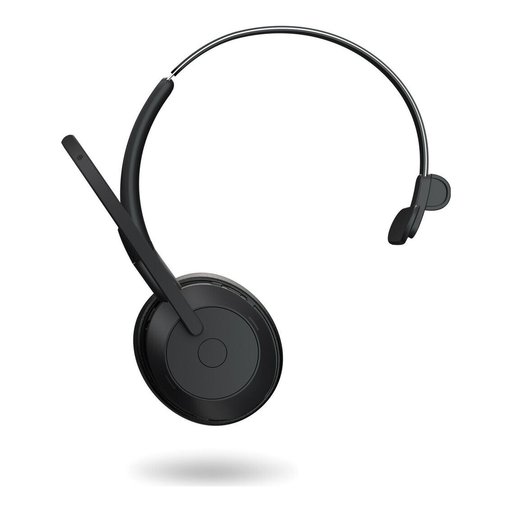
Jabra Evolve2 55 Mono wireless headset with noise-cancelling microphones

Jabra Evolve2 55 Mono Wireless Headset, Noise-Cancelling Microphones and ANC, Black

Could suit you if you’re looking for a single-ear wireless headset; check that its connection is suitable for your recorder.

Described as a mono wireless headset with noise-cancelling microphones and ANC.

Joybuy

Jabra Evolve 20 SE Mono headset with USB-C/A connection

Jabra Evolve 20 SE Mono Headset, USB-C/A, Black

Could work for a wired PC or softphone setup; check whether your recorder supports a compatible USB headset.

Described as a mono headset for VoIP and softphones with a USB-C/A connection.

Joybuy

Frequently asked questions

Can I simply record conversations at a village gathering?

Under § 201 StGB, you must not record other people’s non-public spoken words on an audio device without authorisation. Before you start, let the people concerned know that you’re recording. Whether a particular conversation is non-public and what authorisation applies depends on the circumstances; sharing or publishing the recording later is a separate matter.

Can I use any wireless headset in Germany without registering it?

No, that doesn’t apply to every wireless headset. According to the Federal Network Agency, certain generally allocated frequencies can be used without registration and free of charge, provided the relevant technical and operational conditions are met. Check the frequency band and current allocation for your specific system; Ruling 37/2026 repealed, among others, the previous Ruling 109/2025.

How can I check whether a headband microphone will work with my recorder?

Check that the connection and power requirements match the microphone input. Shure specifies an XLR connection for the WH20XLR, which doesn’t require phantom power; the RØDE HS2 needs plug-in power when connected directly to a suitable 3.5 mm microphone input. The Sennheiser ME 3 requires a compatible bodypack transmitter. Make a test recording with your planned setup and listen back before starting a long take.

Is one headset enough for a conversation with several people?

A single headset is primarily focused on the voice of the person wearing it. If several people will be taking turns speaking, plan the microphone positioning and inputs to capture all the voices you want. Zoom describes recorder setups for this, including multiple microphone inputs and face-to-face conversation recording.

What else should I plan for a long take?

Make sure the power supply and storage for your complete recording setup will last for the planned duration. A wireless setup also needs a transmitter and receiver; a stated battery life for one device doesn’t automatically tell you how long the complete setup can record. A test recording lets you check the connection and sound before the gathering.