Speakers who use gestures
If you use head movements and gestures while delivering your monologue, the microphone boom should stay in position. Test it with both quiet and loud lines rather than relying on general claims about sound quality.


For a powerful performance of a historical monologue, choose a microphone boom you can position and that stays in place as you move your head. A complete headset is a good fit if you want to monitor your performance as you speak; if you already have headphones, a separate head-worn microphone may be worth considering. The key is to check the connections on the exact model and make a test recording, setting the level for your loudest lines.
If you use head movements and gestures while delivering your monologue, the microphone boom should stay in position. Test it with both quiet and loud lines rather than relying on general claims about sound quality.
If you want to monitor your recording or keep using your existing headphones, your choice depends on whether your device’s microphone and headphone connections are compatible with the headset or separate microphone.
For longer passages, fit, ear pads and the ability to monitor your performance all matter. Try the headset for the length of time you plan to record, rather than assuming it will suit every head shape.
A good fit if: you want to use headphones and a microphone together and monitor your performance as you speak.
What to consider: RØDE says the microphone on the RØDE NTH-100M only works with the supplied TRRS cable, so your device’s connection must be compatible.
A good fit if: your recording device or interface has separate microphone and headphone connections, and you want to monitor your performance as you speak.
What to consider: The Audio-Technica BPHS1 has an XLR connection for the microphone and a 6.3 mm connection for the headphones. Sennheiser says the HMD 26, article number 700318, is not supplied with a cable.
A good fit if: you want to keep using your existing headphones and choose your microphone and monitoring setup separately.
What to consider: The Shure SM35 has different connection options. For the wired TQG version, Shure specifies an additional preamp; the XLR version has a built-in preamp and requires phantom power, according to the instructions.
| What matters | What to look for when buying | Who should consider this? |
|---|---|---|
| Microphone distance and level | Try different boom positions; record and listen back to both quiet and emphatic lines, then adjust the input level. | If your monologue shifts between quiet and loud passages, your voice should remain clear and undistorted. Around 36 % of consumers have this as their main concern. |
| Connections and monitoring | Check the exact model, microphone input, headphone output, power requirements and included accessories together. | If you want to use an existing interface or headphones, the signal path must be compatible with your recording device. Around 29 % of consumers have device compatibility as their main concern. |
| Noise at the recording location | Check the polar pattern of the exact model and make a voice test at your intended recording location. | If you can hear background noise in your room, what matters is the result of a test recording made at the actual recording location. Around 21 % of consumers have this as their main concern. |
| Fit during longer passages | Try the fit for the length of time you plan to record; if necessary, check whether replacement ear pads and cables are available for the exact model. | If you plan to record longer sections, the fit and monitoring should remain comfortable for you throughout the session. Around 14 % of consumers have comfort during longer recordings as their main concern. |
A TRRS cable, separate XLR and headphone plugs, and the Shure SM35’s different connection options are not interchangeable. An incompatible signal path can prevent you from making the recording you planned.
Check the exact model and what’s included against your device’s microphone input, headphone output and any power requirements.
Depending on the signal path, you may also need a suitable adapter, interface or preamp.
A microphone’s polar pattern affects the directions from which it picks up sound; the ear cups’ isolation, on the other hand, describes what you hear while monitoring. Neither proves that background noise will disappear in every environment.
Make a test recording at your intended location and listen back to the recorded voice alongside the background noise.
Sennheiser describes ActiveGard on the HMD 26 as a limiter for the headphone signal. This does not mean that a loud microphone recording will not clip.
Test your loudest line first and adjust the microphone input level. Assess headphone volume and recording level separately.
The features listed apply to the specific models mentioned and should not be taken as general claims about every product from each brand.
The NTH-100M combines headphones with a detachable boom microphone for voice and media production.
The BPHS1 and BPHS2a are broadcast headsets with separate microphone and headphone connections.
The separate SM35 head-worn microphone can be paired with headphones chosen separately and a compatible recording setup.
The wired HMD 26 broadcast headset, article number 700318, is an option for a compatible recording and monitoring setup.
The Joybuy products below are headsets with microphones for hands-free speaking. Before buying, check that the connection and microphone position suit your voice recording.
 No image available
The headset is described as having a detachable microphone and may be suitable for hands-free speaking. Check that you can position the microphone appropriately for your presentation.
The product name mentions in-line audio controls.
 No image available
The headset is described as having a detachable microphone. Before recording your voice, check that the boom stays where you want it while you gesture.
The product name mentions 2.4 GHz wireless and wired operation. If you use it wirelessly, check the requirements for the exact frequency version.
 No image available
This wired headset with a microphone may be suitable for hands-free speaking. Check that its connection is compatible with your recording device.
The product name mentions USB and a 3.5 mm connection. Check which option is compatible with your microphone input.
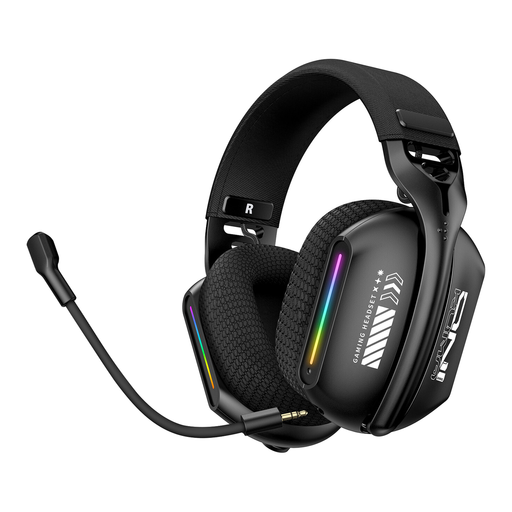 No image available
The headset is described as having a microphone and may be suitable for hands-free speaking. Check that you can adjust the microphone to the right distance from your mouth.
The product name describes it as a triple-mode headset. Before buying, check which three connection types the specific version offers and which one is compatible with your recording device.
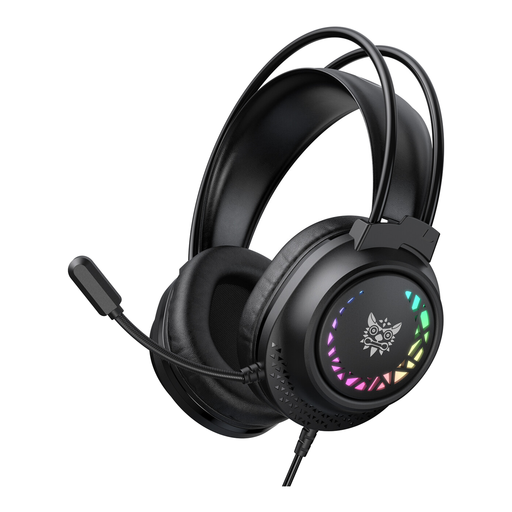 No image available
This wired headset with a microphone could be an option if you want to keep your hands free while speaking. Check beforehand that the connection and microphone position suit your recording setup.
The product name describes a wired connection.
Before recording, try your loudest passage and listen back to the saved file. Crackling or distortion may indicate clipping; Audacity Support recommends lowering the recording level and checking the recording again.
For the Shure SM35, Shure recommends positioning it at the corner of your mouth rather than directly in front of it to reduce plosive sounds. Don’t assume this specific advice applies to other boom designs; listen back to a test recording.
It depends on the exact version and your recording setup. Sennheiser says the HMD 26 with article number 700318 is not supplied with a cable; for wired use of the Shure SM35-TQG, Shure specifies an additional preamp. So check the cables, adapters and connections before buying.
The historical subject alone doesn’t determine the rights to the specific text. The German Patent and Trade Mark Office explains that copyright protection for a work in Germany generally ends 70 years after the author’s death; a translation may also have its own rights. Check the rights to the work you’re using and, where relevant, the translation before publishing your recording.
Not all transmission frequencies can be used freely. In its general allocation dated 15 April 2026, the Federal Network Agency sets out the permitted frequency bands and technical and operational requirements. Check the exact frequency version of the wireless system against the requirements that apply to your use.
No, not in every case. The European Commission says CE marking is only required for products covered by harmonised EU rules that call for it. You’ll need to check which rules apply to the specific wired or wireless version.