What to look for when choosing
First decide whether you need integrated headphones or can set up a separate monitoring route. Then check that the connections and power supply match your recording device. DPA Microphones shows, in a test conducted in an anechoic chamber, that microphone position can affect frequencies important for speech. That’s why testing in your own room should be part of your selection process.
| What matters |
What to check when buying |
Who it matters most to |
| Speech clarity |
Check that the microphone boom is adjustable and that a suitable windscreen is included. Record and listen back to a news report with both quiet and emphatic sentences. |
If I want to record both quiet passages and clear emphasis faithfully, I test the sound in the room where I plan to use it. Around 28% of consumers put expressive, easy-to-understand speech first. |
| Monitoring while recording |
Check whether headphones are included and whether the headphone and microphone connections are compatible with your recording device. |
If I want to monitor my voice or playback audio directly, I need a working monitoring setup. Around 22% of consumers prioritise monitoring while recording. |
| Compatibility and signal path |
Check the exact model variant, microphone input and power requirements. For wireless models, make sure you account for both the transmitter and receiver. |
If I want to keep using my existing recording or wireless equipment, the microphone needs to work with the whole signal path. Around 22% of consumers pay particular attention to how it connects to their equipment. |
| Noise in the recording space |
Make a test recording in the room where you’ll be recording, and don’t confuse the microphone’s performance with the headphones’ noise isolation. |
If there’s background noise in my room, I want to hear how clearly my voice comes through before recording. Around 17% of consumers put background noise first. |
| Fit and freedom of movement |
Test the fit, adjustable headband, cable routing and the room you’ll need to move around in while recording. |
If I gesture or move while speaking, the microphone should stay in place and feel comfortable. Around 11% of consumers prioritise freedom of movement and comfort. |
Related products on Joybuy
The products below are gaming headsets with microphones. They may be suitable for hands-free speaking, but the available information doesn’t identify them as broadcast headsets for news recording. Check the connection and sound in your room before buying.
 No image available
AOC wired gaming headset for PS5, Xbox Series X|S, Xbox One and PC
Could be suitable for hands-free speaking if the wired connection works with your recording device.
The description specifies a 3.5 mm connection and a flexible 360-degree microphone.
View on Joybuy
 No image available
ONIKUMA GT889 gaming headset, wired and 2.4 GHz
Could be a good option if you’re looking for a headset with a microphone and have already checked which connection type suits your recording setup.
The product name specifies wired and 2.4 GHz wireless connections, 50 mm drivers and a detachable microphone.
View on Joybuy
 No image available
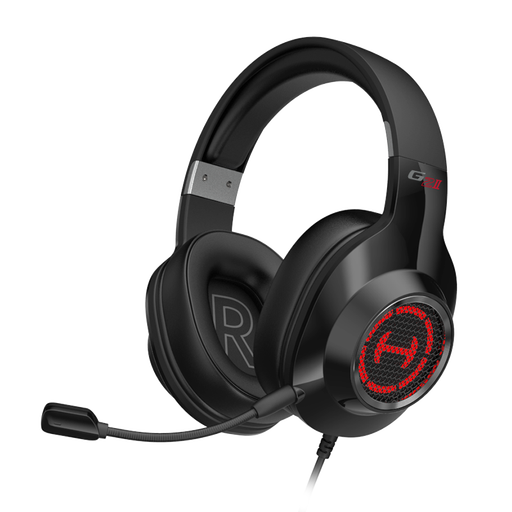
EDIFIER G2II wired USB gaming headset for PC and PS4
Could be worth considering for hands-free speaking if your recording device supports a compatible USB connection.
The product name specifies a wired USB connection, and the microphone is described as noise-reducing.
View on Joybuy
 No image available
Siukie H100 wired headset with USB and 3.5 mm connections
Could be suitable for hands-free speaking if one of the specified connections is compatible with your recording device.
The description specifies an adjustable omnidirectional boom microphone, as well as USB and 3.5 mm connections.
View on Joybuy
 No image available
Siukie L200 wired over-ear headset with USB and 3.5 mm connections
Could be an option if you’ve checked that it connects to your recording device and would like an over-ear model.
The product name specifies a 50 mm driver, while the description mentions a flexible boom microphone and USB and 3.5 mm connections.
View on Joybuy
Frequently asked questions
Do I need an additional audio interface for a broadcast headset?
It depends on the connections on your recording device. On the Audio-Technica BPHS1 and BPHS2a, the microphone signal uses XLR and the headphones use 6.3 mm. You’ll need compatible inputs and a working monitoring setup. This doesn’t establish that you can connect the headset directly to any computer.
How should I position the microphone boom for a news recording?
Position the microphone boom according to the instructions for your specific model, then listen back to a test recording. Sennheiser recommends placing the ME 3 2 to 3 cm to the side of the corner of your mouth. This distance is not a general recommendation for other microphones.
What additional equipment or spare parts should I consider in the signal path?
Check that your recording and monitoring setup is complete and compatible with the model you’ve chosen. Shure specifies a preamplifier, available separately, for wired use of the SM35-TQG. Audio-Technica describes the BPHS2a as having replaceable cables and earpads.
Can I record other people for a news report in Germany?
If you’re recording a conversation with other people, check that you’re legally entitled to do so before you start. Section 201 of the German Criminal Code makes it a criminal offence, in particular, to record another person’s spoken words in a non-public setting without authorisation. Recording a report in your own voice is a different situation. You can read the legislation on the Federal Ministry of Justice and Federal Office of Justice websites.
Can I use a wireless headset microphone on any frequency in Germany?
No. The Federal Network Agency publishes frequency allocations with specific frequencies and conditions of use. Its general allocation for 174 to 230 MHz, published in December 2025, remains valid under the conditions set out there until 31 December 2035. It does not automatically make other frequencies available or guarantee interference-free operation. Check your specific wireless system against the applicable allocation.


