What should you look for when buying?
USB computer headset
A good fit if: you want to record directly to a computer with a compatible USB port and value a simple connection.
Consider: The Logitech H390 is described as suitable for calls; that doesn’t demonstrate its suitability for quiet narration. Check the connector type and listen to a test recording.
Headset with a 3.5 mm TRRS connector
A good fit if: your recording device supports the microphone input on the headset’s supplied cable and you want to connect your headphones and microphone together.
Consider: A 3.5 mm connector alone doesn’t confirm that the device will also process the microphone signal. RØDE’s claims about voice and plosive reproduction are manufacturer specifications.
Broadcast headset with separate connections
A good fit if: you have a suitable recording interface and can plan for microphone positioning and monitoring. Audio-Technica says the BPHS1 has a pivoting dynamic microphone.
Consider: The BPHS1 microphone needs a compatible XLR input, and the headphones need a suitable connection. Check in advance whether you’ll need any extra accessories.
For a quietly spoken audio description, microphone position, a compatible connection and a test recording in the actual room are what matter most.
| What matters |
What to check when buying |
Who is it important to? |
| Recording a quiet voice clearly |
How easily you can position the microphone boom; listen back to a test recording at your usual speaking volume. |
If I speak quietly, I want to be able to position the microphone boom so that my voice remains clear. Around 36% of consumers put quiet voice recording first. |
| Reducing room noise and speech sounds |
Record test passages with breaths and plosive sounds in the room where you plan to use the headset; try different microphone positions. |
In a noisy room, I want to check how breaths and background noise sound in the recording, rather than assume it will be quiet. Around 29% of consumers prioritise reducing this kind of unwanted noise. |
| Checking compatibility with your recording device |
Check the microphone input, connector type and any additional hardware you might need for your specific device. |
If I want to keep using my existing recording equipment, the headset needs to support its microphone signal. Around 21% of consumers put device compatibility first. |
| Monitoring your recording comfortably |
Check the fit, listen to a complete passage and watch for clipping in your recording software. |
For longer recordings and listening back afterwards, I want to consider both comfort and recording levels. Around 14% of consumers prioritise comfortable recording monitoring. |
Joybuy products for voice recording
The Joybuy products below are headsets with microphones. For a quiet audio description, pay particular attention to microphone position and check that the connection supports the microphone signal on the recording device you plan to use.
 No image available
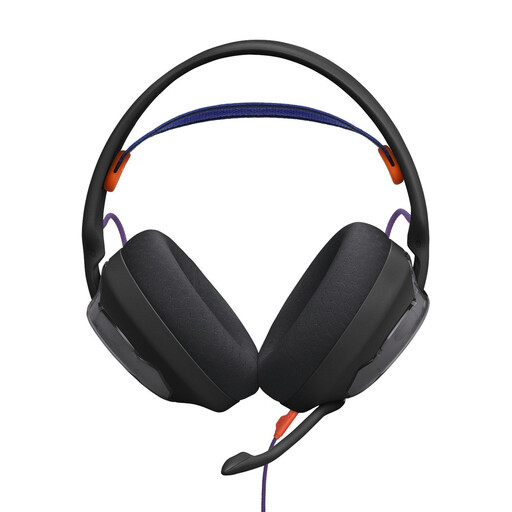
JBL Quantum 250, wired over-ear headset, black
The detachable boom microphone can be positioned close to your mouth, according to the product description. Try adjusting it while speaking at your usual volume.
Features listed include a unidirectional cardioid microphone, a foam windscreen and a 3.5 mm audio connection.
View at Joybuy
 No image available
ONIKUMA GT889, wireless over-ear headset
If you need different connection options, check them against the inputs on your recording device and test the microphone before you record.
The product description lists a flexible, detachable microphone, 2.4 GHz wireless, Bluetooth 5.4 and a wired connection.
View at Joybuy
 No image available
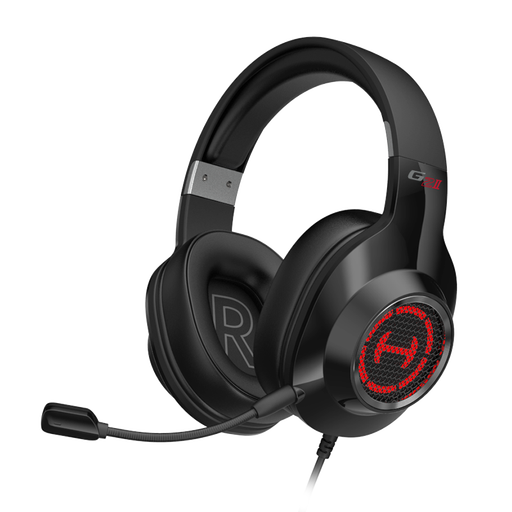
Edifier G2II, wired USB headset for PC
If you want to record directly over USB, check that the microphone works with your specific computer and judge the sound using a test recording.
The product description lists USB and compatibility with PC, Mac and PS4. It describes the microphone as noise-cancelling, but this isn’t independent evidence of its suitability for quiet narration.
A wired USB connection is listed as a limitation.
View at Joybuy
 No image available
Siukie CH25, wired over-ear headset
If you want to use either connection option, check whether the microphone input works through it on your recording device.
The product title lists USB and a 3.5 mm connection. The microphone is described as noise-cancelling; listen to a recording made in the room where you plan to use it.
View at Joybuy
 No image available
Siukie H100, wired headset
You can adjust the microphone boom to suit your speaking position. Try it out and see how much room noise you can hear in your test recording.
USB and a 3.5 mm connection are listed. The microphone is described as omnidirectional, rather than directional.
View at Joybuy
Frequently asked questions
How do I test a headset for a quietly spoken audio description?
Record a short passage at your usual volume in the room where you plan to use the headset. Start by positioning the microphone boom beside your mouth, listen for breathing and room noise, and check your recording software for clipping. Audacity recommends peaks around −6 dB for test recordings; this is software guidance, not a universal limit.
Can I connect any headset directly to my recorder or computer?
No. The right connection depends on the headset and the recording device. The H390 documentation specifies USB-A, the NTH-100M uses the supplied TRRS cable, and the BPHS1 has separate microphone and headphone connections. Check that your specific device not only accepts the connector, but also processes the microphone signal.
What should I check about cables and any extra equipment I might need?
Before choosing a model, check that the connections in your recording setup match the cables you’ll need. Audio-Technica lists a replaceable cable for the BPHS1; beyerdynamic says the DT 297 PV MK II is supplied without a connection cable. Depending on your setup, you may also need a suitable interface.
What are my rights if a headset is faulty or bought online in Germany?
If a product is faulty, your statutory rights are against the seller and are separate from any voluntary guarantee. The Verbraucherzentrale explains the difference in its article dated 28 September 2026. For online purchases, its article dated 13 August 2026 says you generally have a 14-day right to cancel; whether this applies in a particular case depends, among other things, on the type of contract and any exceptions.
Can I record other people’s conversations in the gallery?
Section 201 of the German Criminal Code (StGB) covers, among other things, recording another person’s non-public spoken words without their permission. This is different from recording your own narration. If other people might be audible, make sure your recording doesn’t capture their conversations without permission; the details depend on the specific circumstances.


