For an audition speech recorded while seated, choose a microphone that suits your existing recording setup. A USB headset with headphones and a microphone is one option for a suitably equipped computer, while an XLR headworn microphone needs a compatible microphone input. Manufacturers such as Audio-Technica, Shure and RØDE specify different connection and power requirements, so also check the microphone position, how visible the design will be and, where relevant, the extra components needed for a wireless system. This overview is based on manufacturers’ specifications, not a comparative recording test.
Which design is right for you?
Auditionees recording on a computer
If you’re recording your speech on a computer and want to wear headphones, consider a headset with headphones and a microphone, using the appropriate USB adapters. Audio-Technica lists USB-C and USB-A adapters for the ATH-M20xSTS.
Auditionees who want to keep the microphone out of shot
If you want the headband to be as unobtrusive as possible on video, check the profile of a low-profile or dual-sided headworn microphone, as well as the microphone input it needs. RØDE describes the HS2 as having a low-profile headband, while DPA offers a dual-sided headband with the 4088.
Auditionees with audio equipment already in place
If you already have a suitable microphone input or a compatible wireless system, match the exact connection option to your equipment. Shure offers the WH20 with XLR, jack and TQG connections; Sennheiser designed the ME 3 for compatible EW-D and XSW wireless systems.
What should you look for when buying?
First, map out the complete signal path to your recording device. Then consider microphone position and framing. Wireless is mainly worth considering when being free of cables offers a practical benefit.
| Consideration |
What to check when buying |
Who is this particularly important to? |
| Clear speech |
Check that the microphone boom is adjustable and look for the manufacturer’s positioning guidance; recommendations vary by model. |
If I want to position the capsule near the corner of my mouth to suit changes in speaking volume, I look at how the headband fits and how the microphone can be positioned. Around 36% of consumers prioritise clear speech. |
| Connection and recording setup |
Check the connector and any power or amplification requirements. Make sure your recording device is compatible with any interface, transmitter and receiver you may need. |
If I want to record my speech directly using the equipment I already have, I check the entire signal path from the microphone to the device. Around 29% of consumers prioritise connection compatibility. |
| Visibility and fit |
Check a test frame and compare earcups, a dual-sided headband and a low-profile microphone boom. |
If I want the headset to be as unobtrusive as possible in my audition video, I compare its design with the planned framing. Around 21% of consumers pay particular attention to a discreet fit. |
| Freedom from cables |
For a wireless setup, check that you have a complete compatible system and that the conditions for the specific frequency variant are met. |
If I don’t want a cable on my body even when sitting down, I need a suitable wireless recording setup. Around 14% of consumers prioritise being free of cables. |
Common misconceptions
-
‘Headset microphone’ always means headphones and a microphone
A headset with headphones and a microphone, such as the Audio-Technica ATH-M20xSTS, includes headphones. The Shure WH20XLR is a headworn microphone with an XLR connection. These two designs serve different purposes.
Before choosing a model, decide whether you want to wear headphones while recording and which device you’ll use to record your speech.
Depending on the connection you choose, you may need a different input or extra audio equipment.
-
A compatible connector is all you need for the complete recording setup
A 3.5 mm plug on its own doesn’t confirm that a camera or recorder can power the microphone. The RØDE HS2 needs a compatible microphone input with plug-in power, while the Sennheiser ME 3 connects to a bodypack transmitter.
Check the connector, power requirements and complete recording setup against the specific device you’ll be using.
Some setups also need a compatible input, an interface or, for wireless use, a transmitter and receiver.
-
Wireless is automatically the right choice for a seated speech
Being free of cables can be useful, but a wireless microphone such as the ME 3 still needs a compatible wireless system. You’ll also need to check the conditions for the frequency band you plan to use.
Choose wireless only if freedom of movement matters for your setup, and check the specific system and its use in Germany. Otherwise, a suitable wired connection may be worth considering.
A wireless recording setup requires extra system components, and you’ll need to check the applicable frequency conditions.
Key brands to consider
Audio-Technica
The ATH-M20xSTS is a headset with headphones and a microphone, designed for computer recording.
- Audio-Technica lists a 3.5 mm TRRS cable, along with USB-C and USB-A adapters.
- The headphones and microphone boom are part of the visible design; the manufacturer’s claims about speech clarity are not based on an independent audition test.
Shure
The WH20 range includes different connection options; the WH20XLR is the wired XLR version.
- Shure says the dynamic capsule in the WH20 does not need phantom power.
- Shure notes that its output level is lower than that of condenser microphones, so check that your input is suitable and provides enough gain.
RØDE
The HS2 is a low-profile headworn microphone for use with a compatible 3.5 mm microphone input with plug-in power.
- RØDE says you can wear the microphone boom on either side of your head.
- A 3.5 mm TRS connection alone doesn’t confirm that a camera or recorder can supply the power required.
DPA
DPA lists the 4088 as a professional headworn microphone for theatre and offers it with different connection options.
- The manufacturer lists a dual-sided headband and a modular adapter system.
- The exact version needs to match your transmitter or recording device; the manufacturer’s claims about sound quality and industry standards are not independent comparisons.
Sennheiser
Sennheiser says the ME 3 is designed for its EW-D and XSW wireless systems, rather than as a standalone recorder.
- The instructions describe connecting it to a bodypack transmitter and positioning it 2–3 cm from the corner of your mouth.
- If you don’t already have a compatible wireless system, check which components you need and which frequency variant is suitable for your use.
Joybuy products for computer recording
The Joybuy options below are over-ear gaming headsets with microphones, including wired and wireless models. They’re only suitable if you specifically want to wear headphones while recording; a low-profile stage headworn microphone or an XLR recording setup has a different design.
 No image available
JBL Quantum 360P Over-Ear Wireless Gaming Headset
Only consider this if you specifically want a wireless over-ear headset with a microphone for computer recording; test the speech recording before your audition.
The product title lists a flip-up microphone, ANC, Bluetooth 5, 22 h battery life and the colour White.
View at Joybuy
 No image available
ONIKUMA GT889 Wireless Headband Headphones
This over-ear headset is only an option if you want to use headphones and a microphone together; test the speech recording on the device you plan to use.
The product title lists 2.4 GHz wireless, a wired mode and LED lighting.
View at Joybuy
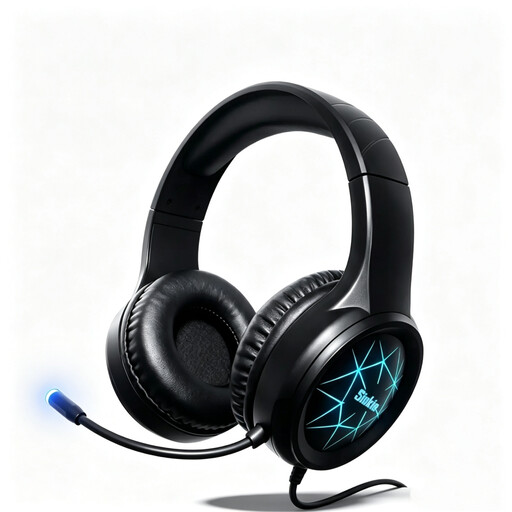 No image available
Siukie CH25 Wired Over-Ear Gaming Headset
For computer recording, only consider this if you want a wired over-ear headset with a microphone; test the speech recording before your audition.
The product title lists a 50 mm driver, along with USB and 3.5 mm connections.
View at Joybuy
 No image available
Siukie H100 Wired Gaming Headset
Only consider this wired headset if you want to wear headphones while recording, and make a test recording of your speech first.
The product title lists USB and 3.5 mm connections, as well as an adjustable microphone boom.
View at Joybuy
 No image available
Siukie L200 Wired Over-Ear Gaming Headset
This over-ear headset is only suitable for a setup where you want to wear headphones and a microphone together; test the speech recording on the computer you plan to use.
The product title lists a 50 mm driver, along with USB and 3.5 mm connections.
View at Joybuy
Frequently asked questions
Can I connect any 3.5 mm headworn microphone directly to a camera or smartphone?
No. The connector alone isn’t enough to confirm compatibility. For the RØDE HS2, the manufacturer specifies a compatible 3.5 mm TRS microphone input with plug-in power, so check the connections and power supply on the specific device you plan to use.
How should I position the microphone for a run-through?
Follow the instructions for your specific model. Shure recommends positioning the WH20 within 25 mm of the right corner of your mouth, rather than directly in front of it. Sennheiser specifies a distance of 2–3 cm from the corner of your mouth for the ME 3; these recommendations don’t apply to every headset.
What extra components might I need for recording?
It depends on your recording setup. The Shure WH20XLR needs a suitable XLR input, while the Sennheiser ME 3 needs a compatible system with a bodypack transmitter and receiver for the wireless use described. The RØDE HS2 needs a microphone input that provides plug-in power.
Do I always need an individual frequency allocation for a wireless headset in Germany?
There’s no general answer without knowing the specific system. Germany’s Federal Network Agency describes general frequency allocations, each with its own frequency and operating conditions. The frequency band and intended use are among the factors that matter. Check the regulations for the specific device before using it.


