Dialect storytellers
If you want to capture regional pronunciation, quieter passages and changes in expression, check the sound with a test recording of your own rather than relying on marketing claims alone.


If you want to wear headphones and a microphone while telling stories, start by choosing a connection that works with your recording device, then check the sound with a test recording of your own. A USB headset can make getting started easier on a compatible computer; broadcast headsets and standalone headworn microphones may need suitable inputs and additional monitoring equipment, depending on the model. Microphone position, recording level and a quiet environment are also important for clear recordings.
If you want to capture regional pronunciation, quieter passages and changes in expression, check the sound with a test recording of your own rather than relying on marketing claims alone.
For longer storytelling sessions, a steady microphone distance and a headband with ear cushions that feel comfortable to you both matter.
If you want to record without an existing audio interface, check beforehand that the connection, recording device and monitoring option you want to use all work together.
Start by checking how your own voice sounds, then consider comfort during longer storytelling sessions and whether the connection works with your recording device. Think about the room, too: a headset alone won’t make background noise inaudible.
| What you need | What to check before buying | Who it matters most to |
|---|---|---|
| Clear storytelling voice | Record the same short passage with quiet and loud sections, listen back to the unedited file and check the input level. Audacity points out that clipping cannot be undone after recording. | If I want to record dialect sounds and quieter passages clearly and naturally, my own voice is the most important measure. Around 33% of consumers put voice quality first. |
| Comfort and microphone position | Check the adjustability, padding and fit with your glasses on during a longer speaking test. Also consider whether you need headphones connected directly to the headset. | For long storytelling sessions, I want a comfortable fit and a microphone that stays in place. Around 27% of consumers prioritise long-term comfort. |
| The right connection | Compare the exact model and its plugs with your computer, recorder or audio interface. Audacity explains that XLR microphones connect via an audio interface; the RØDE NTH-100M needs the specified TRRS cable for its microphone function. | If I want to get started on a computer without a separate interface, the connection needs to work directly with my device. Around 20% of consumers prioritise ease of setup. |
| Background noise and room acoustics | Make a voice recording and a short silence test in the place where you plan to tell your stories. Reduce avoidable noise, then listen back for room echo and other unwanted sounds. | If fans, traffic or echo could affect my recording, I first want to know what will be audible in the actual recording space. Around 20% of consumers put control of background noise first. |
Logitech’s description of the H390 focuses mainly on calls and meetings; it doesn’t provide evidence of an independent comparison of fairy-tale recordings.
Before making a longer recording, listen to an unedited test that includes dialect sounds and both quiet and loud passages.
The Audio-Technica BPHS1 variant described has separate microphone and headphone connections. The RØDE NTH-100M microphone works with the specified TRRS cable; according to Audacity, an XLR microphone cannot be connected directly to a computer on its own.
Before ordering, check the exact model, all the plugs, and the inputs and outputs on your recording device.
Even a directional microphone won’t automatically make noise from windows, fans or room echo inaudible.
Test it in the place where you’ll be telling your stories and reduce avoidable noise before recording.
The NTH-100M combines closed-back over-ear headphones with a detachable boom microphone. RØDE lists podcasting among its intended uses.
The BPHS1 is a broadcast headset with a dynamic boom microphone and closed-back headphones, designed for recording and monitoring at the same time.
The WH20 is a dynamic headworn microphone with no built-in headphones. The WH20XLR variant is the one to consider for a wired XLR input.
The C520 is a lightweight condenser headworn microphone with an XLR connection, but no built-in headphones.
The H390 is a wired USB computer headset that Logitech describes for calls and meetings.
This selection features headsets with built-in microphones, so you can wear both while sitting and telling stories. It includes wired USB models and one wireless model. Before buying, check that your recording equipment’s connection supports both the microphone and headphones in the way you need.
 No image available
Could be worth considering if you want to wear a microphone and headphones together while telling stories; check that the connection suits your specific recording setup.
Over-ear design; wireless with Bluetooth; flip-up boom microphone; detachable 3.5 mm cable.
 No image available
Could be a good fit if you want to use a USB headset with your computer and adjust the microphone position.
USB-A connection; adjustable noise-cancelling microphone; on-earpiece controls.
 No image available
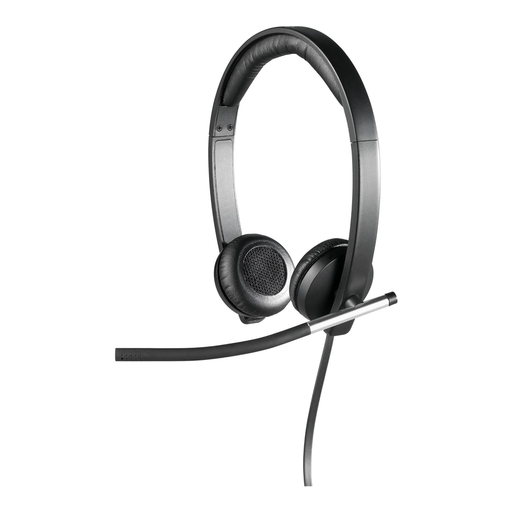
Could suit computer recording if you’re looking for a wired USB headset with an adjustable microphone arm.
Stereo USB headset; flexible, rotating microphone arm; in-line volume control; leatherette ear cushions and headband.
 No image available
Could be suitable if you want to record on your computer via USB and adjust the position of the microphone arm.
Wired; USB connection; 2.4 m cable; adjustable microphone arm; volume and mute controls.
 No image available
Could be worth considering if you want a wired USB-A headset with mono headphone output.
USB-A connection; mono headset; 85 g according to the product description; boom microphone arm. The headphone output is not specified as stereo.
Select the microphone and headphones as the input and output in your recording software, position the microphone arm according to the instructions for your specific model, then test it with your storytelling voice. Audacity recommends peaks of between −18 dB and −6 dB for normal speech; at 0 dB, the recording may clip and cannot be repaired afterwards.
For computer recording with an XLR microphone, you need a suitable microphone input or an audio interface. According to the manufacturer, the AKG C520 also needs a 9 to 52 V power supply; the dynamic Shure WH20 does not need phantom power. These standalone headworn microphones do not have headphones built in.
Check whether you already have an audio interface, compatible connections and headphones. Audio-Technica lists a replaceable cable and ear cushions for the BPHS1; check which replacement parts are available for the specific variant.
It depends on the text you use and how you plan to use it. According to the German Patent and Trade Mark Office, copyright protection for a work in Germany generally expires 70 years after the author’s death. A separately protected translation or adaptation needs to be assessed separately; the word ‘traditional’ does not automatically make a modern version of the text free to use.
If other identifiable people take part, you should check the recording and planned publication separately. The German Data Protection Conference explains that consent must be freely given, informed and specific to the circumstances; silence does not in itself count as consent. This does not mean that consent is the only possible legal basis in every conceivable recording situation.