Who is this selection for?

Dialogue and character voice actors

If you switch between quiet lines and loud exclamations, keep the microphone in a consistent position and check the level against your loudest line. The Audacity manual recommends monitoring the level while speaking or performing at your loudest.

Voice actors recording in noisy rooms

If you can hear fans or other noise where you record, pay attention to the microphone position and polar pattern. Noise-reduction features are no substitute for making a test recording in your own room.

Voice actors with an existing recording setup

If you want to connect a headset, headphones and a PC, mixer or audio interface, check the microphone and headphone connections separately. Depending on the model, you may need suitable adaptors or a preamp.

What should you look for when buying?

Complete wired headset

A good fit if: you want to record your voice and monitor it through the headset at the same time.

Consider: connections vary. For the RØDE NTH-100M, the manufacturer specifies an additional adaptor with suitable power for an XLR microphone input. The beyerdynamic MMX 300 PRO is an analogue gaming headset.

Broadcast headset

A good fit if: you need a flexible microphone boom and separate connections for the microphone and headphones.

Consider: the Audio-Technica BPHS1 has an XLR plug for the microphone and a 6.3 mm plug for the headphones; the BPHS1-XF4 has a different connection configuration.

Gaming headset with PC audio filters

A good fit if: you want to adjust voice filters such as noise processing or compression on your PC.

Consider: according to Logitech, the advanced BLUE VO!CE features on the Logitech G PRO X require a PC and G HUB. Only a listening comparison will tell you whether the processing suits your performance.

Microphone headset without headphones

A good fit if: freedom of movement while speaking matters more to you than having headphones built in.

Consider: the Shure SM35 is not a complete headset with headphones. Wired use of the SM35-TQG depends on an optional preamp; the SM35-XLR includes a permanently attached preamp.

Buying priority What to look for Who this matters most to
Expressive performance without clipping Check whether you can position the microphone boom and adjust the input level on your recording equipment. Test both quiet and loud lines. If I record quiet dialogue and loud exclamations, I want to set the level so the loudest line does not clip. Around 33% of consumers put expressive changes in volume first.
Voice recording with room noise Compare test recordings made in your actual recording space, and listen with any filters switched on and off. If I can hear fans or other noise, I want to judge how my voice sounds in my own recording space. Around 27% of consumers prioritise handling room noise.
Connections and a complete setup Check the microphone and headphone connections separately against your recording equipment. If you choose a microphone-only headset, also check your monitoring solution. If I want to use my existing recording equipment, I need to know whether I can connect both the microphone and the headphones. Around 20% of consumers pay particular attention to compatible connections and a complete setup.
Comfort and monitoring Check the fit, ear cushions and microphone position for your recording session, and make sure you can monitor your voice in a way that works for you. If I have several takes to record, I want to wear the headset comfortably and monitor my voice. Around 20% of consumers prioritise comfort and monitoring.

Avoid common buying mistakes

  • Assuming noise cancellation preserves your character voice unchanged

    Filters can alter your voice, and their availability alone tells you nothing about how your performance will sound afterwards.

    Listen to the same test recording with and without the filter, then choose the version that best preserves the expression you want.

  • Treating the microphone and headphone connections as one

    Headsets and microphone models can have different connections and requirements. So even a compatible microphone will not necessarily connect directly to every PC, mixer or audio interface.

    Make a note of the inputs and outputs on your equipment and compare them with the exact model variant. If you choose a microphone-only headset, also check what you will use to monitor your voice.

    Depending on your existing equipment, you may need an adaptor, a preamp or separate headphones.

  • Testing only at your normal speaking volume

    A level that works for everyday dialogue may peak when you deliver a loud exclamation. The Audacity manual recommends checking the level against your loudest line.

    Before recording, perform your loudest planned line and check the recording for clipping.

    If the recording clips, you may need to do another take.

Useful brands to consider

RØDE

The NTH-100M is a complete wired headset for recording and monitoring.

  • RØDE specifies a detachable microphone and a microphone position designed to reduce plosive sounds.
  • A splitter is specified for separate 3.5 mm microphone and headphone sockets. For an XLR microphone input, RØDE recommends a suitable adaptor with plug-in power; a direct XLR connection is not specified.

beyerdynamic

The MMX 300 PRO is a closed-back analogue gaming headset with a condenser boom microphone.

  • beyerdynamic specifies a cardioid polar pattern, along with replaceable ear cushions, a replaceable headband and a replaceable cable.
  • These specifications alone do not show that the headset is particularly well suited to acting recordings.

Audio-Technica

The BPHS1 is a broadcast headset with a dynamic boom microphone and separate connections.

  • Audio-Technica describes a positionable microphone boom and a replaceable cable.
  • Don’t confuse the BPHS1 with the BPHS1-XF4: they have different connection configurations. Its use as a broadcast headset does not prove how well it will record character voices.

Logitech G

The wired PRO X is a gaming headset for voice actors who want to adjust voice filters on a PC.

  • Logitech lists BLUE VO!CE features such as noise reduction, compression and de-essing.
  • According to Logitech, the advanced features require a PC and G HUB. Listen to a test recording to check whether the processing suits the performance you want.

Shure

The SM35 is a head-worn condenser microphone for voice actors who use a separate monitoring solution.

  • Shure specifies windscreens to reduce plosive and breath noise.
  • The SM35 is not a complete headset with headphones. The SM35-TQG and SM35-XLR have different requirements for wired use.

Joybuy product selection

The Joybuy options below include gaming headsets with microphones and a range of connection types. For character voice recordings, pay particular attention to the microphone position and which connection carries the audio.

AOC wired gaming headset for PS5, Xbox and PC

AOC Wired Gaming Headset for PS5, Xbox Series X|S & Xbox One, PC

Worth considering if you’re looking for a wired headset with a positionable microphone.

The product description lists a 3.5 mm connection and a flexible microphone that moves through 360 degrees.

View at Joybuy

HyperX Cloud Alpha gaming headset

HyperX Cloud Alpha

It may suit your shortlist if you’re looking for a headset with a detachable microphone and over-ear design.

The product description lists a 3.5 mm connection, a detachable cable and memory foam ear cushions.

View at Joybuy

ONIKUMA GT889 headset

ONIKUMA GT889

It may suit you if you’re considering a headset with a flexible, detachable microphone and several connection options.

The listed features include 2.4 GHz, Bluetooth and wired operation, as well as 50 mm drivers. Before recording, check which connection mode is compatible with your recording equipment.

View at Joybuy
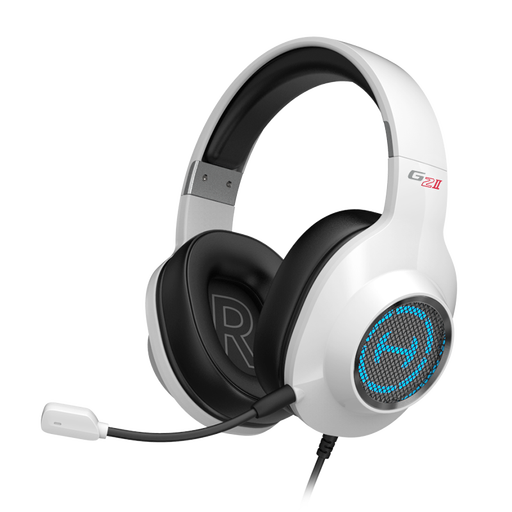
EDIFIER G2II USB gaming headset in white

EDIFIER G2II, White

Worth considering if you’re looking for a USB headset with a rotating microphone that can be locked in position.

The product description lists software settings for the microphone and sound, as well as compatibility with PCs and Macs. Check that the software is compatible with your recording equipment.

View at Joybuy

Siukie CH25 wired gaming headset in pink

Siukie CH25, Pink

It may suit you if you’re looking for a wired headset with a swivelling, retractable microphone.

According to the product description, audio is carried over 3.5 mm; the USB connection is for RGB lighting only.

View at Joybuy

Frequently asked questions

How should I set the recording level for whispers and exclamations?

Start with your loudest planned line and watch the level meter as you perform it. If the meter peaks or the recording clips, reduce the input level and check another test recording.

Can I connect a headset with a 3.5 mm microphone plug directly to an XLR audio interface?

Not necessarily. For the RØDE NTH-100M, the manufacturer specifies a suitable adaptor for an XLR microphone input that provides the required plug-in power. Check the connections on your specific headset and interface.

What should I check before future recording sessions?

Check the microphone boom and cable, make a short test recording before longer takes, and find out which parts are replaceable on your model. For the MMX 300 PRO, beyerdynamic lists replaceable ear cushions, a headband and a cable.

What are my rights in Germany if I buy a headset online?

Your statutory rights if a product is faulty are separate from any voluntary guarantee. According to the Verbraucherzentrale, online purchases generally come with a 14-day right to cancel. Check the conditions and exceptions that apply to your purchase.

What should I check to make sure a headset meets the relevant requirements?

For products within its remit, the Bundesnetzagentur lists checks including correct CE marking, product traceability and accurate manufacturer details. You cannot determine whether a specific model meets these requirements from its product category alone.