For a news bulletin recorded in a reverberant room, the microphone boom should keep the mic consistently close to your mouth as you speak. However, a headset won’t eliminate room echo. Shure points out that a microphone cannot effectively distinguish direct sound from reflected speech. For a computer, a compatible USB or TRRS version may be suitable, while broadcast headsets with separate connections require a matching recording setup.
Who is a headset suitable for?
Speakers in a reverberant room
If you’re recording a bulletin in a room with noticeable echo, keeping the microphone a consistently short distance from your voice matters more than promises to digitally remove the reverb. DPA Microphones describes consistent distance as an advantage of a headset microphone.
Recording news on a laptop
If you’re recording directly on a computer, check that the connection on the specific headset version matches your device’s inputs. Audio-Technica describes different connections for the ATH-M50xSTS and ATH-M50xSTS-USB; RØDE requires the supplied TRRS cable for the microphone function on the NTH-100M.
Presenting with an audio interface
If your recording setup has separate microphone and headphone connections, a broadcast headset may suit that signal path. Audio-Technica specifies an XLR microphone connection and a separate headphone connection for the BPHS1.
What should you look for when buying?
First, check that the microphone position and connection suit your recording setup. Then assess an unprocessed voice sample in the room where you’ll be recording.
| Consideration |
What to check when buying |
Who is it important to? |
| Speech intelligibility in a reverberant room |
How securely and easily the microphone boom can be positioned, and the direction of the capsule; listen to an unprocessed test recording in your recording space. |
If I’m speaking in a noticeably reverberant room, I want to record my voice as directly as possible without assuming the result will be echo-free. Around 36 % of consumers put speech intelligibility first, even when there’s room echo. |
| Compatible connection |
Exact model version and compatible microphone and headphone connections; factor in any required cable or interface. |
If I’m recording on a computer, I want to check the signal path in advance rather than discover during setup that the plug doesn’t fit. Around 29 % of consumers prioritise a compatible recording setup. |
| Monitoring your voice |
Position the microphone outside the direct airflow from your breath; check the level and unprocessed recording. |
If I’m recording a bulletin with quiet and emphatic passages, I want to spot plosives or distortion before recording the whole thing. Around 21 % of consumers prioritise monitoring voice quality and levels. |
| Fit and included accessories |
Comfort for your usual recording session, plus what’s included, connection cables and whether parts can be replaced. |
If I’m planning longer recordings, I want to consider a comfortable fit and make sure I have the parts I need. Around 14 % of consumers prioritise comfort and a complete set of accessories. |
Avoid common assumptions
-
Assuming ‘noise cancelling’ means room echo will be eliminated
Room reflections are part of the sound that gets recorded too. A microphone won’t automatically improve the acoustics of the room; Shure explains that it cannot effectively distinguish direct speech from reflected speech.
Try different microphone distances and positions in the room, then listen to an unprocessed voice sample rather than relying on a product label alone.
-
Assuming similarly named connection versions are interchangeable
Audio-Technica describes different connections for the ATH-M50xSTS and ATH-M50xSTS-USB. The model name alone therefore won’t tell you whether the headset will work with your recording device.
Check the full model name against your microphone input, headphone output and intended signal path.
If the connections aren’t compatible, you may need a different recording setup or an additional interface.
-
Assuming a broadcast headset comes with all the cables you need
According to beyerdynamic, all versions of the DT 297 PV MK II are supplied without a connection cable. The manufacturer also says that no cable is included with the current Sennheiser HMD 26.
Before buying, work out which plug type you need and what your recording device requires.
Key brands at a glance
Audio-Technica
The BPHS1 is designed for a broadcast recording setup with separate connections. Audio-Technica describes the ATH-M50xSTS-USB as a computer option with a USB-A connection.
- According to Audio-Technica, the BPHS1 has a dynamic cardioid microphone, closed-back earcups, a replaceable cable and replaceable cushions.
- The USB version isn’t interchangeable with the ATH-M50xSTS, which has different connections. Manufacturer information about the design and connections doesn’t demonstrate how it performs in a reverberant room.
RØDE
The NTH-100M is an over-ear headset with a detachable microphone, designed for use with a compatible analogue headset connection.
- RØDE describes the microphone as detachable and designed to be positioned for speech.
- According to RØDE, the supplied TRRS cable is required for the microphone function. The manufacturer’s claims about sound quality aren’t a test in a reverberant recording room.
beyerdynamic
The DT 297 PV MK II is a broadcast option, but you’ll need to make sure the version, cable and microphone power supply suit your recording setup.
- For the 80-ohm version, beyerdynamic specifies a condenser microphone with a cardioid pickup pattern and closed-back earcups.
- According to beyerdynamic, all DT 297 versions are supplied without a connection cable. Check which cable you need for your exact version.
Sennheiser
According to Sennheiser, the current HMD 26 is designed for a modular broadcast recording setup.
- Sennheiser specifies a dynamic supercardioid microphone for the current HMD 26.
- The manufacturer says no cable is included. Check in advance which cable and microphone power supply your recording setup requires.
Joybuy products
The Joybuy products below are headsets with microphones and different connection options for computer-based voice recording. A microphone is no substitute for testing in the room: Shure points out that direct and reflected speech cannot be effectively distinguished from one another.
 No image available
Logitech H540
Could be worth considering if you’re looking for a computer-friendly USB headset with an adjustable microphone.
The product title lists a USB connection, an adjustable microphone and on-ear controls. Check that the connection is compatible with your recording device.
View at Joybuy
 No image available
JBL Quantum 400
Could suit you if you’re considering a wired over-ear headset with a flip-up microphone boom.
The product title lists a 3.5 mm connection, USB and a flip-up microphone. Check which connection is intended for the microphone and headphone functions you need.
View at Joybuy
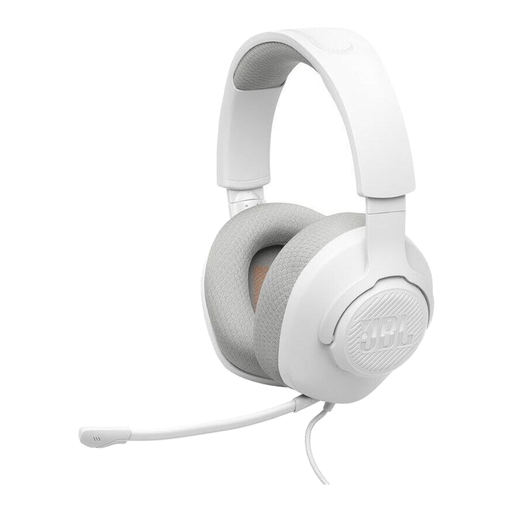 No image available
JBL Quantum 100M2
Could be worth considering for voice recording if you’re looking for a wired on-ear headset with a detachable microphone.
The product title lists a 3.5 mm connection and a detachable microphone with mute function. Check that the connection is compatible with your recording device.
View at Joybuy
 No image available
Logitech 960 Stereo Headset
Could be worth considering if you’re looking for a USB headset with an adjustable microphone boom for recording on a computer.
The product title lists a USB connection and a 2,4 m cable. Check that the connection is compatible with your recording device.
View at Joybuy
 No image available
Jabra Evolve2 75 Wireless PC Headset
Could be relevant for voice recording if you want a foldable microphone boom and the connection options listed in the product title.
The product title lists a charging stand, USB-C, Bluetooth and a Bluetooth adapter. Check which signal path is intended for your recording.
View at Joybuy
Frequently asked questions
Can a headset completely eliminate room echo?
No. Keeping the microphone close at a consistent distance can help the direct voice stand out against room reflections, but according to Shure, a microphone cannot effectively distinguish direct sound from reflected speech. So, test an unprocessed recording in the room you plan to use.
How should I position the microphone before recording a bulletin?
Position the capsule close to your voice, but outside the direct airflow from your breath. Record a test sentence with the strongest emphasis you plan to use, watch the input level, then listen to the unprocessed recording for plosives, echo and distortion.
What extra equipment should I allow for before buying?
It depends on the model and recording device. Audio-Technica specifies separate XLR and headphone connections for the BPHS1; beyerdynamic supplies the DT 297 PV MK II without a connection cable; and the supplied TRRS cable is required for the microphone function on the RØDE NTH-100M. Check the entire signal path, not just the headphone plug.
Can I use any wireless microphone in Germany on any frequency?
No. If you’re using a wireless system, you must check the frequency band and the technical and operating conditions that apply to that specific system. The Federal Network Agency published Vfg. 37/2026 in April 2026; among other things, it repealed Vfg. 109/2025. This alone doesn’t establish whether a specific system that hasn’t yet been selected falls within its scope.


