What to look for when choosing
Assess microphone performance, how well you can hear your own audio, fit and connectivity separately: none of these features automatically answers the other questions.
| What matters |
What to look for when buying |
Who it matters most to |
| Clear voice transmission |
Check for an adjustable microphone and microphone noise reduction; test it with your tutorial app and typical noise in your shared flat. |
If I do a lot of talking, I want my voice to stay clear despite conversations in the room. Clear voice transmission is the main concern for around 33% of consumers. |
| Hearing questions and your surroundings |
Consider the difference between stereo isolation, ANC and wearing a mono headset with one ear free; think about which sounds in your home you need to hear. |
If I need to hear questions and important sounds around the flat, I want to weigh up how much isolation I need. This is the top priority for around 27% of consumers. |
| Comfort during longer tutorials |
Check the fit, padding and pressure for the length of time you plan to use it; keep the volume at a suitable level. |
For longer sessions, I want to know whether the headset will stay comfortable for the planned duration. Comfort is the most important concern for around 20% of consumers. |
| Connectivity and freedom of movement |
Check the USB type and device variant; with wireless models, also consider charging and whether a receiver is needed. |
If I move around while explaining or need a particular connection, the right connectivity matters. Connectivity and freedom of movement are the main priorities for around 20% of consumers. |
Related products at Joybuy
This selection includes wired and wireless headsets for tutorials at a fixed desk or with extra freedom of movement, including models that can also be used for gaming.
 No image available
JBL LIVE 770NC, wireless over-ear headphones with noise-cancelling and microphone
If you want freedom of movement and isolation while listening, these wireless over-ear headphones are an option; also consider how much noise from your shared flat you need to hear.
The product name mentions a microphone and noise-cancelling. Before buying, check whether you can adjust how much of your surroundings you hear to suit your needs.
View at Joybuy
 No image available
JBL Quantum 360P, wireless over-ear gaming headset
If you’re looking for a headset for tutorials that you can also use for gaming, consider this wireless model; check that it connects to the computer you actually use.
The product name lists a boom microphone, ANC, Bluetooth 5 and battery life of up to 22 hours. It also lists PlayStation, PC, Mac and Switch as platforms.
View at Joybuy
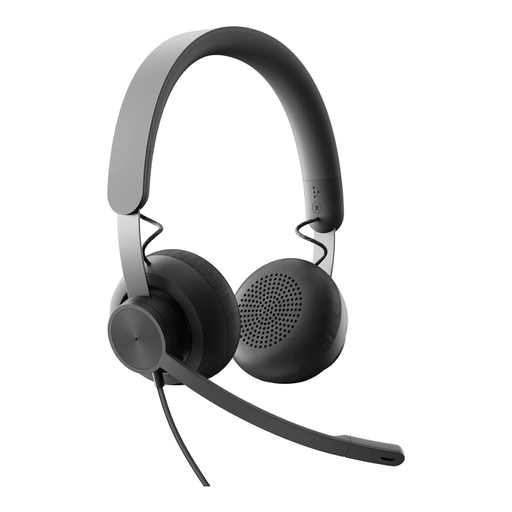 No image available
Logitech Business Zone Wired Teams Headset
A wired business headset could suit a dedicated tutorial space, provided the specific Teams variant works with your tutorial app.
If you want to adjust the volume and manage calls directly on the headset during short breaks, check that the specific variant has the controls you need. The cable limits how far you can move.
View at Joybuy
 No image available
JBL Quantum 400, wired over-ear gaming headset
This wired model could suit a fixed desk setup and occasional gaming; check that the connection is compatible with your computer.
The product name lists a 3.5 mm connection, USB and a flip-up boom microphone. The cable limits how far you can move around.
View at Joybuy
 No image available
ONIKUMA GT889, wireless gaming headset
If you want to switch between wireless and wired use while explaining, check that the specific connection works with your computer and tutorial app.
The product name lists 2.4 GHz wireless and a wired mode. It also lists a microphone; test how well it transmits your voice in your shared flat.
View at Joybuy
Frequently asked questions
For conversations in a shared flat, which helps more: ANC or a noise-reducing microphone?
The microphone’s performance is what matters for how clearly the other participants hear you. ANC in the headphones mainly affects the sounds you hear yourself; some models combine both features. Test the microphone with your tutorial app in your actual surroundings.
How do I set up my headset before my first tutorial?
First check the connection for the full model variant, then select the correct input and output devices in your tutorial app. Test the microphone, volume and mute controls with a practice call; with wireless devices, also check the charge level and, if needed, the USB receiver.
What should I consider for longer tutorials?
Choose a fit that will stay comfortable for the planned duration, and keep the volume at a suitable level. The German Social Accident Insurance highlights the risks of high sound pressure and strong isolation from your surroundings during prolonged or intensive use.
What if the headset I ordered online doesn’t fit or is faulty?
Check the cancellation terms for your specific online purchase; if the product is faulty, distinguish your statutory rights from any voluntary guarantee. The Consumer Advice Centre explains the difference; the terms of your specific purchase and the seller determine the details.
Can I simply record my online tutorial, including the participants’ voices?
The presence of a record button in your conferencing software doesn’t, by itself, mean that recording is permitted. The German Data Protection Conference and the Federal Commissioner for Data Protection and Freedom of Information note that recording involves processing personal data such as audio and video, and requires a legal basis. Whether a particular recording is permitted depends, among other things, on who is responsible, who is taking part and how the recording will be used.


