What should you look for when buying?
First check the signal path to your recording device. Then decide whether the speaker should wear headphones while recording and whether you need to hear the questions too.
| What you need |
What to check before buying |
Who is this important to? |
| Clear recording of one voice |
Check the microphone position and polar pattern of the specific version; listen to a saved test recording. |
If my main aim is to capture the speaker’s voice, I focus on microphone position and the recording itself. Around 33% of consumers prioritise clear recording of a single voice. |
| Compatible signal path |
Check the microphone and headphone plugs against the connections on your computer, recorder or interface separately. |
If I want to keep using my existing device, I need compatible connections for both the microphone and monitoring. Around 27% of consumers say connection compatibility is their top buying priority. |
| Comfort |
Try the headband, microphone boom and ear pads before a longer session. |
If I’m speaking while seated for a long time, the headset needs to be comfortable and the microphone needs to stay in position. Around 20% of consumers put comfort first. |
| Recording both voices |
Decide in advance whether the questions should be part of the recording; if needed, plan for a second microphone and recording channel. |
If I want my questions or comments to be part of the club’s story, I need to include the interviewer’s voice in my plans. Around 20% of consumers say recording both sides of a conversation is their top priority. |
Headsets and microphones at Joybuy
The following Joybuy options are headsets or earphones with a microphone, suited to recording one seated speaker. Before buying, check that the connection on your chosen model works with your recording device.
 No image available
ONIKUMA GT889 Wireless Headset
A possible option if you’re looking for a wireless headset and can check its connection to your recording device in advance.
The product name lists 2.4 GHz wireless, Bluetooth 5.4, wired use and 50 mm drivers.
View at Joybuy
 No image available
Jabra Engage 75 SE Wireless Stereo
A possible option if you’re looking for a stereo headset with a base station for a compatible computer connection.
The product name lists DECT, a USB-C to USB-A connection, and a stand and cable.
View at Joybuy
 No image available
Siukie CH25 Gaming Headset
This could suit you if your recording device has a compatible 3.5 mm audio connection and you’d like an over-ear headset.
The product name lists a wired 3.5 mm audio connection and USB for the LED lighting; according to the product details, USB isn’t the audio connection.
View at Joybuy
 No image available
Siukie H100 Gaming Headset
A possible choice if you’re looking for a wired headset with a microphone and your device supports its audio connection.
The product name lists USB and 3.5 mm. According to the product description, USB is for the lighting; audio uses the 3.5 mm connection.
View at Joybuy
 No image available
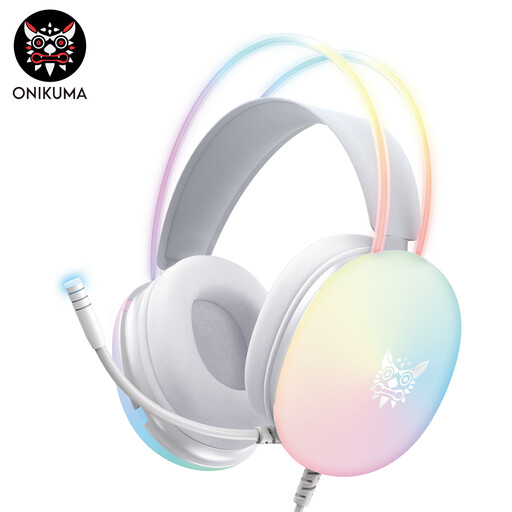
ONIKUMA X25 Earphones with Microphone
A possible option if you prefer earphones to an over-ear headset and your device has a compatible 3.5 mm audio input.
The product name lists a wired 3.5 mm connection and USB power; check which connection your recording device needs.
View at Joybuy
Frequently asked questions
Is a headset worn by the speaker enough for an interview?
If you only want to record the speaker, a suitably connected microphone worn by them may be enough. If you also want the questions to be clear in the recording, plan a separate, suitable recording channel for the interviewer and test both voices in advance.
Can I simply connect an analogue headset to an XLR input?
Not just because the plug fits. RØDE says the NTH-100M needs plug-in power when used with an XLR microphone input, along with suitable adapters. Audio-Technica lists a dedicated XLR microphone plug for the BPHS1. Check the instructions for the specific headset and your input.
What should I know about ear pads and cables?
Check which parts can be removed or replaced on the specific model. Audio-Technica lists replaceable cables and ear pads for the BPHS1; RØDE documents detachable ear and headband cushions for the NTH-100M. Ask the supplier whether suitable replacement parts are available.
What extra equipment might I need for recording?
That depends on the headset and the inputs on your recording device. For the NTH-100M with XLR, RØDE describes a suitable adapter; the BPHS1 needs a compatible XLR microphone input and a headphone output. Check the complete signal chain before deciding.
Can a club record and publish a conversation without the speaker knowing?
Under Section 201 of the German Criminal Code (StGB), recording privately spoken words without authorisation is prohibited; the provision also covers certain uses or disclosures of such a recording. Make sure everyone involved knows about the recording. Processing personal data also requires an appropriate legal basis; the Federal Commissioner for Data Protection and Freedom of Information generally points to the requirement to provide information when data is collected. Be clear separately about any planned publication, and don’t assume it is automatically covered by consent to the recording.


