What to look for when buying
First, check that the connection and controls work with your devices. Then assess separately whether your voice comes through clearly and whether you can hear the group well despite noise in the room.
| Priority |
What to check before buying |
Who it matters most to |
| Your voice amid noise in a shared house |
Microphone position and mute control; test your voice in the app you use |
If you often explain things or ask questions, your voice should come through clearly despite the usual noise in a shared house. Around 33% of consumers put voice clarity first. |
| Hearing others despite background noise |
Fit and noise isolation of the earcups; distinguish this from microphone noise reduction |
If conversations in the room distract you from following longer contributions, pay particular attention to the fit and how well the earcups block out noise while you listen. Around 27% of consumers prioritise listening without distractions. |
| Comfort over long periods |
Try the headband and ear cushions for the length of a typical session |
If your study group sessions run for a while, your headset should feel comfortable. Manufacturer information about weight or padding doesn’t tell you how it will feel to wear. Around 20% of consumers prioritise comfort. |
| Connection and controls |
Check whether it’s USB-A or USB-C and which adapters are included; for Bluetooth, check pairing and battery level |
If you switch between devices or places, you need a connection that works with your devices and can be selected in your video-conferencing app. Around 20% of consumers check connection and controls first. |
Joybuy products for study groups
The following Joybuy models are headsets with microphones for speaking and listening. Most are wireless, with one wired option. Check that the connections and features suit your devices and the conditions in your room.
 No image available
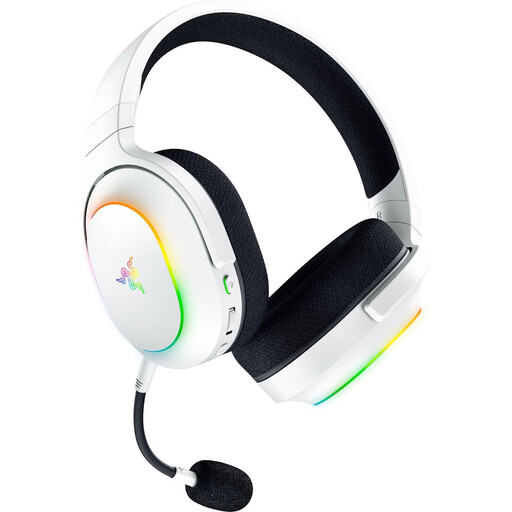
Razer Barracuda X Chroma, White
The listed 2.4 GHz and Bluetooth connections may suit you if you move between devices or places. Check which connection works with your device.
Detachable microphone; Bluetooth 5.3; stated battery life of up to 70 hours; weight 285 g. According to the product information, the HyperSpeed dongle is required for 2.4 GHz use with a PC or console. Wireless use requires a charged battery.
Joybuy
 No image available
JBL LIVE 770NC, White
The over-ear design with microphone may suit you for speaking and listening. Try the fit and noise isolation if conversations in your shared house distract you.
Wireless over-ear headphones with microphone and noise cancellation. The stated talk time is up to 33 hours; remember to charge them for wireless use.
Joybuy
 No image available
ONIKUMA GT889
The product information lists several connection types and a detachable microphone. Check that the connection works with your devices and that the controls suit your calls.
Listed connections are 2.4 GHz, Bluetooth and wired mode. The description mentions an adjustable headband and soft ear cushions; wireless use requires a charged battery.
Joybuy
 No image available
Razer Barracuda, Black
If you switch between devices, check that the listed wireless connections suit your set-up. Having a microphone doesn’t replace testing it on a call with the usual noise in your room.
Wireless headset with microphone; the product name lists SmartSwitch, 50 mm drivers and USB-C. Charging is required for wireless use.
Joybuy
 No image available
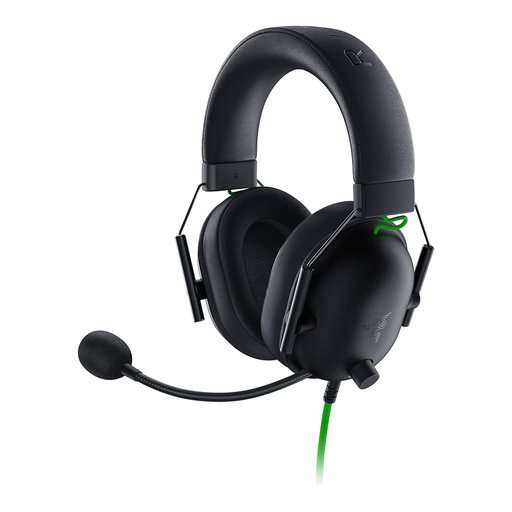
Razer BlackShark V2 X, Black
The wired model doesn’t need a battery. Before choosing it for your study group, check that the 3.5 mm connection is compatible with your device.
Wired headset with a 3.5 mm connection and microphone. According to the product information, a Y-splitter is required for PCs with separate audio and microphone sockets.
Joybuy
Frequently asked questions
How do I test my microphone and headphones before a study group?
Select the input and output devices you want to use in your video-conferencing app, then run its speaker and microphone test. Zoom plays back your microphone recording so you can check it. If possible, test with the usual noise in your room too.
Will a headset with microphone noise reduction also protect my hearing from noise in a shared house?
No. Information about the microphone relates to how your voice is transmitted. For listening, check the fit and passive noise isolation of the earcups separately. Explicitly listed ANC is another feature, but it’s no substitute for trying the fit.
How can I listen as safely as possible during long sessions?
The World Health Organization recommends keeping the volume low, taking regular listening breaks and wearing well-fitting, noise-reducing headphones in noisy surroundings rather than continually turning the volume up. This is general advice, not a set of measurements for a specific headset.
What are my rights if a headset bought online is faulty?
According to EU consumer information, consumers are entitled to a minimum legal guarantee of two years from receipt of the goods, with the seller responsible. A voluntary manufacturer’s warranty doesn’t replace these rights, and the right to cancel an online purchase is a separate matter.
What should I look for in the CE marking on a Bluetooth headset?
Where a product is subject to relevant EU harmonisation legislation and placed on the EU market, the German Federal Network Agency describes CE marking as a requirement. Check the documentation and marking for the specific model. The CE mark alone says nothing about microphone quality.


