Frequent speakers in a shared room
If you’re commenting on a draft as you go while other people can be heard in the house, it’s important that your voice comes across clearly.


If you speak frequently in a shared house, check how well the microphone picks up your voice when there are conversations in the background. Headphone ANC alone won’t ensure that colleagues in another room can hear you clearly. A suitable USB headset may be enough for a desktop computer, while a wireless model gives you more freedom to move but means you’ll need to consider the connection, adapter and battery. If several people in the same room need to speak, one personal headset doesn’t guarantee that everyone’s voice will be picked up reliably.
The German Social Accident Insurance recommends choosing a headset to suit the intended use and surroundings.
If you’re commenting on a draft as you go while other people can be heard in the house, it’s important that your voice comes across clearly.
If you’re following lengthy feedback on a text, consider how much isolation helps you, without assuming that headphone ANC will definitely block out voices. In tests of headphones from 2019/2020, the Federal Institute for Occupational Safety and Health found no particular potential for suppressing intelligible speech in the surrounding environment.
If you use different workstations or devices, the connection, controls and, where relevant, charging requirements need to suit how you work.
| Priority | What to check when buying | Who is it important to? |
|---|---|---|
| Making your own voice easy to understand | Microphone position and mute control; test a voice recording with similar background conversations. | If I speak up often, I want others to understand me despite the noise in a shared house. Around 33% of consumers put voice transmission first. |
| Hearing other people clearly | Try the fit and listening experience in the sort of noisy surroundings you’ll usually be in; assess headphone ANC separately from microphone performance. | If I need to follow lengthy feedback, I want to hear people clearly in meetings despite noise in the house. For around 27% of consumers, hearing clearly comes first. |
| Connection and freedom to move | Check that the connection or wireless adapter works with your device; for wireless models, check the exact version and what’s included. | If I move around while discussing a text or work on different devices, the connection needs to suit my needs. Around 20% of consumers put connection and mobility first. |
| Fit and awareness of your surroundings | Try the fit for the length of time you plan to wear it; consider whether you need to hear people or signals in the room. | If reviewing a text takes a while or I need to respond when someone speaks to me in the room, a comfortable fit and the right level of isolation matter. Around 20% of consumers prioritise comfort and awareness of their surroundings. |
Hearing less noise yourself doesn’t automatically mean the microphone will transmit less background noise from your shared house to the other participants. In tests of headphones from 2019/2020, the Federal Institute for Occupational Safety and Health found no particular potential for ANC to suppress intelligible speech in the surrounding environment.
Assess the listening experience and microphone pickup separately. If you speak often, test voice transmission in surroundings with a similar level of noise, if possible.
USB connections and included accessories can vary between versions.
Check the exact version against your device and make sure it includes the connection, adapter and any other accessories you need.
Greater isolation can make it harder to hear people or important signals around the house.
Before choosing, consider whether hearing the meeting is your main priority or whether you also need to stay aware of your surroundings. The German Social Accident Insurance notes that a one-ear headset makes it easier to hear what’s happening around you.
The H390 is a wired USB option for a desktop computer and online text discussions.
With its foldable design, Bluetooth and headphone ANC, the Evolve2 65 Flex is designed for working on the move.
The Voyager Focus 2 range includes wireless stereo headsets with a microphone boom and three-level headphone ANC.
The IMPACT 100 is available as a wired option for calls, in mono and stereo versions.
The Joybuy products below include wired USB headsets as well as wireless stereo and mono models for personal online conversations.
 No image available
For frequent contributions at your computer, this wired version has an adjustable microphone and on-ear controls.
Stereo playback, a USB-A connection and a mute indicator are listed. The noise-cancelling microphone doesn’t guarantee clear voice transmission when there are conversations in the background in a shared house.
The product description lists PC, Mac and laptop as compatible devices.
 No image available
If you want to move around while talking, this wireless stereo headset offers a DECT connection with a base station.
The product information lists a range of up to 150 m and a noise-cancelling microphone.
A USB-C-to-USB-A cable is listed for use with a PC, while a telephone adapter is provided for a desk phone. Make sure the connection suits your device.
 No image available
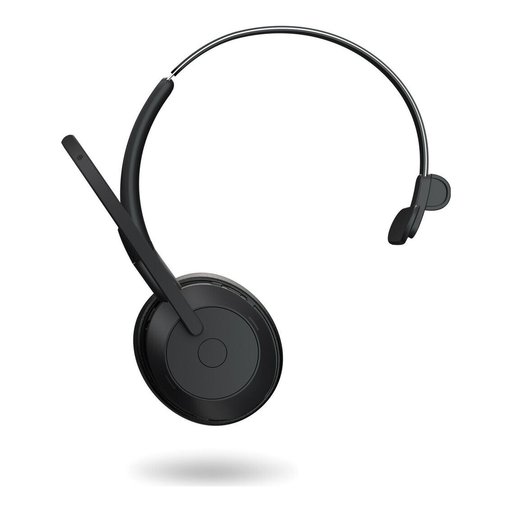
If you want to keep one ear free to hear what’s happening around you while talking, this version is described as a wireless mono headset.
Bluetooth, a wired USB-C connection and ANC are listed. The product description gives up to 37 hours of wireless use without ANC and up to 24 hours with ANC.
The microphone is described as noise-cancelling; this claim is no substitute for testing your voice in the presence of background noise in a shared house.
 No image available
This mono version leaves one ear free to hear sounds in the room during online conversations and has a microphone boom.
USB-A, in-line controls and an LED mute indicator are listed. The product information gives its weight as 85 g.
The product description lists PC, Mac and laptop as compatible devices.
 No image available
If you want to stay aware of your surroundings during online conversations, this wired mono version gives you a one-ear headset.
USB-C and USB-A connections, as well as passive noise isolation, are listed.
The description lists an integrated microphone and an external call control with mute. Check that the connection suits your computer’s ports.
No. Headphone ANC and the sound picked up by your microphone are two different things. In tests of headphones from 2019/2020, the Federal Institute for Occupational Safety and Health found no particular potential for ANC to suppress intelligible speech in the surrounding environment. If possible, test the microphone in conditions similar to those you’ll be speaking in.
First, check that the connection or wireless adapter for the exact version works with your computer. Position the microphone boom, select your preferred input and output devices in your meeting software, then make a short recording to check the volume, mute control and background noise.
Check the fit and volume for the length of time you plan to wear the headset, and choose a level of isolation that suits the situation. The German Social Accident Insurance notes that heavy isolation can make warning signals harder to hear.
The models described are personal headsets designed to pick up the wearer’s voice; that doesn’t mean they’ll reliably pick up everyone in the room. If several people need to be heard, check that the microphone and speaker setup is suitable for the whole room before choosing.