For your own contributions to come through clearly, focus on the microphone and voice pickup in office noise similar to your own working environment. For listening, comfort and how well the headset blocks out sound matter too. ANC in the headphones doesn’t prove that it will block out conversations: when the German Federal Institute for Occupational Safety and Health tested headphones in 2019/2020, it found no evidence of any particular ability to suppress background speech. A wired headset works well if you’re staying at your computer and don’t want a wireless connection. A wireless headset gives you more freedom to move, but you’ll need to check the connection, the specific version and the battery details.
Which headset is right for you?
Those who speak up in an open-plan office
If you’ll be speaking during your mentoring session, check how the microphone picks up your voice against the kind of background noise you’d typically hear from nearby colleagues. Testberichte.de treats the microphone as a separate factor to consider alongside audio quality.
Those who want to listen attentively
If you’ll be listening to longer explanations, look for a comfortable fit and the level of noise isolation that suits you. When it tested headphones in 2019/2020, the German Federal Institute for Occupational Safety and Health found no evidence that ANC was particularly effective against background speech.
Those who switch between devices
If you’ll be joining on a computer and might also use a phone, compare the connections, wireless options and accessories included with the specific version. Jabra and Logitech’s product information shows that these features vary by model.
What should you look for when buying?
For a mentoring conversation in a noisy office, the main things to consider are how clearly your voice comes through, how well you can hear, whether the connection suits your setup and how much awareness of your surroundings you want to retain.
| What matters to you |
What to look for when buying |
Who is this especially important for? |
| Making sure your own contributions come through clearly |
Check for a microphone boom or stated microphone noise cancellation; if possible, listen to a recording made in similar office noise. |
When I’m speaking during a conversation, I don’t want nearby conversations to drown me out. Around 36 % of consumers put clear voice pickup first. |
| Understanding your mentor and listening comfortably |
Consider the fit and ear cushions; assess ANC in the headphones separately from microphone processing. |
When listening to longer explanations, I want to be comfortable without assuming that ANC will block out background chatter. Around 29 % of consumers prioritise focused listening and wearing comfort. |
| Getting the right connection and a reliable setup |
Check that the connection, meeting device and items included match the exact version; for wireless models, check the talk time for the settings you’ll use. |
If I want to join the session without connection problems, my headset and devices need to work together. Around 21 % of consumers put a suitable connection and a reliable link first. |
| Staying approachable in the office |
Consider whether keeping one ear free matters more to you than stronger noise isolation; choose the style of headset accordingly. |
If I need to hear what’s happening in the office during the session, I want to stay aware of my surroundings. Around 14 % of consumers prioritise being approachable in the office. |
Common mistakes when buying a headset
-
Assuming ANC will block out chatter or guarantee a good microphone
ANC in the headphones, passive noise isolation and microphone processing work in different ways. What you hear doesn’t automatically tell you how your voice will sound to the other person. When it tested headphones in 2019/2020, the German Federal Institute for Occupational Safety and Health found no evidence that ANC had any particular ability to suppress background speech.
Check listening quality and microphone pickup separately. If possible, test a recording in similar office noise and find out whether you can use a quieter space for the conversation.
-
Comparing only the model family name
Connections, platform versions and what’s included can vary between versions. A similar-sounding model name doesn’t prove that the accessories or features are the same.
Before you decide, compare the full model name, connection, platform version and what’s included.
-
Comparing battery figures without checking the settings they’re based on
Jabra states that the Evolve2 55 offers up to 16 hours of talk time with ANC and the busylight switched off, or up to 10 hours with ANC and the busylight switched on. These figures are therefore based on different operating conditions.
Compare battery figures only when the settings match, and charge your headset before an important session.
Key headset brands at a glance
Logitech
The Zone Wired range is worth considering for a fixed USB workstation; the Zone 300 is a wireless alternative with a microphone boom.
- Logitech describes the Zone Wired 2 as having a flip-up, noise-cancelling microphone boom and USB-C with a USB-A adapter.
- These features aren’t independent evidence that speech will come through clearly in an open-plan office; the Zone 300 isn’t an identical wired version.
Jabra
The Evolve2 55 and Evolve2 65 Flex are wireless options for work calls, with different versions and accessory configurations.
- Jabra lists microphone noise cancellation and ANC for the Evolve2 55.
- Talk time depends on the ANC and busylight settings; check the exact version for certifications and accessories.
HP Poly
The Voyager Focus 2 is a wireless stereo option with ANC in the headphones and a microphone boom.
- HP describes the model as featuring three-level hybrid ANC and Acoustic Fence technology.
- This manufacturer information doesn’t independently show how well the headset handles background chatter in a particular mentoring office; check the exact version and its features.
EPOS
The ADAPT range includes headsets for mobile and hybrid working; ADAPT 260 is a documented wireless product line.
- EPOS describes the ADAPT range as featuring ANC, noise-cancelling microphones and sound-isolating ear cushions.
- That doesn’t confirm that every ADAPT 260 version has all these features; check the specific model number against the features you want.
Yealink
The BH70 is a wireless office headset option for calls when you need to move around.
- Yealink lists three microphones with noise processing for the BH70.
- This is the manufacturer’s description, not an independent comparison of voice quality against other models.
Headsets for mentoring conversations in the office
This selection includes wired USB and 3.5 mm headsets, as well as wireless stereo and mono models for office conversations.
 No image available
Logitech 960 Stereo Headset
The wired USB connection is a good fit if you’re staying at your computer and don’t want a wireless connection.
USB connection, 2.4 m cable, adjustable microphone boom, stereo playback, and volume and mute controls on the cable.
View at Joybuy
 No image available
Jabra Evolve2 75 Wireless PC Headset
This wireless stereo headset could suit you if you want to move around during the session or use several compatible devices.
Bluetooth 5.2, USB-C connection, pairing with two devices, USB-C adapter and charging stand. Eight MEMS microphones and HD Voice are listed for calls; ANC is also included. These stated features are no substitute for testing how it sounds in office noise.
View at Joybuy
 No image available
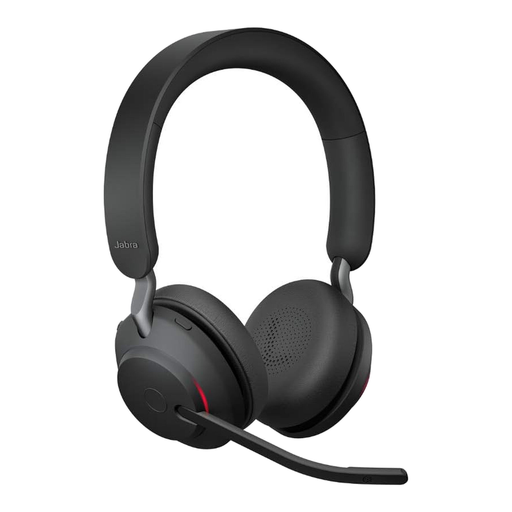
Jabra Evolve2 65 Wireless PC Headset
This wireless stereo version could suit you if you want to move around during calls and prefer to listen with both ears covered.
USB-C Bluetooth adapter, rotatable microphone boom and three microphones. Talk time is stated as up to 37 hours; check the operating conditions for the specific version.
View at Joybuy
 No image available
Logitech H151 Stereo Headset
This wired model is an option if your device has a compatible 3.5 mm connection.
3.5 mm connection, adjustable microphone, and volume and mute controls on the cable.
View at Joybuy
 No image available
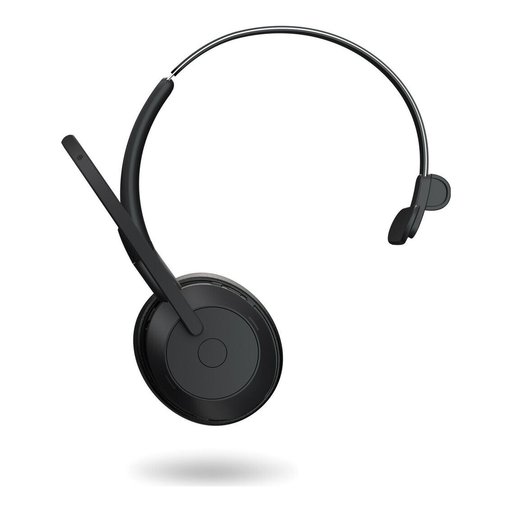
Jabra Evolve2 55 Mono Wireless Headset
The single-ear design could suit you if you want to keep one ear free to hear what’s happening in the office during your session; it offers less isolation while listening than a stereo headset.
Bluetooth 5.2, USB-C connection, USB-C adapter and ANC are listed. The microphone is described as noise-cancelling; this isn’t independent evidence of voice quality in a particular office.
View at Joybuy
Frequently asked questions
Will ANC automatically help my mentor hear me more clearly over nearby conversations?
No. ANC in the headphones affects what you hear; you’ll need to check microphone pickup separately to find out how you sound to the other person. When it tested headphones in 2019/2020, the German Federal Institute for Occupational Safety and Health found no evidence that their ANC was particularly effective at suppressing background speech. The tests don’t cover every headset available today.
What should I set up before my first mentoring session?
In the conferencing software you’re using, select the headset explicitly as both the input and output device, then make a short test recording. Check the microphone position and mute control, and, for a wireless model, check the adapter and battery level. The controls available depend on the specific version.
Does an additional manufacturer’s guarantee replace my statutory rights?
No. For a consumer purchase from a retailer in the EU, you’re generally entitled to a statutory guarantee of at least two years from the date you receive the goods. An additional commercial guarantee can’t reduce these rights; for statutory claims relating to a fault, contact the seller.
What are the rules on online returns and Bluetooth headset compliance?
For a standard online consumer purchase, you generally have a 14-day right to cancel; check separately for any exceptions and return costs. Among other things, the German Federal Network Agency oversees Bluetooth products under radio equipment legislation, checking matters such as CE marking, product identification and the declaration of conformity. A product’s listing alone doesn’t prove that it complies.


