Presenters in open-plan offices
When other people are talking nearby, the main thing is whether your audience can hear you clearly.


For presentations at a fixed computer, a wired USB headset with specified microphone noise cancellation is a sensible place to start. If you move between workstations, you could consider a wireless model, provided the adapter and battery charge are right for the session. ANC for what you hear yourself does not tell you how clearly your voice will come across: CHIP was critical of the Jabra Evolve2 65 Flex microphone in noisy conditions. This finding does not automatically apply to other models.
When other people are talking nearby, the main thing is whether your audience can hear you clearly.
If you stay in one place, you can check the connection and mute function before your presentation, without needing to plan for wireless freedom of movement.
If you change workstations or move around while speaking, consider the connection, the adapter you need and the battery charge.
A good fit if: you present from the same computer and don't want to rely on a battery during the session.
Worth considering: the cable limits your freedom of movement; check that the connection and mute function work with the computer you'll be presenting from.
A good fit if: you want to stand up or move between workstations during your presentation.
Worth considering: check the connection and battery charge before your presentation; the adapter and exact model variant matter.
| What matters | What to look for when buying | Who should pay particular attention |
|---|---|---|
| Clear voice transmission | Check for a boom microphone and specified microphone noise cancellation; listen to a voice recording made in similar office noise. | When presenting in an open-plan office, I want to be understood despite nearby conversations; around 33% of consumers put voice transmission first. |
| Listening without distractions | Check the fit of the earcups and the ANC on the specific model; assess microphone performance separately. | If I need to answer questions, I want to hear contributions despite office noise; around 27% of consumers prioritise listening without distractions. |
| Connection to a fixed computer | Check the USB-A or USB-C connection, select the microphone input and test the mute function in advance. | At a fixed presentation desk, I want to be able to set up the connection reliably before I begin; around 20% of consumers put an easy computer connection first. |
| Freedom of movement | Check the exact device variant and included adapter; check the battery charge and connection before your presentation. | If I move around while explaining, I don't want to be restricted by a cable; around 20% of consumers prioritise freedom of movement. |
ANC in the earcups helps you hear; it does not tell you how effectively the microphone reduces nearby conversations in the audio it transmits.
Check both functions separately and listen to a voice recording made in office noise as similar as possible to your own.
Variants in the EPOS IMPACT 1000 family differ in features such as wearing style, ANC and equipment. UC and Teams versions may also have different model numbers.
Compare the full model number, UC or Teams version, connection and the accessories actually included.
Depending on the variant, you may also need to allow for a separate adapter or charging station.
With a wireless headset, you also need to check the pairing and battery charge, as well as the microphone.
Test the connection with the computer you'll be presenting from well in advance. If you stay in one place, check out a wired USB option too.
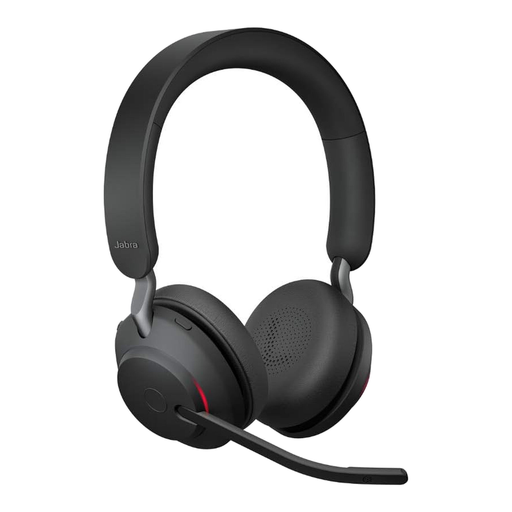
The Evolve2 range includes wireless headsets for office calls and more compact options for people who move between workstations.
The Blackwire 8225 is a wired USB option, while the Voyager Focus 2 is wireless.
The Zone Wired 2 for Business is a wired USB option for presentations at a fixed workstation.
The IMPACT 1000 family includes wireless variants with different wearing styles and features.
The BH74 is a wireless office headset whose microphone noise cancellation and ANC specifications are worth checking.
Joybuy headsets for presentations at a computer: wired USB and 3.5 mm models, plus a wireless option.
 No image available
A good choice for a fixed presentation desk if your computer has the USB-A connection you need.
Adjustable noise-cancelling microphone; volume and mute controls on the earcup, plus a mute indicator.
 No image available
A wireless option for presenters who want to move around or change workstations during a presentation.
The product name specifies a USB-C Bluetooth adapter. Check the connection and battery charge before your presentation.
 No image available
For a presentation computer with a compatible 3.5 mm socket; check the connection on the device you plan to use.
Adjustable noise-cancelling microphone, with volume and mute controls on the in-line control.
 No image available
A wired option for presentations at a fixed computer, provided USB-A is available.
The product name specifies volume control and an in-line mute function with an LED indicator.
 No image available
For a fixed presentation computer with a USB-A connection; check the device's input and adapter requirements in advance.
The product name identifies this as the wired Evolve2 30 SE version. Check the mute function before your presentation.
No. ANC in the earcups and noise reduction at the microphone are different functions. Listen to a voice recording made in similar conditions; CHIP reported that the Jabra Evolve2 65 Flex microphone struggled in noisy conditions.
Check the connection, select the headset as the microphone input on the computer you're using, and check the mute function. With a wireless model, you also need to check the connection and battery charge.
If you have a wireless model, keep the right adapter with the headset and charge it before your next session. Jabra provides Jabra Direct software for some settings and updates; if necessary, check with your IT team before installing it on a work computer.
For a consumer purchase made remotely, the EU portal explains that you generally have a 14-day right to cancel from the date of delivery and a statutory guarantee of at least two years for faulty goods. Consumer rights cannot automatically be applied to a purchase made by an employer.
No. The Federal Environment Agency recommends disposing of electrical waste separately, for example at a recycling centre or an appropriate collection point. If the batteries can be removed, they should be disposed of separately.