For a tutorial in a noisy office, microphone noise cancellation is essential if you want participants to hear you clearly. ANC in the earbuds serves a different purpose and isn’t enough on its own. Choose between a wired headset that doesn’t need charging and a wireless model that gives you more freedom to move around. Also check that the fit, connection and, where applicable, the USB adapter supplied are right for your workplace.
Which headset is right for you?
For instructors working among chatty colleagues
If you give longer explanations, check whether the microphone reduces the sound of people talking at nearby desks in the audio it picks up. Microsoft Learn and Logitech describe relevant features for certain devices and models. A test call in your own office can help you choose.
For instructors who take lots of questions
If you need to hear participants over office noise, the fit and sound isolation of the ear cushions matter. ANC can help you hear, but it doesn’t replace microphone noise cancellation. Testberichte.de and Jabra cover models and features that are relevant to this choice.
For instructors who move between workspaces
If you move around while explaining, check the connection, battery life and any USB accessories you’ll need together. Microsoft Learn explains how Bluetooth connections for Teams on a PC may differ, while HP Poly gives wireless use and talk time as manufacturer specifications for certain models.
What should you look for when buying?
First, check what your participants will hear, then consider how well you’ll be able to hear their questions. Microsoft Learn distinguishes between capturing your own voice and picking up nearby voices on Teams devices.
| What matters |
What to check |
Who it matters most to |
| Make sure your voice comes through clearly |
Check for microphone noise cancellation and a boom mic. For Teams, also look for the exact device certification. |
If I’m explaining something while colleagues nearby are talking, I don’t want their voices to drown out my instructions. This is the top priority for around 33% of consumers. |
| Hear questions clearly |
Check the fit of the ear cushions and passive noise isolation. ANC affects what you hear; it doesn’t automatically change the audio picked up by the microphone. |
If I need to hear questions over office noise, I look for the right level of isolation around my ears. Around 27% of consumers say being able to hear clearly is their top priority. |
| Stay connected throughout the tutorial |
For USB, check the port on your computer. For Bluetooth, check the battery life and connection, and whether you’ll need an adapter. |
If I don’t want connection problems to interrupt a session, choosing the right port or wireless connection is essential. Around 20% of consumers put connection stability first. |
| Stay comfortable during long sessions |
Check the headband, ear cushions and whether you’d prefer a mono or stereo fit. Comfort is personal. |
If my tutorial includes longer explanations and Q&A sessions, I want to be able to wear a headset that feels comfortable. Around 20% of consumers put comfort first. |
Common buying mistakes
-
Assuming ANC means the microphone is good at filtering noise
Noise reduction in the earbuds can help you hear more clearly. But it doesn’t automatically tell you how much background conversation the microphone will pick up.
Check both features separately and look for a microphone demo in a similar office environment.
-
Assuming similar model names mean the same features
USB-A or USB-C, Teams or UC versions, and the accessories included can all vary. Logitech Zone Wired and Zone Wired 2, for example, are different models.
Check the full model name, connection and items included against what you need for your computer.
-
Choosing wireless without considering how long your sessions last
A stated battery life doesn’t mean the battery will be charged, or that the specific connection will suit your tutorial.
Check the talk time for the exact model, plan when you’ll charge it and find out whether you can keep using it with a wired connection.
Brands to consider
Jabra
The Evolve2 65 Flex is a wireless, foldable option with ANC and a noise-cancelling microphone, designed for changing work locations.
- Jabra describes ClearVoice as a filter for background noise.
- CHIP describes the model as lightweight and compact, but notes that the microphone struggles with heavy background noise. So don’t choose it based on the ANC specification alone.
HP Poly
The Voyager Focus 2 combines a wireless stereo headset with a boom mic, Acoustic Fence and multi-level ANC.
- HP lists up to 25 hours of talk time for this model, as well as the option to use it with a wired connection.
- Battery life is a manufacturer’s specification. Check the exact connection setup and plan charging around your session.
Logitech
The Zone Wired 2 is a USB option for a fixed tutorial workstation, with microphone noise cancellation and ANC for what you hear.
- Logitech describes reducing nearby conversations and keyboard noise as features of this model.
- Logitech’s adaptive ANC mode uses Logi Tune, so you’ll need the relevant software configuration to use this setting.
EPOS
The wired IMPACT 400 series includes USB headsets for calls in open-plan offices; features vary by version.
- EPOS lists microphone filtering and, for the version shown, Teams Open Office certification.
- Check ANC, connection and included accessories for the exact version. Manufacturer specifications aren’t a substitute for an independent comparison test.
Yealink
The UH37 is a wired USB office headset available in mono and dual versions.
- Yealink lists two noise-cancelling microphones and mute controls operated by a button or by lifting the boom mic.
- Before ordering, check which connection type comes with the specific version.
Joybuy products for office tutorials
This selection includes wired and wireless headsets and headphones with microphones for calls on your computer. When choosing, check that the microphone, connection and fit are right for your particular workspace.
 No image available
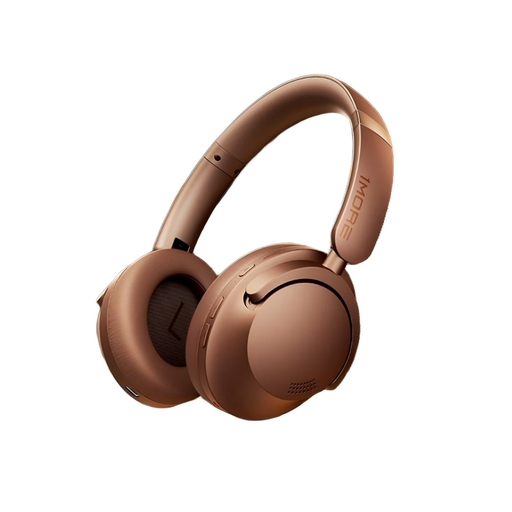
1MOREHQ51 SonoFlowPro Global Mocha Brown
These wireless over-ear headphones are an option if you want more freedom to move around during your tutorial.
The title lists Bluetooth and 90 hours of playback time. The description lists two microphones with AI noise reduction for calls.
Joybuy
 No image available
Logitech Zone True Wireless Earbuds, Graphite
These wireless in-ear headphones are described as suitable for work calls. Check whether this style is comfortable for you during longer tutorials.
The product description lists ANC, a noise-cancelling microphone and multipoint Bluetooth.
Joybuy
 No image available
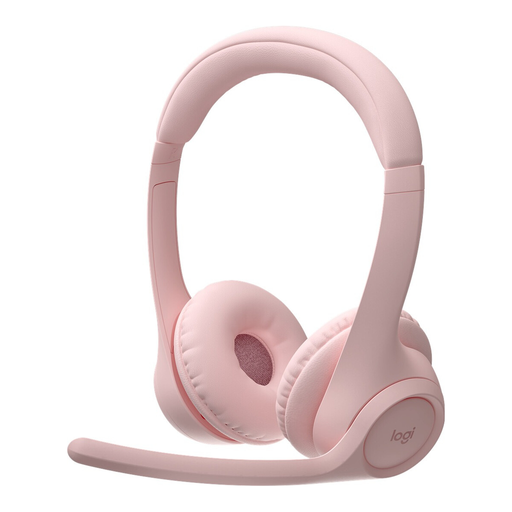
Logitech Zone 300 Wireless Bluetooth Headset, Pink
This wireless headset with a boom mic is an option for computer-based tutorials if you’d like to move around while talking.
The product description lists two beamforming microphones, algorithms to reduce background noise, up to 16 hours of talk time and a weight of 122 g. Flip the boom mic up to mute it.
Joybuy
 No image available
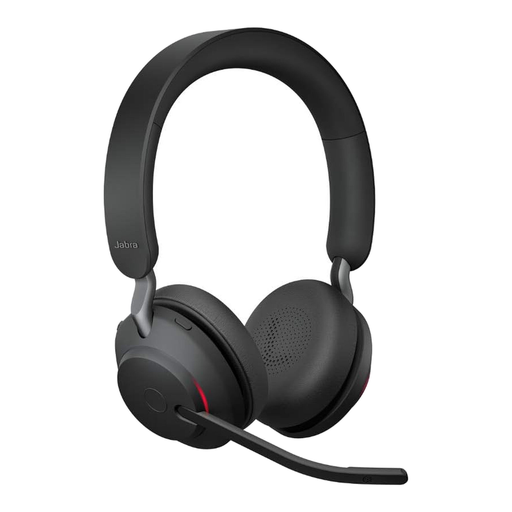
Jabra Evolve2 65 Wireless PC Headset, UC, USB-C Bluetooth Adapter, Black
This wireless PC headset is an option for spoken tutorials if you prefer a boom mic and the freedom to move around.
The product description lists three microphones, a rotatable boom mic, UC certification and a USB-C Bluetooth adapter. Battery life is listed as up to 37 hours.
Joybuy
 No image available
Siukie CH25 Wired Over-Ear Headset, Blue
This wired model is an option for a fixed tutorial workstation if you don’t want to charge a headset battery.
The title lists USB and 3.5 mm connections. The description lists a unidirectional microphone with noise cancellation for voice transmission.
Joybuy
Frequently asked questions
Is ANC enough to stop participants hearing colleagues sitting near me?
No. ANC in the earbuds helps you hear more clearly. Also check the microphone’s noise cancellation. For Teams, the ‘Premium Microphone for Open Office’ certification specifically indicates that the device is designed to reduce nearby voices.
How do I set up my headset before a tutorial?
In your meeting app, select your actual headset as the microphone and speaker, then test a recording with typical office noise in the background. With Teams, controls and direct Bluetooth connections may depend on the certified device and connection method.
What should I bear in mind for longer use and care?
Check the fit and condition of the ear cushions regularly, and charge wireless models before longer sessions. Refer to the instructions for the specific version to find out whether the cushions can be replaced and how to clean them.


