What should you look for?
First, check which connection you need. Then make a test recording to see whether the microphone position, recording level and fit work for your tour.
The figures show the main buying priority chosen by consumers selecting a headset for a virtual tour.
| Priority |
What to look for |
Who is this especially important for? |
| Vocal expression and emphasis |
Record a test with quiet, normal and particularly emphatic passages; listen to the saved file for clipping and plosive sounds. |
If I switch between calm narration and strong emphasis, I want to be able to assess both in the recording. Around 31% of consumers put vocal expression first. |
| Background noise and room echo |
Test the headset where you’ll actually be recording and, if needed, angle the microphone boom to the side of your mouth. A directional microphone alone can’t guarantee an echo-free recording; Shure describes this limitation in microphones generally. |
If fan noise, room echo or plosive sounds could affect my recording, I want to check how the room and microphone work together. Around 25% of consumers prioritise having the cleanest possible recording environment. |
| Connection and signal path |
Check the exact model variant and its inputs. The supplied TRRS cable is required for the microphone function of the RØDE NTH-100M; for an XLR connection, RØDE also specifies Plug-in Power. |
If I want to use the computer or interface connections I already have, the exact variant needs to work without unsuitable adapters or a missing power supply. Around 25% of consumers prioritise having the right recording connection. |
| Comfort during longer takes |
Check the fit for the length of session you have planned, then listen to the saved recording through the headset. If needed, check whether replacement ear pads or cables are available for the specific variant. |
If I’m recording longer passages, I want the fit and monitoring to remain comfortable. Around 19% of consumers prioritise comfort and being able to monitor longer takes. |
Joybuy product options
This Joybuy selection includes headsets with boom microphones that could be a useful starting point for a voice test. Before recording, check the exact connection and listen to your saved narration for yourself.
 No image available
JBL Quantum 360P Wireless Gaming Headset, White, 22h Battery
You could try the described boom microphone for a voice test; listen to the recording to decide whether it’s suitable for a finished tour.
Bluetooth 5 and a detachable 3.5 mm cable are listed. The microphone is described as flip-up and mutes when raised.
View at Joybuy
 No image available
ONIKUMA GT889 Wireless Gaming Headset with LED Lighting
The flexible, detachable microphone is described as being for voice communication; listen to a test recording before choosing this headset for a tour.
Connection options listed include a 2.4 GHz USB receiver, Bluetooth 5.4 and wired use.
View at Joybuy
 No image available
Logitech G PRO X Gaming Headset, Black, USB
It could be suitable for recording voice on a PC if the supplied USB sound card works with your setup; check the sound with a saved test recording.
The description lists a detachable cardioid microphone and Blue VO!CE voice filters. A cable and Y-splitter are also included.
View at Joybuy
 No image available
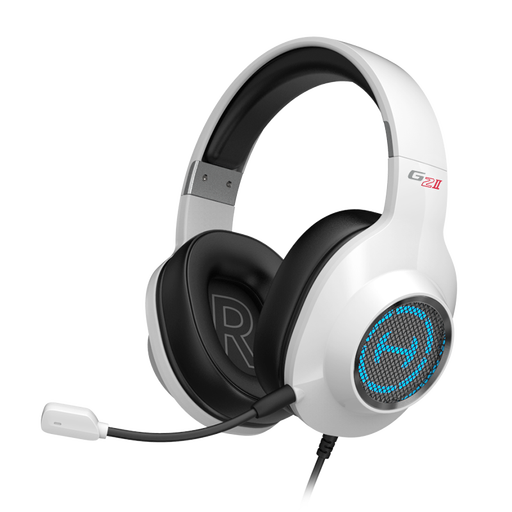
EDIFIER G2II USB Gaming Headset for PC, White
You could try this wired USB headset with microphone for a voice test on a compatible device; the description doesn’t establish that it’s especially suitable for narration.
The product description lists software options for equaliser and microphone settings, as well as a noise-cancelling microphone for voice communication.
View at Joybuy
 No image available
Siukie L200 Wired Over-Ear Gaming Headset with Mic
This over-ear headset with a flexible microphone is worth considering for a voice test; only listening back will tell you whether the recording works for your tour.
USB and 3.5 mm audio connections are listed. The description also specifies a noise-cancelling microphone.
View at Joybuy
Frequently asked questions
Is a headset designed for phone calls enough for an expressive spoken tour?
You can’t tell from its suitability for calls alone. Record some calm and emphatic passages, then assess the saved recording; Logitech specifically describes the H390 as being for video calls.
How do I connect a headset with an XLR microphone signal?
Check the microphone input and headphone output on your recording device separately. The Audio-Technica BPHS1 in the version described uses a 3-pin XLR connection for the microphone and a 6.3 mm connection for the headphones. The RØDE NTH-100M uses its TRRS cable and a splitter; RØDE also specifies a suitable Plug-in Power supply when connecting its microphone to XLR.
How can I reduce plosive sounds and room echo?
Try angling the microphone boom to the side of your mouth, then listen to a test recording made in the actual recording space. Shure points out that a microphone can’t fix poor room acoustics on its own. An independent Bonedo review found that the beyerdynamic MMX 300 PRO was susceptible to plosive sounds.
Which extra connections or parts should I check before buying?
Check that your device supports the connection you need and whether you’ll require cables, a splitter or a suitable power supply. The supplied TRRS cable is needed for the microphone function of the RØDE NTH-100M. If you plan to use it for longer periods, you can also check whether replacement ear pads or cables are available for the specific variant.
Do consumers have a statutory right to cancel online purchases in Germany?
Consumers generally have a right to cancel a distance contract; section 355 of the German Civil Code (BGB) sets out a 14-day period. Section 312g of the BGB includes exceptions, including for certain unsealed hygiene products. Whether an exception applies to a specific order depends on the product and the circumstances of the contract. These statutory provisions are published by the Federal Ministry of Justice and the Federal Office of Justice on the “Laws on the Internet” website.


