
Lieferung heute & morgen

Qualitätsgarantie

Willkommens-Angebote freischalten: KOSTENLOSE Lieferung | Bis zu 80 % RABATT | Kostenlose 30-Tage-JoyPlus-Testphase
App herunterladen
Choosing the right gaming PC case is crucial for the performance, longevity, and aesthetics of your system. However, the market is flooded with models whose marketing promises are often more style than substance. A visually appealing case can quickly turn into a thermal nightmare or make it impossible to install modern components. This guide will help you navigate common pitfalls and make an informed decision based on objective criteria.
Before we dive into the important specifications, let's look at three typical problems that often lead to frustration when choosing a PC case:
To avoid these problems, you should base your selection on a few non-negotiable technical parameters. These three points are central to any PC build.
Compatibility is everything. Before buying, check the manufacturer's specifications for the following dimensions to ensure all your components will fit:
A good cooling concept is the key to a stable and quiet system. Look for cases that allow for flexible and effective cooling.
A well-designed case saves time and frustration during assembly and later maintenance.
Based on the criteria above, we have compiled a few models for different user profiles.
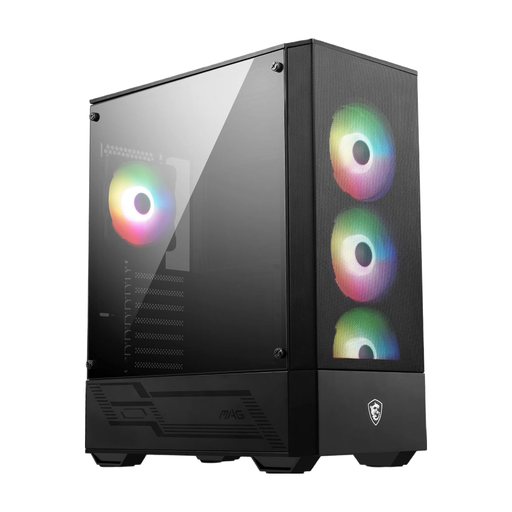
Why This Fits Their Persona: Ideal for users looking for a solid foundation for their first gaming PC without breaking the bank. It offers essential features like pre-installed fans and a mesh front, which aren't a given in this price range.
The wide mesh front bypasses the "glass front trap," ensuring good airflow. With four pre-installed 120mm ARGB fans, solid baseline cooling is provided right out of the box.
Supports ATX motherboards and has room for GPUs up to 330mm. The integrated 1-to-6 ARGB hub simplifies lighting control.
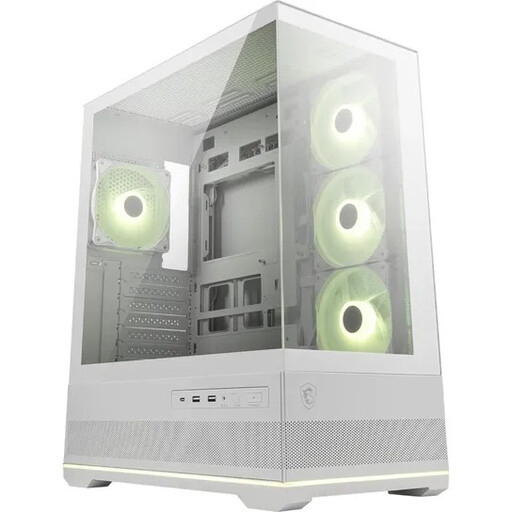
Why This Fits Their Persona: For PC builders who want to showcase their hardware as if in a display case. The white PC case with 270° panoramic glass offers an unobstructed view of the components and RGB lighting.
Despite the focus on glass, cooling is not neglected. Side air intakes and support for up to 10 fans ensure good air exchange. The dual-chamber design separates the power supply and cables from the main heat-generating components.
Three pre-installed reverse-blade fans on the side display their lighting without the obstructive fan frame. It offers space for GPUs up to 400mm and a 360mm radiator at the top.
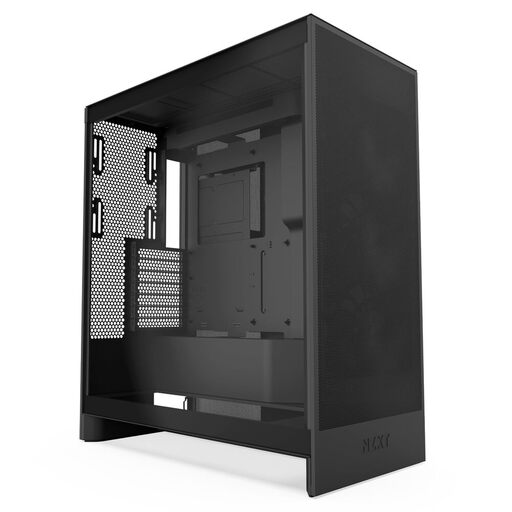
Why This Fits Their Persona: For users whose top priority is maximum cooling performance. This case is purpose-built for high airflow to keep even the most demanding hardware running at low temperatures.
This case is the antithesis of the "glass front trap." The perforated front and top panels maximize airflow. It also offers generous space, which eliminates compatibility issues with large radiators (up to 420mm) and long GPUs from the outset.
Outstanding cooling potential with support for large radiators and a dedicated mounting option for bottom fans for direct GPU cooling. The intuitive cable management system with wide channels and Velcro straps facilitates a clean build.
We have compiled a complete, real-time list of products that fully satisfy these strict selection criteria and UK safety regulations.
How many case fans are necessary for a gaming PC? For a typical gaming PC, a configuration with at least three fans is recommended: two at the front for fresh air intake and one at the rear for warm air exhaust. For high-end systems, additional fans at the top (exhaust) or bottom (intake) can further improve cooling performance.
Mid-Tower or Full-Tower: Which case is right for me? A mid-tower case is the right choice for most users. It offers sufficient space for standard ATX motherboards and the most common components. A full-tower is only necessary if you have special requirements, such as installing E-ATX motherboards, multiple graphics cards, or complex custom water-cooling loops with several large radiators.
How important is a USB-C port on the front of the case? A USB-C port on the front I/O panel is a feature of modern cases and offers great convenience. It allows for the quick connection of external SSDs, smartphones, or other peripherals without having to reach around to the back of the PC. Make sure your motherboard has the corresponding internal header to use the port.