
Lieferung heute & morgen

Qualitätsgarantie

Willkommens-Angebote freischalten: KOSTENLOSE Lieferung | Bis zu 80 % RABATT | Kostenlose 30-Tage-JoyPlus-Testphase
App herunterladen
A high-end PC will not automatically suit every type of user. Impressive model names, powerful graphics cards and eye-catching cases can distract from important details: too little RAM, an unsuitable platform or a power supply without sufficient headroom. If you are buying a powerful desktop PC in the UK, you should therefore look beyond individual components and consider how the entire system works together.
An NVIDIA RTX 5080 or RTX 5070 Ti may be suitable for gaming, 3D rendering and AI applications. However, how well it performs in practice also depends on the processor, cooling system, power supply and available graphics memory. For professional CAD or simulation software, a certified NVIDIA RTX PRO 4000 may also be a better choice than a gaming-only graphics card.
A 2 TB SSD provides space for games, projects and large media files. On its own, however, it says little about working speeds. Other important factors include the type of SSD, its connection interface, performance during extended write operations and the option to expand it later. If you regularly work with video footage, 3D scenes or datasets, you should calculate your storage requirements realistically.
An AI PC may feature an NPU, a dedicated GPU or a specialised platform. That does not automatically mean that every AI application will run efficiently locally. Before buying, check whether your frameworks, containers and drivers are supported. For data science and local model inference, storage capacity, GPU memory and the operating system are often more important than a general “AI” label.
For demanding gaming, modern GeForce GPUs such as the RTX 5070 Ti with 16 GB GDDR7 or the RTX 5080 with 16 GB GDDR7 are important specifications to consider. For professional applications, driver support, certifications and available VRAM also matter. A PC for 3D rendering or engineering may therefore benefit from a workstation GPU with 24 GB GDDR7.
Also make sure that your monitor is connected to the ports on the dedicated graphics card. On many tower PCs, the GPU ports are positioned horizontally further down the rear of the case, while the motherboard ports are located higher up.
An AMD Ryzen 7 7800X3D is designed for high gaming performance, with 8 cores and 16 threads. An Intel Core Ultra 9 with 24 cores, on the other hand, may be appealing for parallel applications, software development and multitasking. For professional workloads such as data science, simulation or rendering, you should assess the core count together with the GPU.
When it comes to RAM, 32 GB RAM is sufficient for many games and office applications. 64 GB RAM provides more headroom for streaming, development, image editing and virtual machines. 128 GB RAM is particularly suitable for large datasets, local AI models and extensive creative projects. Also check whether there are free slots and whether the motherboard can be upgraded.
Powerful components require adequate cooling. Liquid cooling systems with a 240- or 360-millimetre radiator may be an option for compatible systems, but airflow, case size and access for maintenance remain important. A power supply rated at 850 watts or more may be sensible for powerful gaming configurations, provided that it is suitable for the specific hardware.
For businesses, Windows 11 Pro, BitLocker, Secure Boot and remote management are often important criteria. If you prefer a mini PC, you should instead look for Thunderbolt 4, DisplayPort, the network standard, VESA compatibility and the number of USB ports.

Why this product suits this profile: This configuration combines a 20-core processor with 32 GB DDR5, a 512 GB NVMe SSD, NVIDIA RTX A400 and Windows 11 Pro. It is aimed at users who want to handle business applications, development and straightforward professional graphics work.
The dedicated RTX A400 is clearly specified, as are the power supply, ports and operating system. This makes the overall specification easy to understand.
20 cores, Windows 11 Pro, a 500-watt power supply, plus a keyboard and mouse included.

Why this product suits this profile: For gaming and creative applications, it offers an Intel Core Ultra 9 285K, an RTX 5080 with 16 GB GDDR7, 32 GB DDR5 and a 2 TB SSD.
The 240-millimetre liquid cooling system and 2 TB drive address two common bottlenecks in powerful systems.
RTX 5080, 24 processor cores, Wi-Fi 7 and several USB-C ports; the operating system is Windows 11 Home.
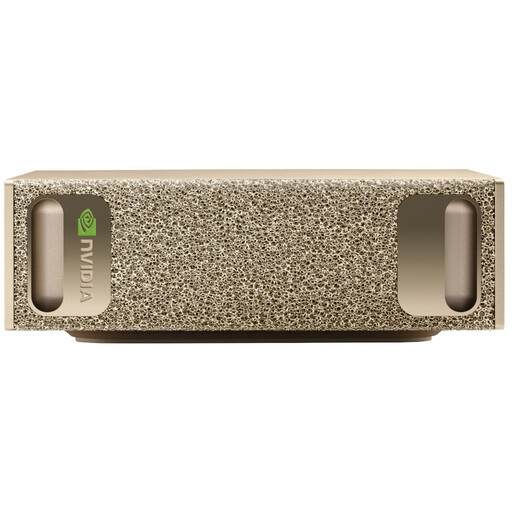
Why this product suits this profile: This compact AI PC is designed for developers and data science users. NVIDIA GB10, 128 GB LPDDR5X, a 4 TB SSD and pre-installed NVIDIA DGX OS are tailored to local AI and deep learning workflows.
The platform specifies the operating system, framework support, storage and network ports in detail, rather than simply making general claims about AI features.
128 GB RAM, 4 TB SSD, 10-GbE LAN, Wi-Fi 7 and a case measuring 15 × 15 × 5,05 cm.

Why this product suits this profile: This system combines the AMD Ryzen 7 7800X3D with an RTX 5070 Ti, 32 GB DDR5 and a 2 TB NVMe SSD. It is suitable for demanding gaming as well as creative applications with high graphics requirements.
The graphics card, storage, power supply and Wi-Fi standard are all clearly specified. The ventilation guidance helps you position the system correctly.
Ryzen 7 7800X3D, RTX 5070 Ti with 16 GB GDDR7, 2 TB NVMe SSD and an 850-watt power supply.
We have put together a complete, regularly updated list of products that fully meet these strict selection criteria and the safety regulations applicable in the EU.
For gaming and standard applications, 32 GB RAM is often sufficient. 64 GB RAM provides additional headroom for streaming, creative software and software development. For AI development, large datasets and virtual machines, 128 GB RAM may be a sensible choice. It is also important to check whether the motherboard supports future upgrades.
The cost depends on power consumption, usage time and your electricity tariff. A gaming PC with a powerful GPU uses considerably more power under load than a mini PC. Check the power supply rating, power management features and your actual usage habits. For an accurate comparison, you can use an energy meter between the socket and the PC.
Its lifespan depends on cooling, dust exposure, operating hours and upgradeability. Good ventilation, sufficient clearance from walls and regular cleaning help ensure reliable operation. When buying, you should also check the warranty terms, availability of replacement parts and free expansion slots.