Game-focused adventurers
You already have a historical adventure in mind and want to check that the version you’re after runs on your console before you buy.


First, choose a console that supports the games you want to play. Then consider your screen, where you prefer to play and whether you want to use discs. According to Ubisoft, Assassin’s Creed Shadows is available for PS5, Xbox Series X|S and Switch 2; Kingdom Come: Deliverance II is listed for PS5 and Xbox. A console’s ability to output at 4K doesn’t automatically mean every game will be displayed in 4K.
You already have a historical adventure in mind and want to check that the version you’re after runs on your console before you buy.
You mainly play on your existing home office screen and want to make sure it’s compatible with the console’s output and connections, and that it suits the way you use discs or downloads.
You want to start an adventure at your desk and carry on playing on the same console somewhere else.
A good fit if: You want to play PS5 games and use compatible game discs.
Bear in mind: Check the exact model; according to Sony, the PS5 Digital Edition has no built-in disc drive.
A good fit if: You mainly play on a screen and want to enjoy a game optimised for PS5 Pro, such as Kingdom Come: Deliverance II.
Bear in mind: Sony describes the PS5 Pro as a digital console with no built-in disc drive. Any graphics benefits depend on the game and your screen.
A good fit if: You want to play Xbox versions of historical adventures; Assassin’s Creed Shadows is listed for Xbox Series X|S.
Bear in mind: Microsoft lists 4K for the Series X and 1440p for the Series S in its comparison of these models; not every Series X has a disc drive.
A good fit if: You want to play an available adventure on your TV as well as in handheld mode; Assassin’s Creed Shadows is one confirmed example.
Bear in mind: Ubisoft targets 30 fps for Assassin’s Creed Shadows in both modes. TV output of up to 4K requires a compatible game and screen.
| What matters when buying | What to check | Who is it most important to? |
|---|---|---|
| Game availability | Check the specific title, platform and edition; Ubisoft lists Assassin’s Creed Shadows for PS5, Xbox Series X|S and Switch 2. | If I want to play a particular adventure, I check which versions are confirmed first. Around 33% of consumers put the availability of the game they want at the top of their list. |
| How games look on your screen | Check that your screen, connection and the game’s supported output are compatible; possible 4K output doesn’t guarantee that every game will be displayed in 4K. | If I play on my existing home office screen, the supported output needs to match my display. Around 27% of consumers place the greatest importance on how games look at their desk. |
| Playing away from your desk | Check whether the game version you want supports handheld mode and how it performs in that mode. | If I want to carry on playing away from my desk, handheld mode matters to me. Around 20% of consumers prioritise portable gaming. |
| Discs, downloads and storage | Check whether the specific model has a disc drive and how much storage is available for downloads; Nintendo lists microSD Express cards as a way to expand Switch 2 storage. | If I want to use discs I already own or store downloads, I check the disc drive and storage options before buying. Around 20% of consumers prioritise physical media and storage capacity. |
Microsoft compares a Series X with a disc drive, but there are also Series X models without one. The model name alone doesn’t tell you whether you can use discs.
Before you buy, check the full model name and make sure a disc drive is explicitly listed.
Without a disc drive, you can’t use game discs you already own directly; you’ll need to consider digital versions instead.
The actual output depends on the game and your screen. For Assassin’s Creed Shadows on Switch 2, Ubisoft targets 30 fps in both handheld and TV modes.
Choose based on the details for the specific game and your screen, not just the console’s maximum possible output.
According to Sony, neither the PS5 Digital Edition nor the PS5 Pro has a built-in disc drive.
Before choosing, consider whether you want to keep using your existing discs and whether a separately available disc drive is compatible with the console you’re considering.
If you play digitally, you’ll need digital game versions rather than the discs you already own.
Nintendo specifies microSD Express as the standard for expanding Switch 2 storage.
Check the card standard and whether a system update is required before planning your storage.
You may need a compatible microSD Express card to expand your storage.
The brands below represent the console ranges and gaming platforms mentioned here. The details apply to the specific models and games, not necessarily to everything a brand offers.
PS5 models for playing historical adventures at home. Kingdom Come: Deliverance II is listed as a PS5 game optimised for PS5 Pro.
Xbox Series X and Series S for gaming at home; Assassin’s Creed Shadows is listed for both model ranges.
Switch 2 for players who want to enjoy confirmed historical adventures on a screen and on the go.
This selection includes digital PS5 models for playing on a screen, as well as Switch 2 for use with a TV or in handheld mode.
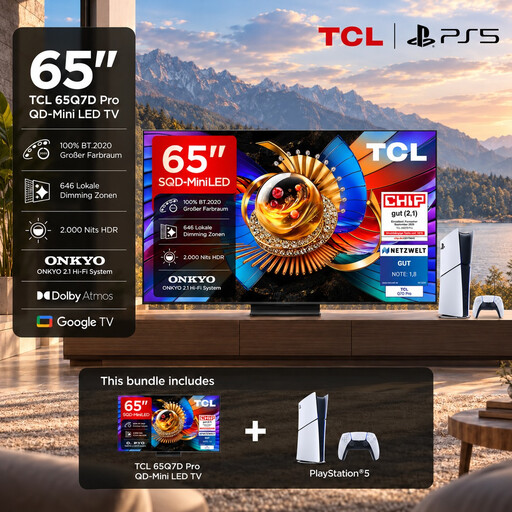 No image available
This bundle pairs a PS5 Slim Digital Edition with a TV for gaming on your home office screen.
The product name specifies a 65-inch 4K TV. The PS5 Digital Edition included has no built-in disc drive, so games are purchased digitally.
 No image available
Switch 2 is a good fit if you want to play an available adventure on your home office screen and on the go.
Nintendo lists a 7.9-inch screen and 256 GB of internal storage. TV output of up to 4K requires compatible games and a suitable screen; Nintendo recommends microSD Express cards to expand storage.
 No image available
This PS5 Slim Digital Edition is a good choice if you want to download PS5 adventures and play on your home office screen.
It has a listed storage capacity of 825 GB. There’s no built-in disc drive; you’ll need a PlayStation Network account to buy games digitally.
No. Nintendo specifies that 4K TV output requires a compatible game and screen, so check the details for the specific game version and your display.
Nintendo lists compatible microSD Express cards for expanding storage. According to Nintendo, you’ll need to install a system update over an internet connection before using one.
Not necessarily. The PS5 version of Kingdom Come: Deliverance II we checked is listed as supporting offline play for one player. Check the details for the specific edition and any extra features you want to use.
According to consumer advice service Verbraucherzentrale, consumers can claim their statutory rights from the seller for faults in newly purchased goods within two years of delivery or receipt. This is separate from a manufacturer’s guarantee.
The USK explains that age ratings restrict the sale of games carrying the relevant rating to minors in shops. They don’t directly determine which games parents can make available at home, and an age rating is not a recommendation for parents. Check the rating for the specific game.