If you want to present without a computer, first check whether the projector can play your specific image and video files directly from USB storage. A USB port alone doesn’t guarantee this. For rooms with the lights on, a presentation projector used with a computer and mains power may be a better fit, while a built-in battery can help when there’s no socket at your venue. Resolution, legibility in your chosen setting and file compatibility are all important factors to weigh up.
Which approach is right for you?
Presenters without a laptop
If you want to show historical photos and other local files straight from a storage device, check the USB file management and test that your own files play correctly beforehand. ViewSonic’s guide describes these features for the M1X.
Presenters in rooms with the lights on
If you’re showing slides and image captions to a group in a lit room, and can bring a computer and connect to mains power, consider the brightness specifications and how legible the image will be in your chosen setting. Epson lists 3,000 lumens of white and colour brightness for the EB-1780W.
Presenters on the move, without access to a socket
If you move between venues, weigh up battery power, portability and image detail together. ViewSonic lists up to four hours of battery life for the M1X, while BenQ lists a built-in battery for the GV50. Actual battery life depends on the operating mode.
What should you look for when choosing?
Start by thinking about your presentation and the conditions at the venue. Direct file playback, legibility in ambient light, power supply and native resolution each meet different needs.
| What matters to you? |
What to check |
Who needs this? |
| Local files without an internet connection |
USB reader and file management; test your own images and videos offline. |
If I want to present without a laptop, I need reliable direct access to my files; around 36% of consumers would put offline playback first. |
| Legibility in ambient light |
Take the room lighting and planned image size into account; do a test run at the venue. |
If a group needs to read image captions and map legends, legibility in the actual room matters; around 29% of consumers would make it a priority. |
| Presenting without a socket |
Check whether the projector has a built-in battery or needs an external power supply; confirm the battery life for your chosen mode. |
If I’m presenting at different venues without a reliable socket, power is essential; around 21% of consumers would prioritise operating without mains power. |
| Fine image detail |
Compare native resolution, not just supported resolution; test small captions at the planned image size. |
If small place names or details in scanned images need to remain clear, native resolution matters; around 14% of consumers would put fine image detail first. |
Avoid common mistakes when choosing
-
Assuming “has USB” means it can play files directly
A USB port doesn’t automatically mean the projector can open the image and video formats you need. The ViewSonic M1X guide describes a USB reader and file management, while also noting that some USB storage devices may not be compatible.
Check the guide for the exact model and test your files before your presentation. For important presentations, have a tried-and-tested HDMI connection ready as a backup.
Without a built-in battery, you’ll need access to mains power or a suitable external battery.
-
Taking supported input signals to mean native resolution
According to ViewSonic, the M1X supports higher input signals but displays images at a native resolution of 854 × 480 pixels. This can make a difference with small captions and scanned documents.
Compare the native resolution and test the smallest important caption at your intended image size.
Brands worth considering
ViewSonic
According to ViewSonic, the M1X combines a battery with USB file management, making it a possible option for playing local media without a laptop.
- ViewSonic lists a USB reader for the M1X and explains how to select local files in the guide.
- ViewSonic lists the native resolution as 854 × 480 pixels, so check how small text and map details look.
Epson
Epson describes the EB-1780W as a portable presentation projector for use with a computer and mains power.
- Epson lists 3,000 lumens of white and colour brightness for this model, as well as a carry case.
- A USB port doesn’t guarantee that every local presentation or video file will play directly. Bring a computer if needed.
BenQ
According to BenQ, the GV50 combines a built-in battery with native Full HD resolution and several inputs.
- BenQ lists HDMI, a USB-A reader and a native resolution of 1,920 × 1,080 pixels.
- The stated brightness is 500 ANSI lumens. Check legibility in your chosen room and test the specific file formats you plan to use.
LG
LG describes the CineBeam Q as a portable 4K UHD projector for people considering resolution and flexible positioning.
- LG’s product description lists 4K UHD.
- LG specifically notes that the CineBeam Q doesn’t have a built-in battery. Direct playback of your archive files isn’t confirmed either.
Joybuy products for presentations on the go
The portable projectors below offer different playback options and power supplies. Before your presentation, check whether your chosen model can play your specific locally stored historical files directly.
 No image available
V1 Outdoor Mini Projector, 720P
Could suit presentations at different venues, as long as you check file playback and battery life beforehand.
The native resolution is listed as 720P; 4K support doesn’t indicate native resolution. The product specifications list a 10,400-mAh battery and up to two hours of wireless playback. Screen mirroring from Android and Apple devices is also listed.
View on Joybuy
 No image available
Aurzen Tri-Fold DLP Mini Projector, grey
Could be suitable for short presentations on the go if the stated battery life is enough and your files work with your chosen playback method.
The product specifications list a built-in 5,000-mAh battery and up to 1.5 hours of video playback. Screen mirroring without a Wi-Fi network is listed, but this doesn’t confirm direct playback of files from USB.
View on Joybuy
 No image available
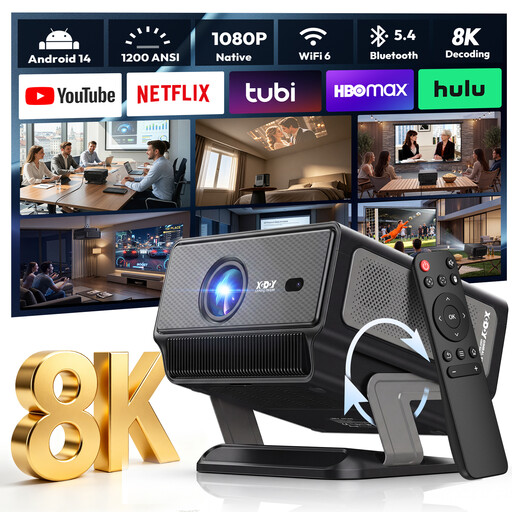
XGODY Gimbal A8, native 1080P
Could suit presentations using a connected computer if HDMI is your planned playback method.
The product name lists native 1080P resolution, 1,200 ANSI and HDMI and USB compatibility. Test separately whether it can play the specific local files you need.
View on Joybuy
 No image available
XGIMI Vibe One Match Night Collection, FHD 1080P
Could work for presentations on the go if the battery and listed playback options suit your needs.
The product specifications list FHD 1080P, a built-in battery, HDMI and USB, as well as a projection screen with stand. The stated brightness is 250 ISO lumens.
View on Joybuy
 No image available
Projector with built-in app store and 180° rotation
Could suit flexible positioning and playback from a computer or USB stick; check beforehand that your files are supported.
The product name lists HDMI and USB stick compatibility, automatic image correction, 180° rotation and a screen size of 50–200 inches.
View on Joybuy
Frequently asked questions
Can I play a file directly just because the projector has a USB port?
No. The manufacturer describes a USB reader and file management for the ViewSonic M1X, but a USB port alone doesn’t confirm that other models have these features. Check the relevant manual and test your files before your presentation.
How do I prepare the ViewSonic M1X for a presentation without internet access?
Save your media to a suitable USB storage device and open it using the file manager. ViewSonic notes that some USB storage devices may not be compatible, so keep an additional copy of your files and do an offline test run.
Does a portable projector mean I won’t need a socket?
No. ViewSonic and BenQ list a built-in battery for the M1X and GV50 respectively. LG specifically notes that the CineBeam Q needs a power adapter or a suitable external battery.
What can I do if my new projector is faulty?
For a consumer purchase, your statutory rights against the seller are separate from any voluntary guarantee. The Verbraucherzentrale states that new goods are generally covered for two years from delivery; the specific circumstances and terms of purchase will determine what applies.
Can I publicly project historical photographs taken by someone else?
You can’t determine this just from the fact that the files are stored locally or the images are historical. Section 19(4) of the German Copyright Act (UrhG) covers the right to make certain works and photographic works publicly perceptible using technical equipment. Whether your specific images are protected, and what rights or exceptions apply to the event, depends on the material and the individual circumstances.


