Choose based on your own letter scan and whether you’ll hold the tablet while reading or prop it up. A larger display shows more of the page, while a more compact device is easier to hold. In a shared bedroom, adjustable display settings and silent notifications also matter. If you want to make handwritten notes, the stylus, what’s included and your document app all need to work together. Display size alone can’t tell you whether faded writing will be easy to read in your scan.
Who reads historical letters on a tablet?
Readers of hard-to-read letter scans
When the writing has faded, you’ll want to zoom in on the detail without losing sight of the rest of the page. Trying a scan of your own is a better way to see whether the view works for you than relying on display size alone.
Evening readers sharing a bedroom
You want to read while someone else is trying to sleep, so adjustable brightness and silent notifications are important. Apple Support describes brightness controls, Dark Mode and Do Not Disturb Focus on iPad, among other features.
Readers who like to annotate
If you want to mark passages or jot down your thoughts, check that the stylus works with your exact model, see what’s included and make sure your document app has the features you need.
What should you look for when buying?
Compact LCD tablet around 11 inches
A good fit if: you often hold letters while reading and want to zoom in on individual lines.
The trade-off: When zoomed in, you may need to pan around frequently to see the whole page.
Larger LCD tablet
A good fit if: you can prop the device up and want to see as much of the letter page as possible at once.
The trade-off: Compare the size and weight with the case or stand you plan to use.
E Ink note-taking tablet
A good fit if: comfortable reading of supported files and handwritten notes are your priorities.
The trade-off: Check your archive viewer and try a sample page. File format support alone doesn’t confirm that an archive website will work.
| What matters to you |
What to look for when buying |
Who it matters most to |
| Making sense of letter scans |
Open a typical scan in the viewer you’ll use and try the full-page view, zoom and pan controls. |
If I want to enlarge faded writing while still keeping the page in context, I’ll test my own scan. Around 33% of consumers say scan readability is their main concern. |
| Reading considerately in the evening |
Check brightness and colour settings with your own document; set up the notification mode, including any exceptions you need. |
I read beside someone who wants to sleep, so I need a gentle display and silent notifications. This is a priority for around 25% of consumers. |
| Adding handwritten notes |
Check the stylus and what’s included with the exact model; test whether the document app saves notes alongside the letter and lets you open them again. |
If I want to mark passages or make notes about a letter, the stylus and app need to suit the way I work. Around 25% of consumers prioritise annotation features. |
| Holding or propping up the device |
Compare the dimensions and weight of the exact model, ideally with the case or stand you plan to use. |
I want to know whether I can hold the tablet for a while or would rather prop it up. How the device handles is the main concern for around 17% of consumers. |
Avoid common buying mistakes
-
Assuming display resolution guarantees easy reading
Whether faded handwriting is legible also depends on the scan and how far you need to zoom in. Display specifications alone can’t answer that question.
Before you decide, open a representative letter scan in the app you plan to use.
-
Confusing stylus compatibility with a stylus being included
Apple lists compatible Pencil models for the iPad (A16), but doesn’t include a Pencil in the listed contents. Samsung lists an S Pen with the Galaxy Tab S10 FE; this doesn’t automatically apply to other models.
Check stylus compatibility and what’s included for the exact version on offer.
-
Assuming a mains adapter is included
Xiaomi states that the REDMI Pad 2 Pro doesn’t come with a mains adapter.
Check what’s included with the exact version and whether an adapter you already own meets the manufacturer’s specifications.
-
Confusing online access with permission to republish
Being able to read a letter online doesn’t tell you whether you’re allowed to republish it.
If you plan to publish it, check the rights for that specific document and the intended use.
Key brands to consider
Apple
The iPad (A16) is an 11-inch option with display settings described by Apple for its devices.
- Apple Germany lists the Wi-Fi version of the iPad (A16) at 477 g. Apple Support describes Night Shift, brightness controls and Dark Mode.
- A Pencil isn’t listed as included. The technical specifications can’t tell you whether a particular letter scan will be easy to read.
Samsung
The Galaxy Tab A11+ and Galaxy Tab S10 FE are different ranges, each with features specific to its model.
- Samsung lists an 11-inch screen and a headphone socket for the A11+, and an S Pen for the S10 FE.
- These features apply to the models named, not every Samsung tablet. Check the full model code on the product listing.
Xiaomi
Xiaomi describes the REDMI Pad 2 Pro as a 12.1-inch option for reading on a device that’s more likely to be propped up.
- Xiaomi lists a weight of 610 g, a reading mode and a 12.1-inch display.
- Xiaomi states that no mains adapter is included. Reading mode doesn’t prove that historical handwriting will be easier to make out.
Lenovo
Lenovo lists a 12.7-inch display for the Idea Tab Pro. Check the version and accessories included with each product listing.
- The larger screen can be useful when you want to view a whole page at once.
- Lenovo lists versions and bundles separately. Don’t assume details about a stylus or case apply to every listing without checking.
PocketBook
The InkPad Eo 2 is an E Ink note-taking tablet for supported document files and handwritten notes.
- PocketBook lists a front light, a stylus and support for file formats including PDF, JPEG and PNG.
- The colour display is listed at 150 ppi in colour and 300 ppi in greyscale. Try your archive viewer and one of your own scans on the device itself.
Joybuy tablets for reading historical letters
This selection includes compact and larger LCD tablets, plus an E Ink note-taking tablet for reading letter scans and, depending on the model, making handwritten notes.
 No image available
Samsung Galaxy Tab A11+ X230, 11-inch, 6 GB RAM, 128 GB, grey
A compact LCD option if you like to hold letters while reading and want to use wired headphones.
11-inch display; Wi-Fi; 6 GB RAM; 128 GB storage; 3.5 mm headphone socket.
Joybuy
 No image available
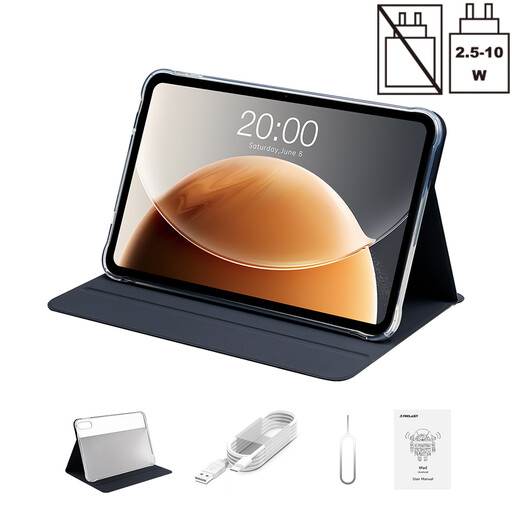
TECLAST T65, 13.4-inch, 128 GB, with Folio Case
The larger screen could suit you if you prefer to prop up the scan and want more room to view it.
13.4-inch display; 128 GB storage; Folio Case listed as included in the product title.
Joybuy
 No image available
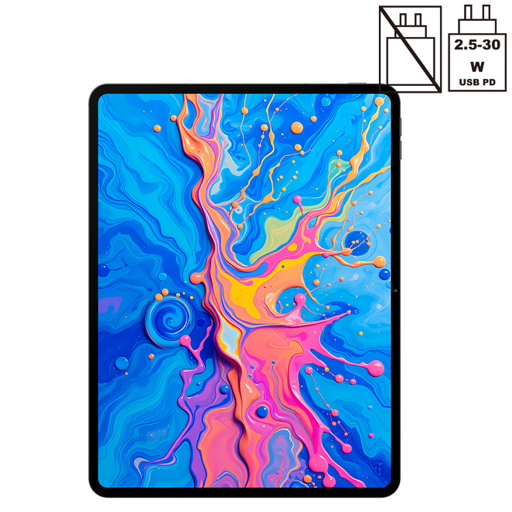
TECLAST ArtPad Pro 2025, 13.4-inch, 2K, with T-Pen
A larger LCD option for readers who also want to make handwritten notes about letters.
13.4-inch 2K display; T-Pen with 4096 pressure levels, according to the product title.
Joybuy
 No image available
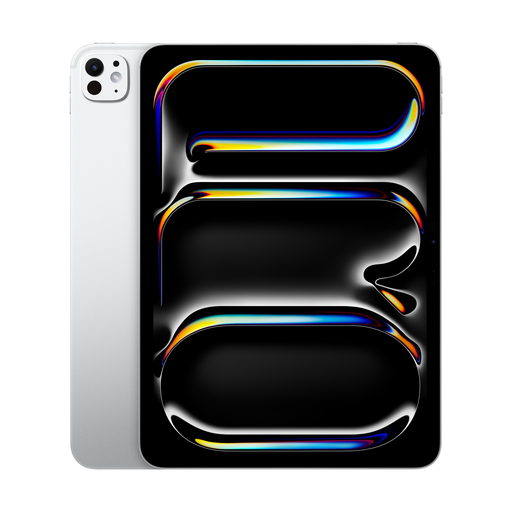
Apple iPad Pro 11-inch, Wi-Fi (2025), 2 TB, standard glass, silver
A compact iPad option if you want to use display and notification settings when reading in the evening.
11-inch display; Wi-Fi; 2 TB storage; standard glass. Apple Support describes brightness controls, Dark Mode and Do Not Disturb on iPad.
Joybuy
 No image available
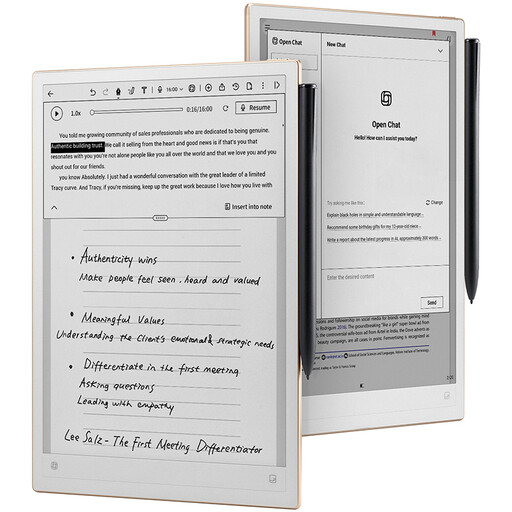
iFLYTEK AINOTE 2, 10.65-inch, E Ink, with stylus
An E Ink option for reading and note-taking, provided your document app and the file you need work on the device.
10.65-inch E Ink display; stylus listed as included in the product description. The display has no front light and doesn’t illuminate itself in the dark.
Joybuy
Frequently asked questions
Can I search the text of historical letters on any tablet?
No. A PDF scan doesn’t automatically contain searchable text. Check whether your digital copy already has a text layer. For handwriting, you may need suitable handwriting recognition, followed by some editing. Transkribus describes this type of recognition, but that doesn’t guarantee a result for your letter.
Why won’t a digital copy from the German Federal Archives open on my tablet?
The German Federal Archives notes that a digital copy may open in a new browser window or tab. If necessary, allow it to open and reload the page. Some digital copies are subject to access restrictions and can’t be viewed from home.
How do I set up an iPad for reading beside someone who’s asleep?
Apple describes brightness controls, Dark Mode and Night Shift for iPad. Do Not Disturb Focus lets you silence notifications and set any exceptions you need. Try your scan on the display to make sure the faint writing is still clear to you.
What rights apply when buying a tablet online in Germany?
According to consumer information from the European Union, distance contracts generally come with a 14-day cancellation period from the date of delivery. Goods are also covered by a statutory guarantee of at least two years from receipt. This is separate from any voluntary manufacturer’s warranty. Check the specific listing to see who the seller is and whether you’ll need to pay return postage.
Can I republish a historical letter I’ve found online?
Not just because the letter is available to read online. The German Federal Archives notes that reusing copyright-protected works may require a relevant legal exception or granted usage rights. Check the rights for the specific document and how you plan to use it.


