People checking for duplicates
When comparing recorded listings with potential matches, keep the original entries until you’ve checked them. Microsoft Support describes highlighting duplicate values as a way to review matches before removing them.


If you regularly enter dates and reference numbers, a full-size keyboard with a number pad is an obvious choice. If you mainly compare listings and use the mouse, a TKL model can leave more room on your desk. A split layout may be worth considering for long typing sessions, while custom actions are only useful with compatible software. No keyboard can decide for itself whether two listings are duplicates. Microsoft Support recommends checking potential matches before removing them: back up your data and only delete entries once you’ve compared them.
When comparing recorded listings with potential matches, keep the original entries until you’ve checked them. Microsoft Support describes highlighting duplicate values as a way to review matches before removing them.
A number pad can be helpful if you regularly enter dates, page numbers or listing references. Weigh the extra space it takes up against how often you make these entries.
If you type for long periods, key layout and the position of your keyboard and mouse at your workstation are important factors to consider. A split layout may take some getting used to, as Perixx notes for the PERIBOARD-512.
A good fit if: you regularly enter dates, page numbers or reference codes and have enough room on your desk.
The trade-off: The number pad makes this keyboard wider than a TKL model.
A good fit if: you rarely enter numbers and often use the mouse while reviewing listings.
The trade-off: The CHERRY STREAM KEYBOARD TKL has no number pad. Also check the layout of the specific version.
A good fit if: long typing sessions are a priority and you’d like to try a different key layout.
The trade-off: Perixx notes that the PERIBOARD-512 may take some getting used to. The position of your keyboard and mouse at your workstation matters too.
A good fit if: you carry out recurring, clearly defined data-entry steps in supported software.
The trade-off: Logitech describes Smart Actions for the MX Keys S with Logi Options+; these actions can’t make decisions about whether entries are duplicates.
| Your priority | What to check before buying | Who this matters most to |
|---|---|---|
| Checking for duplicates | Check whether your data-entry software supports the keyboard shortcuts you need. Test changes on a copy of your data first. | When listings look similar, I want to compare the original entries before removing anything. Around 36% of consumers whose main priority is carefully checking for duplicates place particular importance on a cautious review process. |
| Entering numbers and reference codes | Think about how often you enter numbers rather than text during a typical session. Check whether the specific version has a number pad. | When I enter lots of dates and reference numbers, I want to input groups of figures comfortably. Around 29% of consumers whose main priority is entering numbers pay particular attention to having a number pad. |
| Long data-entry sessions | Check the key layout, dimensions and wrist rest. Consider whether you can try the layout before committing to regular use. | When I type for long periods, I want a layout that suits my workstation and the way I work. Around 21% of consumers who prioritise comfort during long data-entry sessions give this factor particular consideration. |
| Room for the mouse and visual checks | Measure the space available and check whether you can manage without a number pad. Check the key layout of the version on offer. | When comparing listings, I want to keep enough room for my mouse and don’t need to enter numbers all the time. Around 14% of consumers whose main priority is having clear space for their mouse therefore prefer a more compact design. |
A keyboard shortcut can trigger recurring data-entry steps, but it can’t tell you whether listings that look alike actually represent the same record. Microsoft Support points out that removing duplicates in Excel deletes data.
Highlight potential matches first, check them and keep a copy of your data before making any changes.
Unlike the full-size version, the CHERRY STREAM KEYBOARD TKL doesn’t have a number pad. This can affect your workflow if you enter numbers frequently.
Think about what you actually enter and decide whether you need a number pad before choosing a more compact design.
The CHERRY STREAM KEYBOARD TKL version described on Joybuy is explicitly labelled as having a US layout. The model family name alone doesn’t tell you which key layout a particular version has.
Check the language layout and key labels of the keyboard on offer before buying.
The STREAM range includes a wired full-size office keyboard and a TKL version without a number pad.
The ERGO K860 is a split, full-size model with a number pad, while the MX Keys S offers Smart Actions for supported workflows.
The PERIBOARD-512 is a wired, split full-size keyboard with a number pad.
These Joybuy keyboards suit different ways of working, from QWERTZ models with a number pad to sets with a different key layout. Check the layout of the specific version, especially if you enter German special characters.
 No image available
For a workstation where you switch between several devices, the product description lists a connection for up to four devices.
QWERTZ layout; Bluetooth, 2.4G and USB-C; 2000-mAh battery; backlighting.
 No image available
The full-size design with a separate number pad suits frequent number entry, while the included mouse makes it easy to switch to visual checks.
2.4G USB connection; quiet keys; removable wrist rest; mouse with three-level DPI settings; for Windows and Mac.
 No image available
The split keyboard and wrist rest offer options to suit longer data-entry sessions; the model has an integrated number pad.
QWERTZ layout; Bluetooth or USB receiver. Logitech lists adjustable feet for this model.
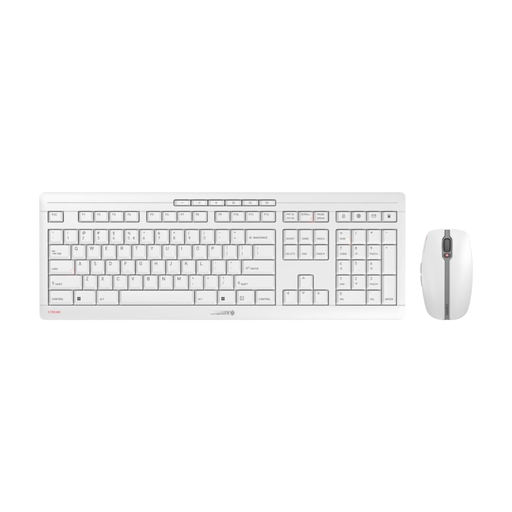 No image available
This set combines a keyboard and mouse for switching between typing and mouse use; the stated EU QWERTY layout is not QWERTZ.
2.4-GHz wireless; quiet SX scissor keys; USB-C charging; white and grey finish.
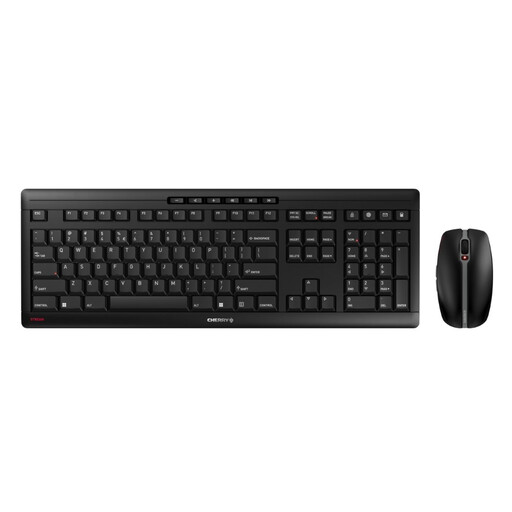 No image available
The set includes a keyboard and mouse for switching between typing and visual checks; note the explicitly stated US layout.
2.4-GHz wireless; quiet SX scissor keys; USB-C charging; 10 hotkeys; mouse with 6 buttons and DPI switch.
No. Programmable keys can’t determine for themselves whether two listings are duplicates in terms of their content. If you use Excel, you can highlight duplicate values and check them first; Microsoft Support points out that “Remove Duplicates” deletes data.
Check your operating system, connection and whether your data-entry software supports the actions. Smart Actions for the MX Keys S use Logi Options+; Logitech offers the app for Windows and macOS. Test actions first without making changes to your original data.
For display screen workstations in workplaces and at telework locations, ASR A6 sets out requirements for employers, as explained by the Federal Institute for Occupational Safety and Health. Its scope does not automatically cover every type of personal use, and it does not create a general obligation to buy a particular keyboard model.
The statutory consumer rights you have against the seller and a voluntary guarantee are different things, as the Verbraucherzentrale explains. Old electrical equipment should be taken to an authorised return or collection point; used batteries must be returned separately to suitable collection points.