Readers who enjoy long novels outdoors
You read longer, mostly black-and-white texts in the garden, park or on holiday, and want to know how clearly you can see the page in daylight. E Ink explains that its displays reflect ambient light.


If you mainly read long novels outdoors, a reflective black-and-white E Ink display is a sensible place to start. Then check whether it can open the books you’ve bought or borrowed. A tablet with a conventional screen gives you more flexibility for reading apps, Onleihe audiobooks and other media. To see how well you can read in the sun, assess it in your usual lighting conditions rather than relying on the manufacturer’s claims alone.
You read longer, mostly black-and-white texts in the garden, park or on holiday, and want to know how clearly you can see the page in daylight. E Ink explains that its displays reflect ambient light.
You get historical novels from a particular shop or library. First, check whether your specific title, including its copy protection, will work on the model you have in mind. Onleihe Help provides compatibility information that depends on the model and software.
You want to use reading apps, Onleihe audiobooks or magazines as well as novels, and are weighing that flexibility against a dedicated e-reader’s focus on longer texts. Onleihe Help lists smartphones and tablets for e-audios and e-magazines.
A good fit if: You mainly read novels from beginning to end in daylight and want a device designed for the job. E Ink describes its display technology as reflective.
The trade-off: A specialist e-reader won’t offer the same choice of apps and media as a versatile tablet. Onleihe doesn’t support its e-audios on e-readers.
A good fit if: You want to use different reading services through apps but prefer a reflective display. BOOX lists Android apps and Google Play for the Go 6 Gen II.
The trade-off: Being able to install an app doesn’t guarantee that every copy-protected title or your library’s sign-in process will work.
A good fit if: You want to use Onleihe audiobooks, e-magazines or other apps alongside novels. Onleihe lists smartphones and tablets for these types of media.
The trade-off: Samsung’s claims about visibility in direct sunlight come from the manufacturer and aren’t an independent comparison with E Ink. Check for reflections and viewing angles in your usual conditions.
The figures below relate to consumers choosing a device for reading historical novels in bright daylight. The most important buying consideration is shown for each person.
| Priority | What to look for when buying | Who is this particularly important to? |
|---|---|---|
| Readability in daylight | Check the display type and surface, and view the device in daylight and at a reading angle similar to your usual conditions, if possible. A front light is mainly useful when there’s little ambient light. | When I read long passages from novels outdoors, I want to be able to see the text in my usual sitting position. Around 36% of consumers put daylight readability first. |
| Access to novels | Check the shop, file format, copy protection and transfer method for the specific title. For Onleihe, also check your library’s version, device model and software. | If I get books from a particular bookshop or library, my specific title needs to work on the device. Around 29% of consumers prioritise access to novels they’ve bought or borrowed. |
| Ease of use while reading | Compare screen size and device dimensions. Try a sample text to check the font size, amount of text on screen and page-turning. | If I hold my e-reader for long periods or take it with me often, I want its size and adjustable font to suit the way I read. Around 21% of consumers place the greatest importance on ease of use. |
| Other apps and media | Check compatibility for each type of media you want to use. Don’t assume Onleihe e-audios will work just because the device has a general audiobook function. | If I want to use magazines, audiobooks or other apps as well as novels, the range of media matters to me. Around 14% of consumers put this versatility first. |
Onleihe excludes its DRM-protected e-books from Kindle e-readers. Good readability doesn’t change whether the title can be opened.
First decide where you’ll get your novels, then check shop compatibility, copy protection and how you’ll transfer them.
Depending on where you get your books, you may also need another compatible device or an alternative way to access them.
A built-in audiobook function doesn’t mean Onleihe e-audios will work on the e-reader. According to Onleihe Help, e-audios aren’t currently available on e-readers.
Check reading and audiobook services separately if you want to switch between the two.
You may also need a smartphone or tablet to listen to Onleihe audiobooks.
Samsung describes the Galaxy Tab A11’s visibility in direct sunlight. This isn’t an independently measured comparison with E Ink, which uses a different, reflective display technology.
If possible, assess the text in your usual lighting and at your usual viewing and reading angles before relying on a display claim.
The 5th-generation shine is a compact black-and-white e-reader for novels, particularly if you use German bookshops or need a compatible Onleihe connection.
The 16 GB Paperwhite is a 7-inch E Ink option if your novels are available through the Kindle store.
The Verse and Verse Pro are compact 6-inch e-readers with manufacturer-listed format support and an Onleihe app.
The Clara BW is a 6-inch black-and-white e-reader for readers who prefer Kobo devices and books.
The Go 6 Gen II combines a monochrome E Ink display with Android apps, making it an option if you want to use more than one dedicated bookshop.
The Galaxy Tab A11 is a compact tablet alternative for readers who want to use other apps and media alongside novels.
This selection includes Android E Ink e-readers, as well as versatile E Ink devices and tablets with conventional screens. For each model, check that it can access your book sources. For tablets, also assess readability in your usual lighting conditions.
 No image available
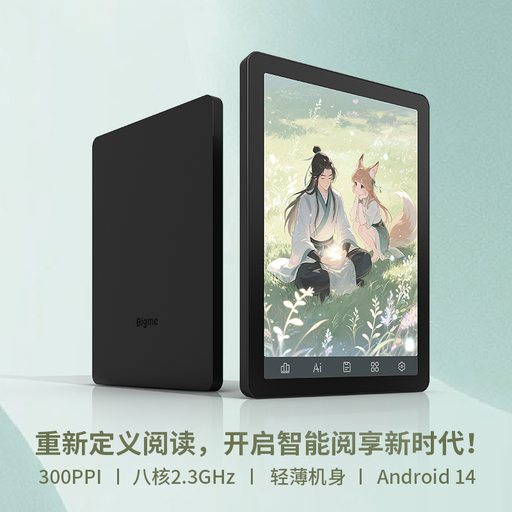
Worth considering if you’re looking for a compact E Ink device with a choice of apps.
The listing specifies a 6.13-inch Kaleido 3 E Ink display, 300 ppi for black-and-white content, Android 14 and Google Play.
Check in advance that your preferred reading app and the DRM-protected title you want to read will work.
 No image available
A good match if you’d like to use reading apps on a compact E Ink device.
The listing specifies a 6-inch E Ink display, 300 ppi for monochrome content, a 36-level front light and Google Play.
Google Play alone doesn’t confirm that a particular app or copy-protected title is compatible.
 No image available
An option if you’d like to use writing features as well as reading on an E Ink device.
The listing specifies a 10.65-inch E Ink display, with reading and writing features.
According to the listing, the device doesn’t have a front light. Bear this in mind if you also want to read in low ambient light.
 No image available
Worth considering if you need the features of a versatile tablet PC as well as a device for reading.
The listing specifies a 13-inch LCD touchscreen with 2,880 × 1,920 pixels and Windows 11 Pro.
The display is LCD rather than E Ink. Check how easy it is to read in your usual lighting and viewing conditions.
 No image available
A versatile tablet option if you want to use other apps alongside novels.
The listing specifies a 12.7-inch IPS display with 2,944 × 1,840 pixels and Android 14.
The display is IPS rather than E Ink. Check how easy it is to read for longer periods in your usual daylight conditions.
Not because of bright ambient light: E Ink uses incoming light to display the page. According to E Ink, a front light is mainly useful when there’s little ambient light.
First check which version of Onleihe your library uses, then compare your exact e-reader model with the relevant compatibility list. For direct Onleihe 3 access, Onleihe Help specifies software version 5.15.253009 for the 5th-generation tolino shine and software version 6.3 for PocketBook devices. Also check the specific DRM-protected title.
This isn’t currently supported for Onleihe e-audios: according to Onleihe Help, they can’t be used on e-readers. For this type of media, the service lists compatible smartphones and tablets with the Onleihe app. A general audiobook function on an e-reader doesn’t automatically support Onleihe titles.
Check whether a protective case or power adapter is included, and read the terms for any stated water protection. According to the contents list, accessories for the 5th-generation tolino shine may need to be purchased separately. The 2024 Paperwhite product page doesn’t list a power adapter as included. A subscription isn’t automatically required when choosing a device; check offer terms separately from the device itself.
Consumers generally have a statutory right to cancel an online purchase. The Verbraucherzentrale says the period is usually 14 days from receipt of the goods, and you must notify the seller that you’re cancelling. Claims for defects in goods generally expire two years after delivery, as set out in § 438 BGB. Exceptions and the specific contract need to be considered separately; a voluntary manufacturer’s guarantee is different.