If a smartphone hotspot tested at work is enough for the occasional work email, you don’t automatically need a separate router. For longer working hours or several devices, a mobile router with a battery may be a good fit; if it will stay in one place, you could also consider a mains-powered mobile router. What matters is the signal at the holiday home, a suitable tariff and your employer’s IT requirements – not just the advertised maximum speed.
Who might need a separate router?
Occasional email checkers
If you only need to check your work inbox briefly while staying at a holiday home, first see whether the existing Wi-Fi or your smartphone hotspot is enough. The F.A.Z. Kaufkompass considers a separate data tariff one possible option for this kind of use.
Holidaymakers working remotely
If you’ll be working on your laptop for longer, consider the signal at your actual workspace, your tariff, battery life and secure set-up. Germany’s Federal Network Agency notes that its mobile coverage map shows predicted coverage outdoors, while the Federal Office for Information Security (BSI) provides advice on working remotely.
People with a dedicated workspace at their holiday home
If the router will usually stay in one place, a mains-powered device may be a better fit than a pocket hotspot. The AVM data sheet for the FRITZ!Box 6860 5G specifies PoE+ power, so this router needs a suitable installation.
What should you look for when buying?
First check whether you can get a connection at your planned workspace. Then choose the type of router, tariff and device size to suit how you’ll actually use it.
Existing holiday-home Wi-Fi
A good fit if: the connection works well enough at your workspace and your use complies with your employer’s requirements.
Consider: Existing Wi-Fi doesn’t automatically provide the necessary security measures or the VPN access required by your employer.
Smartphone hotspot
A good fit if: you occasionally check emails on a few devices and the signal, tariff and battery charge are sufficient.
Consider: The connection depends on your smartphone and its tariff; longer use may drain your phone’s battery faster.
Separate mobile router
A good fit if: your laptop and other devices need their own mobile connection for longer, or the router will stay in one place.
Consider: You’ll still need suitable signal and a tariff that meets your employer’s requirements. Choose between a battery-powered model and one with a suitable power supply for a fixed location.
| What to look for |
What to check before buying |
Who should pay particular attention |
| Signal at the holiday home |
Check the provider’s network and LTE or 5G coverage for the address. If possible, test the connection indoors at your planned workspace too. Germany’s Federal Network Agency describes outdoor coverage as a prediction, not a guarantee of indoor reception. |
If I need reliable access to my inbox on my work laptop, I check the network at my planned workspace. Around 31 % of consumers put reception at the holiday home first. |
| Secure access for work |
Check your employer’s IT requirements and whether a VPN connection is required. The BSI recommends, among other things, keeping router firmware up to date and using secure passwords. |
If I handle work emails, I want to be sure the device and connection meet my workplace requirements. Around 25 % of consumers put secure access first. |
| SIM and data tariff |
Check that the SIM format, supported networks, permitted router use and data allowance suit the tasks you have planned. A data-use indicator can be helpful if your allowance is limited. |
If I only check emails occasionally, I want a SIM and tariff to match how I use them. Around 19 % of consumers rank the tariff and SIM as their top buying priority. |
| Power supply and battery life |
For use on the move, check the battery and charging options; for a fixed location, make sure you have the required power supply. TP-Link states that the M7000 offers up to eight hours of battery life; actual battery life depends on use. According to AVM’s data sheet, the FRITZ!Box 6860 5G is designed for PoE+. |
If I want to use the router without a power socket or leave it running in one place, I choose the right power supply. Around 13 % of consumers put battery life or power supply first. |
| Devices connected at the same time |
Count the devices you’ll actually need to connect at once. TP-Link states that the M7000 supports up to ten devices and the M8550 up to 32; these manufacturer specifications don’t guarantee consistent speeds for every connected device. |
If I want to use the same connection for my laptop, phone and other devices, it’s important to choose a router with enough capacity. Around 12 % of consumers put the number of devices that can connect at once first. |
Avoid common buying mistakes
-
Assuming advertised 5G speeds guarantee reception
Germany’s Federal Network Agency mobile coverage map predicts outdoor coverage. Buildings and network congestion can affect the connection where you work.
Before choosing LTE or 5G, check which provider is right for you and, if possible, test reception indoors too.
-
Assuming a battery-powered router works like a mains-powered device
You can use a mobile router with a battery without a power socket; according to AVM’s data sheet, the FRITZ!Box 6860 5G needs a PoE+ power supply.
Before buying, decide whether you’ll take the device with you or leave it at a fixed workspace, and check what power supply you’ll need.
-
Assuming your own Wi-Fi is automatically approved for work
Choosing an internet connection doesn’t confirm that it meets your employer’s security requirements.
Check your workplace requirements and secure the router with up-to-date software and suitable passwords. The BSI recommends changing insecure default passwords and keeping the firmware up to date.
Brands and models to consider
TP-Link
The M7000 and M8550 represent different types of mobile router: an LTE model with a battery and a 5G model with additional ports.
- TP-Link states that the M7000 supports up to ten connected devices and offers up to eight hours of battery life; it does not support 5G.
- The EU data sheet lists support for up to 32 devices, a Gigabit WAN/LAN port and two TS-9 connectors for the M8550.
- Manufacturer specifications for battery life and ports don’t tell you what reception or actual battery life will be like at a particular holiday-home address.
NETGEAR
The Nighthawk M3 and M7 Pro are portable 5G routers for people who want to connect other devices as well as their work laptop.
- NETGEAR states that the M3 MH3150 supports up to 32 devices and the M7 Pro MR7450 up to 64 devices connected at the same time.
- The maximum number of devices alone tells you nothing about the available mobile connection or the speed when several devices are in use.
FRITZ!
The FRITZ!Box 6860 5G is an option for a holiday home where the router will mostly stay in one place, rather than being used as a battery-powered pocket router.
- AVM’s data sheet lists 5G and 4G support, PoE+ power and suitability for sheltered outdoor areas in accordance with IP54.
- You’ll need a suitable power supply to use it.
Acer
The Connect M6E is a portable 5G router for people who value battery life and a rugged design.
- Acer lists an 8,000-mAh battery, up to 28 hours of battery life and IP68.
- Acer notes that the exact specifications may vary by model and region. The stated battery life isn’t a measurement of how long the device lasts while you check work emails at a holiday home.
Zyxel Networks
According to the manufacturer, the portable NR2301 combines 5G with Wi-Fi 6 and has connectors for external antennas.
- Zyxel lists a 4,500-mAh battery and support for up to 32 connected devices.
- The manufacturer describes the maximum data rate as theoretical and recommends checking the frequencies, bands and network coverage with your provider.
Mobile routers at Joybuy
This selection includes SIM-based LTE and 5G routers for mobile use, as well as devices for a fixed workspace at a holiday home.
 No image available
4G Wi-Fi router with SIM slot, 300 Mbps, 2.4 GHz
For a SIM-based 4G connection, if 2.4-GHz Wi-Fi works with the devices you need to connect.
The product title specifies 300 Mbps and a SIM card slot.
View at Joybuy
 No image available
AVM FRITZ!Box 6825 4G LTE
For a location where you want to use a 4G router with a Nano-SIM and USB-C power supply.
The product title specifies Cat 6, Wi-Fi 6 AX 600 Mbps, 1× Gigabit LAN and Nano-SIM.
View at Joybuy
 No image available
MERCUSYS MT110 4G LTE Mobile Wi-Fi
For occasional mobile LTE use with a Nano-SIM, if a battery-powered hotspot suits your needs.
The product title specifies 150 Mbps and a 2,200-mAh battery.
View at Joybuy
 No image available
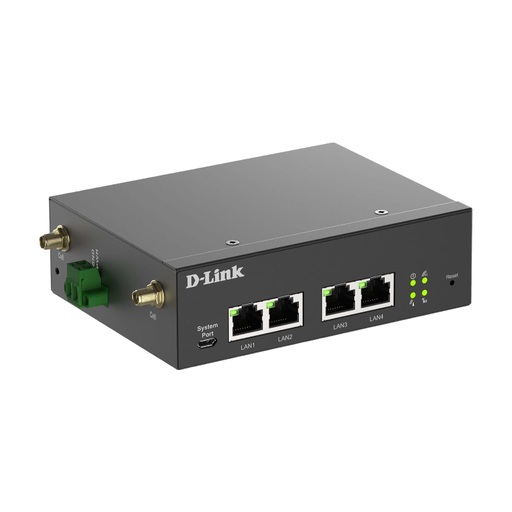
D-Link DWM-314-G mobile router
For a fixed workspace where you plan to use a mobile router with a suitable power supply.
According to the product information, it needs a suitable power supply. Check beforehand that the ports are right for your planned set-up.
View at Joybuy
 No image available
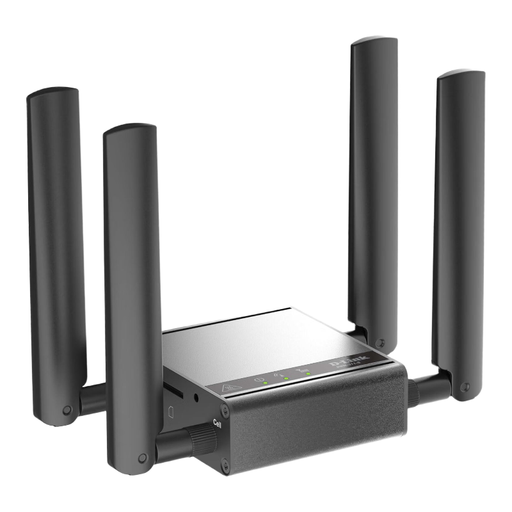
D-Link DWM-311-G mobile router
An option to consider if you’re looking for a mobile router for a fixed indoor workspace.
Before buying, check that the network bands, ports and power supply suit how you plan to use it.
View at Joybuy
Frequently asked questions
Where can I check which mobile network works at my holiday home?
Germany’s Federal Network Agency mobile coverage map shows a provider-specific prediction of outdoor coverage. If possible, also check reception indoors at your planned workspace.
Can I check work emails as soon as I insert a SIM?
Only if the SIM and tariff are valid, you have a connection and you meet your employer’s security requirements. The BSI recommends security measures and VPN solutions for working remotely; having a router connection alone doesn’t mean your employer has approved it.
What should I bear in mind when setting up and maintaining my router?
Change any insecure default passwords, use a strong Wi-Fi password and keep your router’s firmware up to date. The BSI recommends these security measures; your administrator password and Wi-Fi password serve different purposes.


