Who could benefit from a hotspot at a holiday home?

Travellers unsure about mobile reception

If you need to access bookings or tickets online, check the specific mobile network at your destination. Ofcom notes that your experience can depend on factors including your location, contract, device and network congestion. A coverage map can’t reliably predict reception inside a building.

Occasional document access

If only one device needs to go online from time to time, consider using the Wi-Fi already available or your smartphone hotspot first. Apple Support describes Personal Hotspot as sharing the mobile data connection of a compatible device.

Groups travelling with several devices

If you want to connect phones, tablets or laptops together, consider the number of devices, power supply and data plan as a whole. TP-Link lists up to 10 devices and up to 8 hours of battery life for the M7000. These are manufacturer figures for this model, not a guarantee of how long it will last at your destination.

What should you consider when choosing one?

Existing Wi-Fi or smartphone hotspot

A good fit if: You only need to access documents occasionally on one device and can use a connection that’s already available.

Bear in mind: A smartphone hotspot uses your phone’s mobile reception and data plan. Take care when handling confidential documents over someone else’s Wi-Fi.

Battery-powered 4G router with SIM

A good fit if: Several devices need to share a connection and 4G on your chosen network is available where you’re staying.

Bear in mind: You’ll also need a suitable data plan, and should allow for charging the device and getting the right SIM size.

5G router

A good fit if: You have a suitable 5G plan and usable reception, and need to support more demanding applications or lots of devices as well as documents.

Bear in mind: 5G specifications don’t guarantee reception inside a building or offer an advantage when accessing individual bookings or tickets.

Travel router for an existing internet connection

A good fit if: You already have usable Wi-Fi or another internet connection that you want to share with your devices.

Bear in mind: In repeater mode, a travel router can’t replace an internet or mobile signal that isn’t there.

What matters when buying What to look for Who it matters most to
A usable connection at the holiday home Check the mobile network you’ll actually use at your destination and, if possible, test the connection in or around the building. If I need a connection that works at the specific location before I can access tickets, reception comes first for around 36% of consumers.
Extra device, SIM and data plan Check whether your existing plan allows hotspot use, and what SIM and data plan you’ll need for a separate router. If you only access documents occasionally, you may prefer to use connections you already have rather than budget for extra hardware and another data plan; this is the main purchase consideration for around 29% of consumers.
Several devices and power supply Check that the model supports the number of devices you need, and that you have a battery, charging option or suitable power socket. If I want to connect phones, tablets or laptops together, the number of devices and power supply need to work for me; around 21% of consumers put this need first.
Protecting confidential travel documents Check the admin and Wi-Fi passwords, along with available firmware updates. Having your own Wi-Fi doesn’t automatically make it secure. If you want to access bookings and personal documents over your own network, it’s especially important to set it up securely; document protection is the main purchase consideration for around 14% of consumers.

Which mistakes should you avoid?

  • Assuming a high data rate guarantees reception

    Manufacturer specifications describe what a model can do. Ofcom notes that actual mobile usage can be affected by factors including location, contract, device and network congestion.

    First check the network you’ll use at the holiday home, then decide what type of router your devices need.

  • Thinking a repeater provides its own mobile connection

    The repeater mode on the GL.iNet Beryl AX uses existing Wi-Fi; it doesn’t provide mobile reception.

    Before you travel, check where your internet connection will come from: the holiday home’s Wi-Fi, a smartphone hotspot or a router with its own SIM.

  • Forgetting SIM activation and power requirements

    You must complete an identity check before activating a new German prepaid SIM. Battery-powered devices and models with PoE+ power also have different requirements.

    Before you leave, check your data plan, activation status, SIM size and the power requirements of the specific model.

    You may also need a separate data plan. For a router that needs a fixed power supply, you’ll need to plan for suitable power and installation too.

  • Assuming your own Wi-Fi is automatically secure

    Having your own network doesn’t mean you can skip strong passwords and up-to-date router firmware.

    The German Federal Office for Information Security recommends changing default passwords and installing available firmware updates.

Which brands are worth considering for this use?

TP-Link

Battery-powered 4G hotspots for different numbers of devices. The figures below relate to the M7000 and M7650 models.

  • TP-Link Germany lists support for up to 10 devices and up to 8 hours of battery life for the M7000, and up to 32 devices and up to 15 hours for the M7650.
  • These are manufacturer figures for the respective models, not measured battery life or a guarantee of reception at a holiday home.

NETGEAR

The Nighthawk M7 Pro MR7450 is a mobile 5G option for those who need extra features and support for multiple devices.

  • NETGEAR lists 5G, Wi-Fi 7 and support for up to 64 devices for this model.
  • These specifications don’t show that you need 5G for individual documents or indicate how the router will perform at your destination.

FRITZ!

The FRITZ!Box 6860 5G could suit a suitable fixed location in or around your holiday home.

  • AVM’s datasheet lists 5G/4G, Nano-SIM and PoE+ power.
  • Unlike a battery-powered hotspot, this device needs a fixed power supply and a suitable installation.

devolo

The WiFi 6 Router 3600 5G LTE is an option for using your own SIM connection in a holiday flat.

  • devolo lists Nano-SIM, 5G and Ethernet ports for this model.
  • The advertised data rate isn’t a measurement taken in a particular property. You’ll need to check the power supply and data plan separately.

GL.iNet

The Beryl AX GL-MT3000 is a travel router for sharing an internet connection that’s already available.

  • GL.iNet’s guide lists Ethernet, repeater mode and USB tethering as connection options.
  • In repeater mode, the device can’t replace a missing mobile or internet connection.

Routers for your own connection at a holiday home

This Joybuy product selection includes routers for your own 4G or mobile connection at a holiday home, from portable battery-powered hotspots to models designed for a fixed location.

AVM FRITZ!Box 6825 4G LTE wireless router

AVM FRITZ!Box 6825 4G LTE

For your own 4G connection, if there’s a suitable place to position the router at your holiday home with access to a power supply.

With Nano-SIM, LTE Cat 6, Wi-Fi 6, Gigabit LAN and USB-C power.

View at Joybuy

MERCUSYS MT110 4G LTE mobile Wi-Fi hotspot

MERCUSYS MT110 4G LTE

For your own mobile 4G connection, when several devices need to use a portable hotspot.

Portable Wi-Fi hotspot with Nano-SIM and built-in battery. The product listing states up to 10 hours of use.

View at Joybuy

TP-Link M7000 mobile Wi-Fi router

TP-Link M7000

For your own 4G connection across several devices, when you need a mobile hotspot with a battery.

TP-Link Germany lists a Nano-SIM, support for up to 10 connected devices and up to 8 hours of battery life. These are manufacturer figures for this model.

View at Joybuy

ASUS 4G-AX56 Wi-Fi 6 wireless modem router

ASUS 4G-AX56

For your own 4G connection in a fixed location, when you also want to connect wired devices.

With Nano-SIM, LTE Cat 6, dual-band Wi-Fi and Gigabit LAN. The initial setup described requires a power adapter and an Ethernet connection to a computer.

View at Joybuy
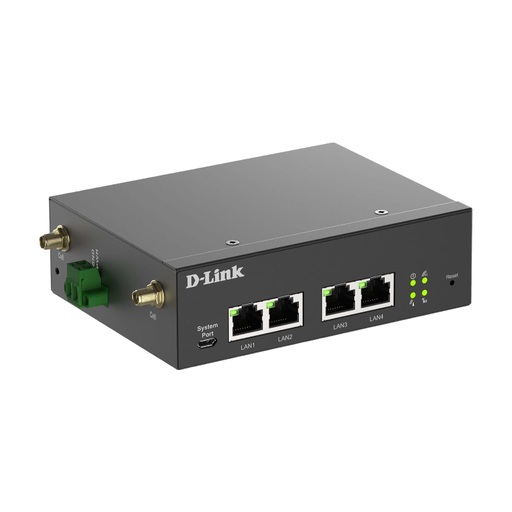
D-Link DWM-314-G mobile router and gateway

D-Link DWM-314-G

For your own 5G or 4G connection with wired devices, when an industrial-grade router suits your setup.

With dual SIM and Gigabit Ethernet. The setup described requires a power supply and an Ethernet connection to a computer, and is completed through a web interface.

View at Joybuy

Frequently asked questions

Will a 5G router help if mobile reception at the holiday home is very poor?

Not automatically. Ofcom notes that your experience can depend on factors including your location, contract, device and network congestion. Check the network you plan to use at your destination; a general coverage map doesn’t prove that the connection will work inside the building.

Do I need to do anything before travelling with a new German prepaid SIM?

Yes. Before a new German prepaid SIM can be activated, the provider must verify the account holder’s details against an identity document. This requirement applies to activating the SIM, not to buying a router without a new SIM.

How can I set up my own router securely for accessing personal documents?

Change any default passwords and keep the router’s firmware up to date. The German Federal Office for Information Security recommends these measures. Secure both the admin and Wi-Fi access, and remember to keep connected devices safe too.

What extra costs should I check before buying?

As well as the device itself, check whether you’ll need your own SIM or data plan, and which power supply the model requires. Using an existing smartphone hotspot could save you from buying extra hardware, as long as your data plan allows the intended use.

How can I check that a router meets product safety requirements when buying in Germany?

According to the German Federal Network Agency, products covered by the relevant EU harmonisation legislation must carry a CE mark when placed on the EU market. Look for clear markings and product documentation; a CE mark is not an independent performance test.