Occasional city guide readers
If you mainly want to download a city guide, first check whether your accommodation’s Wi-Fi or your smartphone tariff will do the job. You don’t automatically need extra hardware for a one-off download.


For the occasional city guide download, the holiday home’s existing Wi-Fi or your smartphone’s hotspot will often be enough. Check these options before buying an extra router and data plan. A dedicated LTE hotspot could be useful if several devices need a separate connection or you want to get online without a power socket. Whether LTE or 5G will actually help depends on reception at the specific location and your tariff. A router for a fixed location also needs a suitable power supply.
If you mainly want to download a city guide, first check whether your accommodation’s Wi-Fi or your smartphone tariff will do the job. You don’t automatically need extra hardware for a one-off download.
If your smartphone, tablet or laptop needs its own mobile connection, consider how many devices will be connected at the same time and how much data is available.
If you want to use the router while travelling or somewhere without a constant power supply, check that it has a built-in battery. Don’t rely on the word ‘mobile’ alone.
Suitable if: You only occasionally download a city guide to one device, and the connection and data allowance are sufficient.
Things to consider: A smartphone hotspot uses your existing tariff and battery; with holiday home Wi-Fi, you’ll need to check access and reception where you’re staying.
Suitable if: You need a dedicated SIM connection for several devices or somewhere without a power socket, and a suitable LTE network is available there.
Things to consider: The SIM format and tariff must be suitable; the actual connection depends on reception at your location.
Suitable if: As well as downloading a city guide, you regularly want to use several devices or more data-intensive applications, and both your location and tariff support 5G.
Things to consider: The advertised maximum speed doesn’t guarantee a particular download speed at your holiday home; the network and congestion affect your connection.
Suitable if: You’re staying in one place for longer, have a suitable power supply and need extra home network features.
Things to consider: A router set up in a fixed location isn’t automatically a battery-powered hotspot; check the power requirements for the specific model.
| What you need | What to look for | Who is this especially important to? |
|---|---|---|
| Reception at your holiday home | For holiday homes in Germany, check coverage on your chosen network at the location and, where possible, test reception in person. The Federal Network Agency points out that actual use depends on factors including location, contract, device and network congestion. | If I first need to find out whether my provider’s network reaches the house, reception matters more than a router’s high maximum speed. Around 36% of consumers put reception at their holiday home first. |
| Extra tariff | Check the existing Wi-Fi and your smartphone data allowance. If you’re considering a new tariff, compare the data allowance, any additional charges and the billing period. The Consumer Advice Centre warns that exceeding your data allowance can lead to extra costs. | If I only occasionally download a city guide, I don’t want to take out an extra tariff without a specific need. Around 29% of consumers put avoiding unnecessary extra costs first. |
| Several devices | Count the devices you’ll need to use at the same time, and don’t confuse the stated number of devices with a guaranteed speed for each one. | If my smartphone, tablet and laptop all need to be online at once, I need a connection that can handle several devices. Around 21% of consumers prioritise sharing the connection. |
| Power supply | Check the battery, charging port and planned location for the specific model. A router for a fixed location needs a suitable power supply. | If there’s no power socket where I want to use it, I need a router that can genuinely run on battery power. Around 14% of consumers put being able to use a router without a permanent power socket first. |
Actual mobile network performance also depends on your location, contract, device and how busy the mobile cells are. So a high speed figure for the router alone won’t tell you how quickly your city guide will download.
First check which network is available at your holiday home. Don’t assume you need a higher-spec device just because of its maximum speed.
The name alone doesn’t tell you whether a device can be used without a power socket. A router for a fixed location doesn’t serve the same purpose as a portable hotspot.
Check whether the specific model has a battery, how it charges and what power supply you’ll need where you plan to set it up.
A separate router may need its own data tariff. For occasional downloads, the existing Wi-Fi or smartphone tariff may already be enough.
Compare the data allowance you’ll need, any extra data charges and the billing period in advance. The Consumer Advice Centre explains that four weeks and one month can mean different tariff periods.
The range includes everything from an LTE hotspot to a 5G option with Wi-Fi 6E.
The Nighthawk M7 Pro is a battery-powered 5G hotspot designed to connect several devices.
The FRITZ!Box 6860 5G is an option for a fixed location with a power supply and extra home network features.
The WiFi 6 Router 3600 5G LTE is designed for a fixed location, with mobile connectivity and additional connection options.
The Mobile WiFi 3s E5785L is an LTE hotspot with dual-band Wi-Fi.
This selection includes a battery-powered LTE hotspot and mobile network routers for a fixed location with a power supply. Before deciding, check that each type is suitable for your holiday home and how you plan to use it.
 No image available
Designed for a fixed location with mobile reception and a power socket; requires an activated, compatible SIM card.
Listed in the product name: 300 Mbps, 2.4 GHz Wi-Fi and a SIM card slot.
 No image available
For a dedicated LTE connection while travelling or somewhere without a power socket; requires a compatible Nano-SIM and an available mobile network.
Listed in the product name: up to 150 Mbps and a 2200-mAh battery.
 No image available
An option for a fixed location with a power supply and mobile connection.
Listed in the product name: Wi-Fi 6, dual-band and Gigabit Ethernet.
The device needs a power socket; before buying, check that the SIM and network requirements suit your needs.
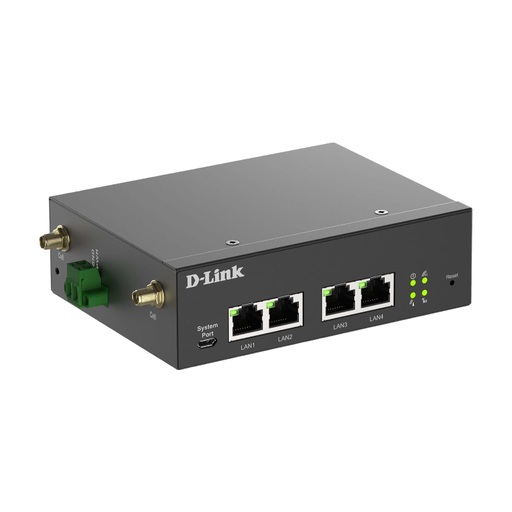 No image available
Designed for a fixed installation or mounting location with a suitable DC power supply.
The device description specifies that the antennas must be at least 20 cm away from people.
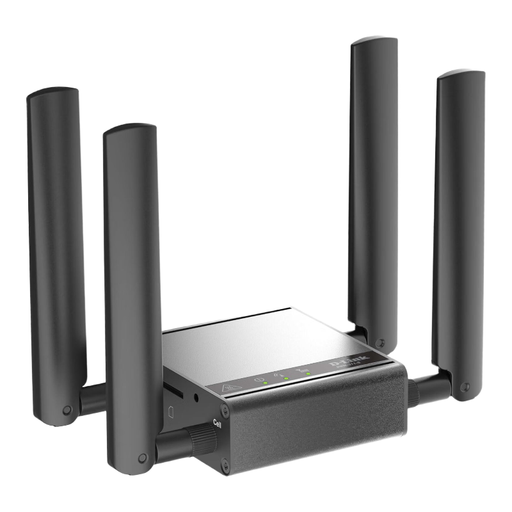 No image available
Designed for a fixed location with a power supply and a wired network connection.
The device description lists a power adapter; a suitable power supply is required for operation.
With a SIM router, you’ll need a working SIM card or a suitable tariff, as well as mobile reception where you’re staying. Check the SIM format for the specific device; TP-Link, for example, specifies a Mini-SIM for the M7200. German law requires the account holder’s details to be verified for a German prepaid SIM, so you should allow time for activation before your trip.
The Federal Office for Information Security recommends changing the router’s default password, keeping its firmware up to date and using a strong Wi-Fi password. Having your own mobile connection doesn’t automatically make your router secure.
Compare the data allowance you’ll need, any extra charges and the billing period. The Consumer Advice Centre points out that a four-week package isn’t the same as a one-month package. For a short stay, the specific tariff terms are what matter.
If a mobile Wi-Fi router is sold in Germany as radio equipment, the specific device must meet the relevant EU conformity requirements, including the required CE marking. The Federal Network Agency and the European Union explain these requirements; a model description alone doesn’t prove that a particular product listing is compliant.
That depends on your destination and tariff. The Consumer Advice Centre explains the ‘Roam like at home’ principle for the EU and other covered countries, while also noting exceptions and possible charges outside the covered area. Check the specific destination and tariff terms before you use your data; a German network coverage map won’t answer this question.